
What Is Programmatic Guaranteed
Management Summary
Setting up a Guaranteed Deal
When setting up Guaranteed Deals there are compared toPrivate AuctionorPreferred Dealssome important differences. You must pay attention to these points:
Step 1: Find publishers
Speak to publishers directly (if their sales department has not already contacted you .-)
If you are not negotiating with a specific publisher, the marketplace (e.g. inGoogle Display & Video 360, formerly DoubleClick Bid Manager – DBM) is good for identifying potential partners. The best way to find these is to use the filter function. Here, at least geographically (User GEOe.g. Austria) and afterTransaction Type(in this case Programmatic Guaranteed).
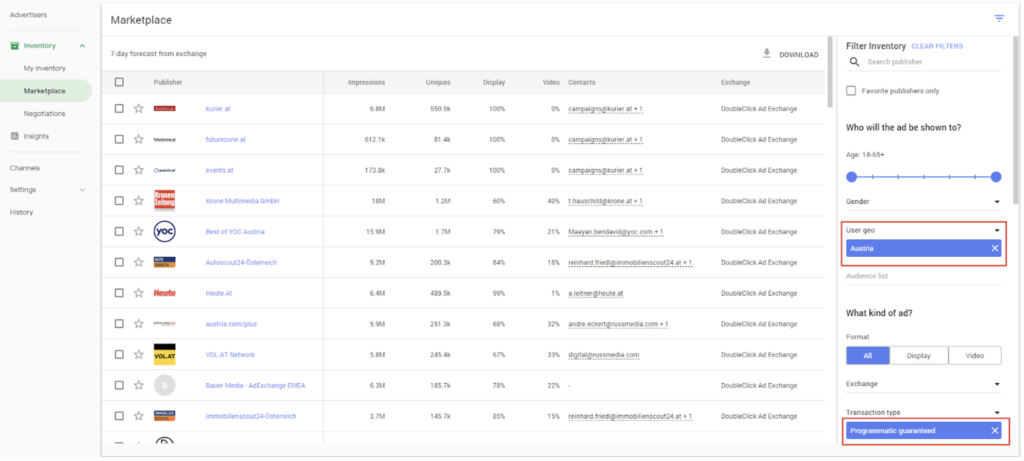
With one click you can select the publisher from the results and, after providing the key data, you can directly send a proposal for a deal!
ATTENTION: The prerequisite is that the publisher uses the Google Ad Manager (formerly DoubleClick AdExchange)!
In the event that the desired publisher does not use Ad Manager, you will find the alternative procedure below.
Step 2: Define target parameters
After the publisher has been selected you go to the next step. The target parameters (goals) must be defined. This is where the most important differences to conventional deals become apparent.
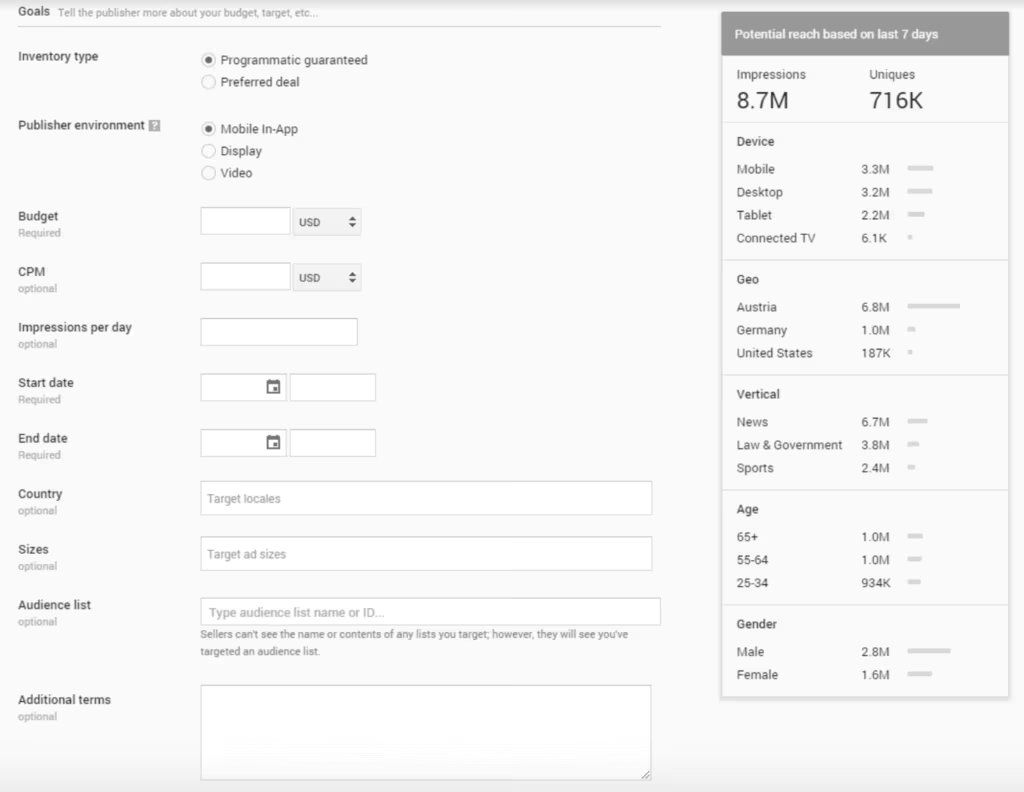
The following parameters must be defined from the start and can no longer be changed:
- budget
- CPM
- => This results in the impression volume
- Start and end dates
- Creative formats
- Optional: 1st Party Audience lists which should be included or excluded
Step 3: Submit proposal
Once the proposal has been sent, it can be adjusted by the buyer or publisher if necessary. If the buyer and seller agree, i.e. both sides accept the deal, Display & Video 360 automatically creates a fixed line item with the deal. This can now NOT be changed! That’s why it’s very important to define all parameters correctly in advance. Spontaneous changes are no longer possible afterwards.
ATTENTION: If the deal is active, the line item begins delivering the ads immediately. The only way to stop the ads is to pause the deal in the Marketplace.
Benefits of Programmatic Guaranteed
The advantages of Programmatic Guaranteed are obvious. The buyer receives a fixed inventory for the specified budget within the agreed period. The seller guarantees acceptance of his inventory.
Tip:The Guaranteed Deal can not only be used in the automatically created line item: within the same advertiser, it can also be used as an inventory source in another insertion order, e.g. in remarketing, if desired.
Audience Guaranteed – Shop with 1st party data
Existing collections can be adapted just as easily. To do this, for example, click on “Edit Collection” in the “Life cycle” collection and you will be taken to the same editing menu. In the following Sc
At Google Display & Video 360 can also be used to create so-called “Audience Guaranteed” deals. If the publisher supports this, its inventory will be compared with the advertiser’s audience lists:
- Either only known users can be purchased
- Or exactly these can be excluded
As an advertiser, for example, I only reach my customers or website visitors.
Tag Guaranteed – if the publisher is not running on Google
In this case, Google Display & Video 360 (formerly DoubleClick Bid Manager – DBM) Marketplace created a new deal under “My Inventory”, entered all the parameters, and then sent the created tag to the publisher.
This has a side effect: Tag Guaranteed Deals can be used by multiple advertisers!
Even more topic about programmatic marketing:
RTB deal nomenclature
Deal troubleshooting
Google DoubleClick Help




