
Tracking Amp Pages With Gtm Part 2 Events

Management Summary
Click tracking
GTM containers for AMP no longer differentiate between link clicks and general clicks. A CSS selector must now be named that describes the elements whose clicks the trigger reacts to. What’s painfully missing here at first glance are variables like the click URL. But CSS Feinspitze have a solution for this: the CSS attribute selector.
The popular tracking of PDF downloads can be implemented with the following selector:
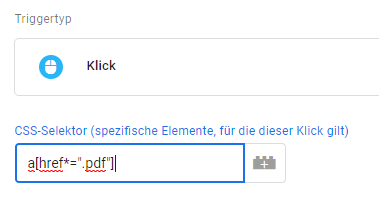
In layman’s terms, this means: record clicks on everyone-Elements (links) whose link target contains .pdf.
This allows workarounds to be created for many situations in which the standard variables such as click URL or click target are missing.
Form tracking
Unfortunately, there is no trigger type available for submitting forms. However, this doesn’t always work with HTML pages because not every form actually triggers an HTTP submit event to which this trigger responds. The following alternatives are available as a workaround for forms without HTTP submit or AMP forms:
- Page viewa thank you or confirmation page
- Visibility-Trigger for a thank you or confirmation popup
- and if necessaryClick on the submit button– even if that doesn’t necessarily mean that the form was actually sent, e.g. because a mandatory field was not filled out.
Scroll tracking
The good news: there are triggers and variables for scroll tracking. The bad news: the variables only indicate the absolute scrolling progress in pixels, not percentage values. And due to the lack of JavaScript, you can’t calculate it yourself.
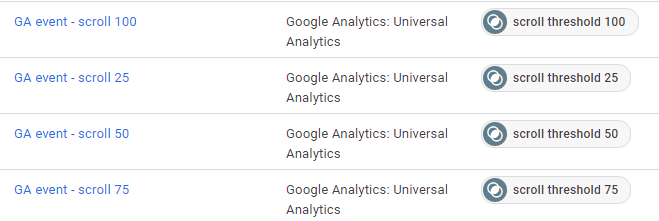
We use two different types of scroll tracking: a maximum scroll depth, which is sent as an event when you leave a page, and a setup with predefined percentage values (usually 25, 50, 75 and 100%), at which one event is fired at a time.
The former cannot be implemented for AMP pages, the latter can. However, if you want to write the scrolling progress to the event label, for example, you have to create a separate tag and trigger for each threshold. In the HTML version this would be possible with a tag and a trigger.
Visibility tracking is an alternative to scroll tracking – not just for AMP pages. For example, what does it say if a blog article has a scroll depth of 50%? For a long article that has not yet received any comments, that the visitor is halfway through the article. For a very short article with lots of comments, the reader has seen the entire article – plus a large portion of the comments.
But if I want to know how many visitors scrolled to the end of my article, it makes more sense to provide the element after the article with a visibility event. Social media icons, the comment section or an information box about the author are elements that can often be found under articles and are useful here.
Visibility
This trigger always fires when a certain element becomes visible on the screen. Unfortunately, the trigger in the AMP version only allows HTML IDs as a selector and not general CSS selectors. In contrast to the HTML version, the trigger offers not only a minimum visibility in percent but also a maximum visibility for setting and the minimum visibility duration can be defined both as the total time on the page and as a continuous time. However, neither is a really adequate replacement for the restriction to IDs as a selector.
In addition to the possible uses already mentioned as a workaround for scroll and form tracking, the trigger type is particularly suitable for impression tracking, e.g. of advertising banners, internal promotions or image carousels:
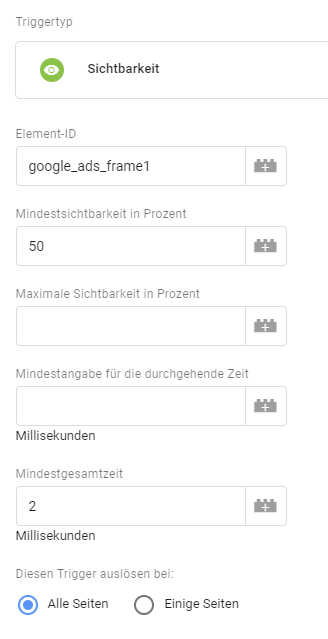
However, because the selector is limited to IDs, visibility tracking is only suitable for applications with a few elements. The effort required to track the 5 subjects in the hero shot is still acceptable, but less for 200 images in a gallery from the last company event.
Timings
We are happy to use a floodlight for our customers that fires on all sides after a certain number of seconds. Anyone who stays on a page for a longer period of time can be assumed to have a certain interest in the product or content, and this information can be used for targeting. Or website operators no longer want to count a visitor as a bouncer if, for example, they stay on an article page for at least a minute. Such a timer is available in GTM AMP containers. In addition to the interval, you can also set how long the trigger should be active, for example the event should be triggered every 30 seconds, but for a maximum of 2 minutes.
Unfortunately, a trigger that fires across the entire website after a certain time is not possible. Although there is a corresponding variable, it can only be passed as a value or dimension and cannot be used as a condition for a trigger.
What is missing?
We have already covered all the trigger options for AMP pages. So what are the top selling web container options?
Video tracking
Since video production for websites is significantly more complex than producing images or graphics, we would like to know whether the effort is worth it. Unfortunately, despite having a separate AMP element for embedding YouTube videos, there are currently no triggers or variables for video tracking in AMP containers.
Custom events
Due to the lack of full JavaScript support, you can hardly send your own events to the GTM anyway, but the ability to use RegEx to summarize all GTM events, regardless of whether visibility, click or page view, e.g. to create a general blocker for all tracking and marketing tags, is sorely missed.
Click text and URL
Unfortunately, popular standard variables such as click text or click URL are missing to fill the events. Despite their name, these variables in web containers cannot only be used for click events. They always contain the values of the last element recorded, for example the advertising banner whose appearance triggered a visibility trigger.
Although most requirements can still be met, in many cases this means that a separate tag and trigger must be created for each element, where in web containers all elements of a type (e.g. all buttons on a website) can be handled with one tag and trigger.
Virtual page views
Unfortunately, the lack of the option to send the page URL to Google Analytics makes virtual page views impossible. Likewise, rewriting individual URLs because they are too long or too illegible, or because you simply want to cut off the parameters so as not to have dozens of lines for the same page in Analytics.
Events with a visibility trigger can be used as a workaround for virtual page views in order to record the individual sections of a single page application or the sub-steps of a form.
Marketing pixels
As usual, remarketing and conversion tags are available for Google Ads and Floodlights. The question is whether you can implement the required triggers and variables using the on-board tools of the AMP container.
However, things get problematic with Facebook tags: since there are no predefined tags here, as with HTML containers, and JavaScript is not available, you unfortunately have to do without Facebook remarketing for AMP pages. The same also applies to other social media platforms such as Twitter or linked.In.
Conclusion
The options for recording user interactions on AMP pages are currently very limited. This is largely due to AMP itself. You shouldn’t expect to be able to replicate the tracking of the HTML pages 1:1 for the AMP pages, but with a little effort and perhaps creativity it should be possible to map the most important interactions.The planned opening of AMPfor your own JavaScript code could greatly expand the possibilities in the near future.
A good indication of how much you should invest in event tracking for your AMP pages is how large the proportion of AMP sessions are in your overall traffic. Read how to make this share visible in Analyticsfirst partthis miniseries.




