
Cross Device Analyzes And Offline Tracking With Google Signals

Management Summary
What is Google Signals?
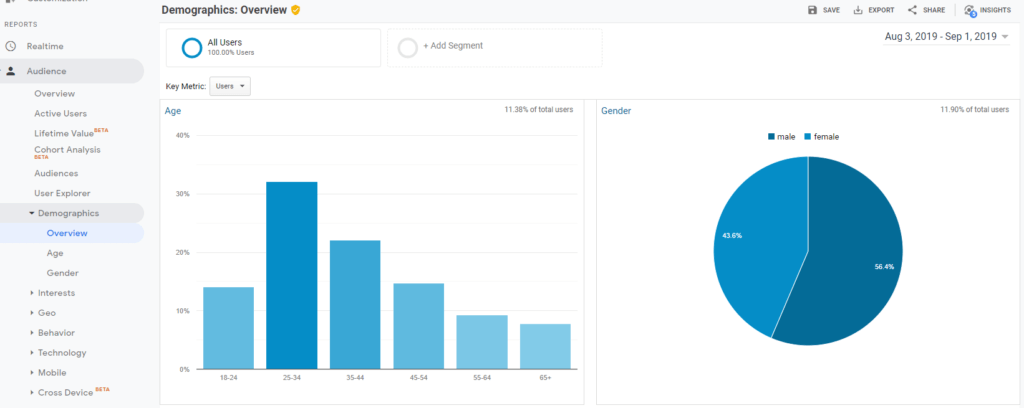
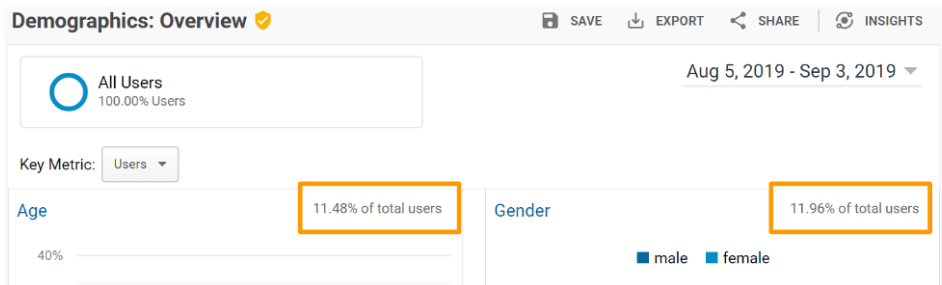
With the activation of the advertising functions (display features), a whole collection of functions was already available in Google Analytics: On the one hand, reports and segments were implementeddemographic characteristics (age, gender) and interests (shoppers, travelers, technophiles)the website visitor expands, as Figure 1 shows.
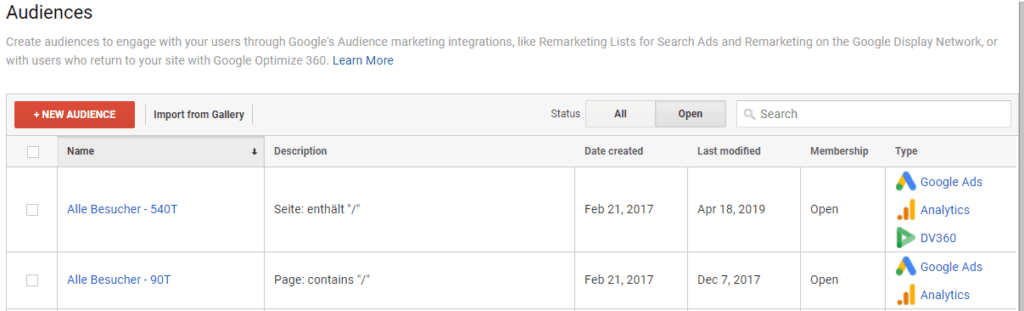
On the other hand, data was suddenly available from all available analyticsRemarketing audiencescreated and pushed directly to Google Ads. Analytics360 users can even share these with all tools in the Google Marketing Platform, as Figure 2 shows. So a powerful feature!
Google Signals is now even going one better: In addition to the previous features, Signals is expanding the advertising functions to include data from the Google Cross-Device Graph.
This enablescross-device trackingand the recording ofVisit offline stores– and that out-of-the-box.
Unlike before, NO additional tracking code needs to be implemented or anything else configured. Google Signals, and thus the former advertising functions, is now easily activated via the Google Analytics Admin Interface with a single click: Under SettingsProperty level → Tracking information → Data collection, as Figure 3 shows.
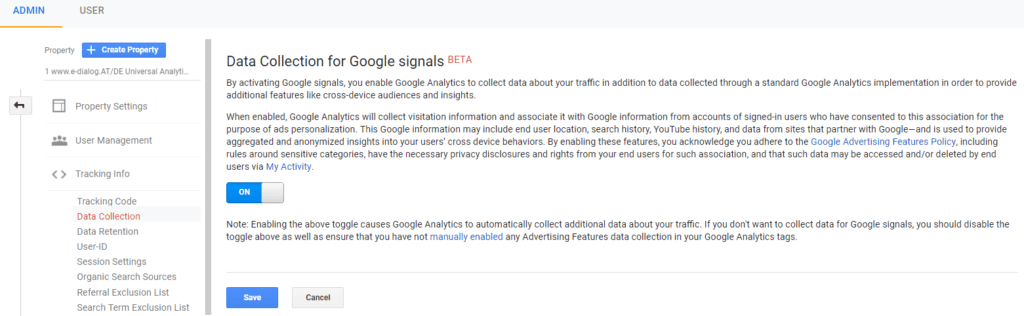
Once activated, cross-device and offline tracking is automatically available for future data in Google Analytics!
Google Signals and data protection
The Signals data is available aggregated and anonymously in Google Analytics.
As with the advertising functions, website visitors must be informed in order to be able to use Google Signals in accordance with data protection regulations.
To do this, the data protection text on the website must be adjusted and the link to opt-out of ad personalization must be included. Further details:https://support.google.com/analytics/answer/2700409
UserID vs Signals
Until Signals launched, cross-device reports were only available in data views with User ID enabled. To do this, you had to identify your users personally, for example via email address.
In order to clearly assign multiple devices to a single user, users had to log in with the same email address on each device. A technically complex process and cannot be implemented on websites without a login.
Google’s X-Device technology saves you this and is usually even more accurate than any custom solution using UserID.
However, Signals does not currently replace the UserID feature as it is still a beta feature. For optimal use, both functions should be used if possible.
Where does Google Signals data come from?
There, too, not much has changed compared to the advertising functions: The data comes from the Doubleclick third-party cookie and is also expanded to include the data from the Google Cross-Device Graph.
These collect behavioral data from all users who are on the move with a logged in Google account in the Chrome browser, Android, Maps, YouTube or Play.
For example, if a user visits e-dialog.group with two different smartphones and then with a laptop and is logged in to the browser with their Google account, Google automatically recognizes this and shows a single user in Analytics instead of three users with three devices, as shown graphically in Figure 4.
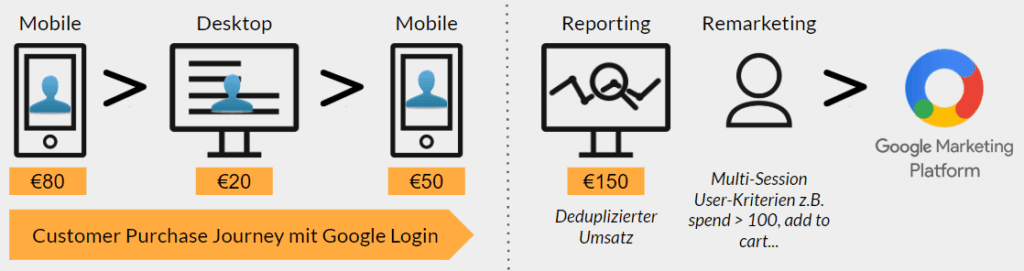
The big advantage: Significantly more accurate reports and even more precise target group targeting.
Attention: limits
However, the whole thing only works if users have thepersonalized advertisinghave activated and Google is therefore allowed to set third-party cookies in the browser.
The good thing: This setting is active by default and only a few people actually log out.
Excursus: Personalized advertising in Google Analytics
Every Google user can decide whether they want to receive personalized ads or not. This setting is active by default, but can be deactivated at any time using the following link:https://adssettings.google.com/authenticatedUnder this link you can also see which interests Google assigns to you based on your browser behavior and can also edit them.
In addition, the analytics reports are based onSamples. These will only be collected if for the specified period250,000 sessions receivedare. Unfortunately, before that the reports are empty and the data cannot be used for remarketing.
Possible workaround: Query a longer period of time. However, these are only available once the advertising functions/signals have been activated and are not available retroactively.Pain point – especially for smaller websites!Also applies to the report datapredefined limit value. This is intended to prevent conclusions being drawn about the identity of individual users. If a row of data contains fewer users than the limit, it will be excluded. That’s why the signals reports are usually based on a rather small amount of data, as Figure 5 shows.
This already clarifies what Google Signals is. And what’s the point?
This is what Google Signals brings
Google Signals brings four new measures: Two for data analysis, namely cross-device reports and store visits.
Also two for data activation, namely cross-device remarketing and conversion export to Google Ads.
Let’s look at this in detail.
The new Cross Device Reports
Cross-device reports are an entire reporting area in Analytics and are located atTarget group → Cross-device. There are four new reports here:
- device overlap,
- device paths,
- Channels and
- Acquisition device.
For example, Figure 6 shows theDevice overlap. This can be used to determine which different types of devices are used by users.
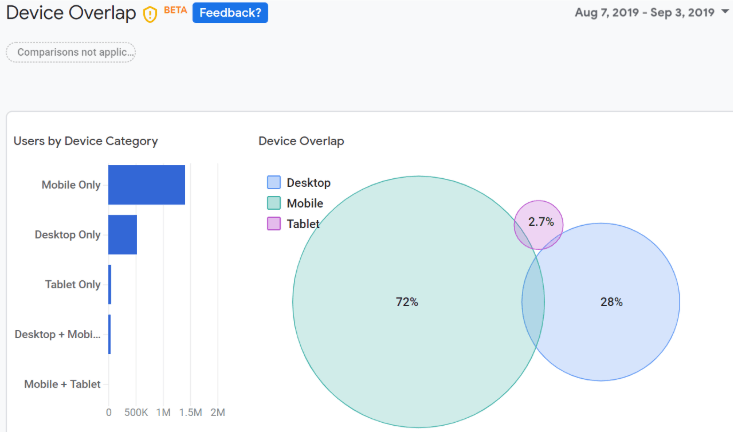
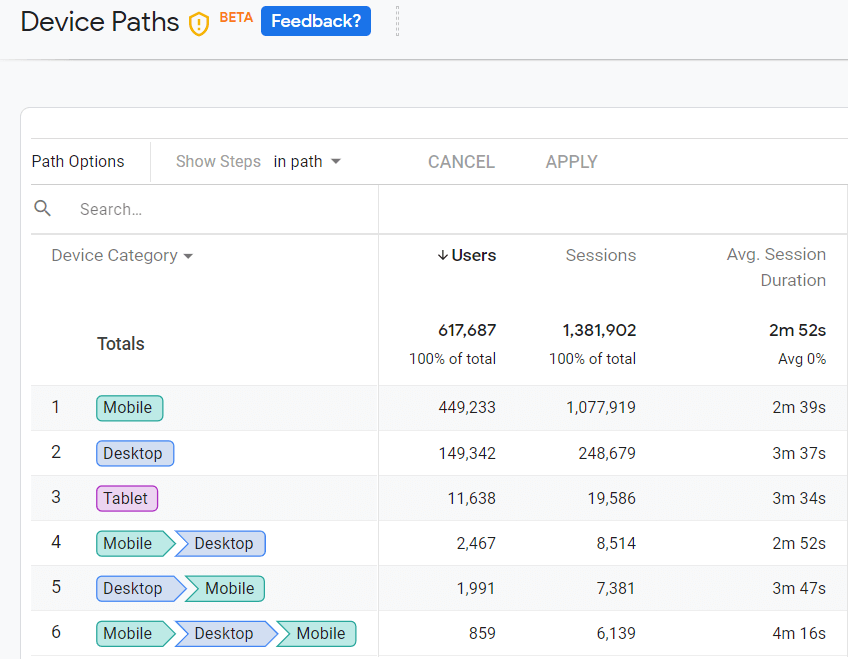
Figure 7 shows theDevice path report. This indicates which different devices users used to visit the website before they converted (ecommerce transaction or goal).
Important: The focus of Signals is on data activation and therefore cross-device remarketing.Google provides some really excellent data here.
The reports themselves are currently still very static: There are no drill-down or filter options. Only a few primary dimensions can be selected; there are no secondary dimensions at all.
However, that is becauseSignals still BETAis. It is to be expected that there will be (much) more to come.
The new store visits reports
The new store visit reports (in German: store reports) for Analytics360 customers are much more interactive:These can be used to analyze how visits to the website affect stationary businesses such as supermarkets, restaurants or hotels.This data is stored in Google AnalyticsConversions → Store Visitsdisplayed, as shown in Figure 8.
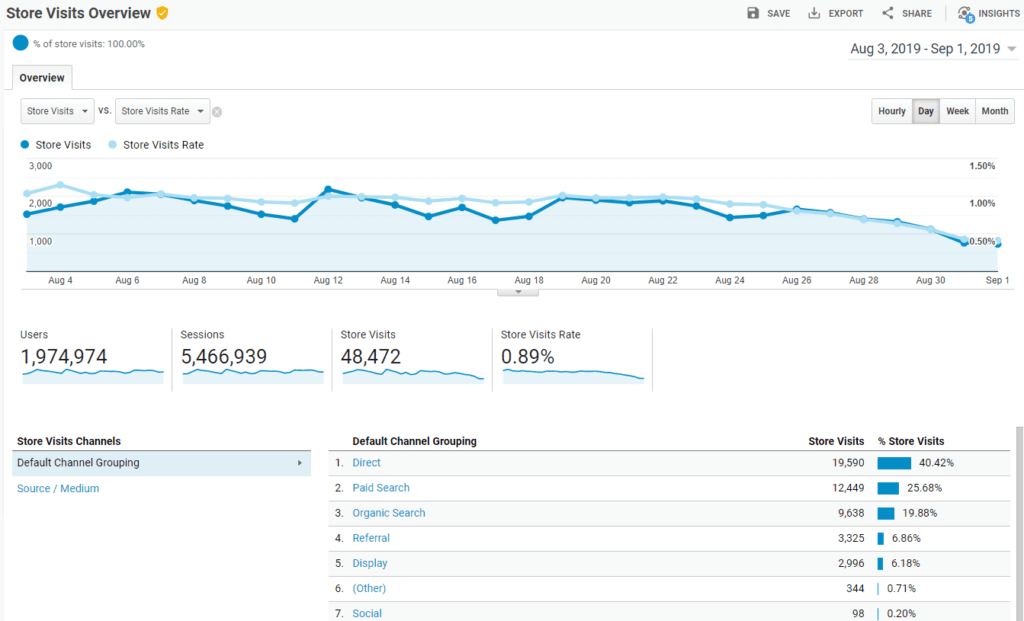
Store Visits data is Google’s estimates based on users who have Location History enabled on their devices. If users have visited the website and entered a store within 30 days, they appear in this report.Here too, Google only provides anonymized and aggregated data – never at the user level.To do this, however, you must have a Google My Business account and have linked it to your Google Ads account. The Ads account must be linked to Google Analytics in order to view store visits.The reports are currently in beta and only available to 360 customers.
Google Signals: Conclusion
Google Signals is pretty impressive: Google has a huge amount of and very accurate cross-device user data. A year ago, no one would have really believed that Google would make this available to us for remarketing and analysis.
At the moment the reports can still be used to a very limited extent. In general it isfocushowever on theData activationand thus the remarketing opportunities that arise through signals – and these are excellent. This means that remarketing campaigns can be played out across devices for the first time and completely automatically – without the laborious implementation of the UserID feature. A great added value for all marketers and the core of Signals.




