
Targeting Guide 8211 Power For Programmatic Campaigns

Management Summary
First of all: Don’t be afraid of testing! It’s better to test more and, above all, different targeting at the beginning (such as Affinities, InMarkets, Categories, Keywords, Custom Audiences, etc.) and then optimize it after a certain period of time and stop targeting that doesn’t work. It often only becomes clear after a while which targeting works well for the campaign and which doesn’t. (Important for the assessment: one targeting per line item.)
Use of 1st party data
Users who look at certain products or perhaps already have them in their shopping cart or users who have carried out certain activities (soft conversions) on the website are particularly important for the success of a campaign. The same applies here: it’s better to test more audiences! Not all remarketing is the same – you can form many exciting target groups with your own data and then choose other strategies for them in terms of bidding, frequency, message, etc.
Custom Audiences
Especially when it comes to a very specific target group that is difficult to reach through standard targeting groups, you like to use Custom Audiences. These are ideal for a granular approach. Details about Custom Affinites including Case Study & Tutorial can be found inthis blog post.
Combined Audiences
These can be formed from several 1st party, Google data, but also, for example, 3rd party audiences. Otherwise only DMPs have this function available. What sounds like data science and complex models can be implemented very easily via DV360: the desired audience is combined with just a few clicks. Once the audience has been created, it can be used in different line items.
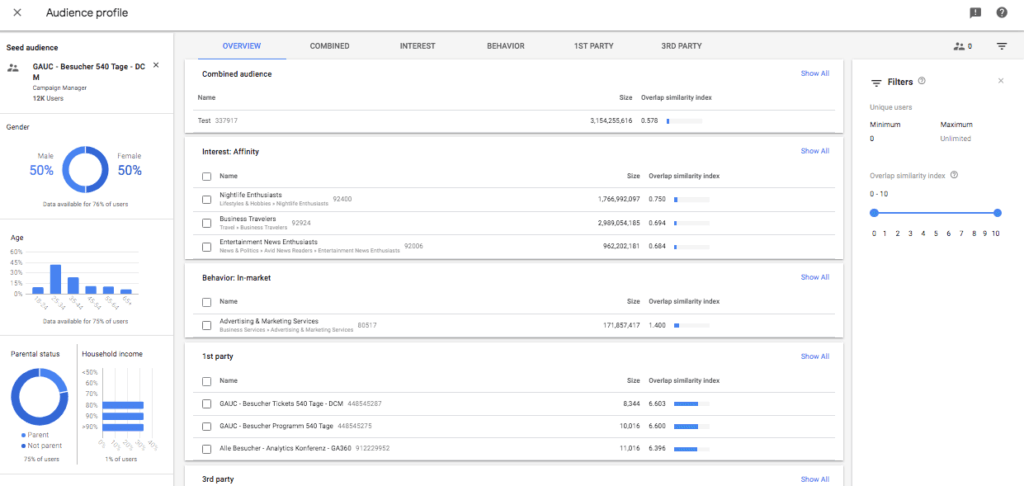
Use Audience Analyzer from DV360
The next DMP function in DV360. The analyzer helps to determine what overlaps there are between a 1st party audience and other target groups in DV360, e.g. Google data, but also 3rd party data. This allows similar target groups and overlaps to be identified. Based on these insights, you can either create an optimal audience or find new targeting and thus increase the overall reach of the campaign.
Similar Audiences
By targeting users who are similar to certain target groups, the possibility of reaching additional potential customers or interested parties who have similar behavior to the selected target groups (e.g. buyers) increases. It combines the selected audience data with extensive data from Google and an intelligent look-alike modeling algorithm to create a custom audience of users who are likely to be interested in, click on, or convert from the ads.

When creating a look-alike audience, you can also set how similar the similar audience should be to the original target group – the more similar, the smaller the reach:
The general rule is: Don’t set too specific targeting at the beginning. This limits the display of the campaign and the work of the algorithm too much, which reduces the possibility of reaching potentially relevant users. You can then adapt and adjust more as the campaign progresses. The important thing is to test, test and test and not be afraid to try out new targeting. Every campaign is different and both the system and the user learn new things every day.
& Last but not least: Don’t forget about geo-targeting! ;-)




