
Event Tracking In The New Google Analytics 8211 Google Analytics 4

Management Summary
In the new Google Analytics, the principle applies that every interaction can be recorded as an event. You can find out exactly what this means and how the event structure of Universal Analytics differs in this article.
Events Universal Analytics vs. Google Analytics 4
In Universal Analytics, events have their own hit type and consist of four components: category, action, label and value. In the new GA, however, every “hit” represents an event. There is no longer any distinction between hit types. Every interaction, be it a page view, session start or download, is recorded as an event. For example, when a website is accessed, the “page_view” event is triggered. There is also the option of attaching information to the events in the form of event parameters, also called custom dimensions and custom metrics. For a download event, for example, the file name or file type is sent as additional information in the corresponding event parameters. Up to 25 event parameters can be recorded per event.
This means that the well-known event structure of Universal Analytics is replaced in Google Analytics 4 by event names and associated event parameters.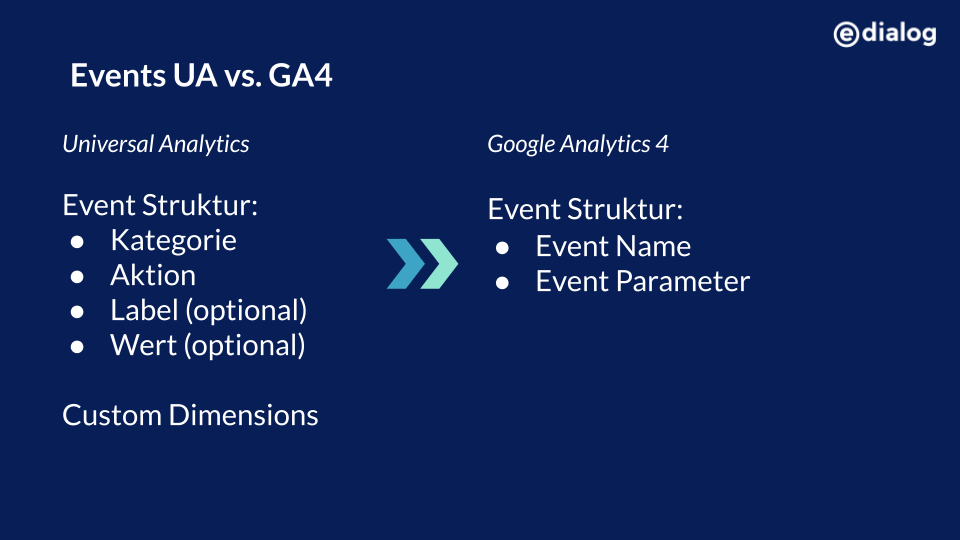
Event types in Google Analytics 4
Events in the new GA can be roughly divided into automatically collected, recommended and user-defined events. Automatically recorded events do not require any code to be added to the website or app. However, for recommended and user-defined events.
1. Automatically recorded events
If you want to record interactions in Universal Analytics that take place independently of the loading process, code must be added to the website. The new GA has a big advantage here, because there are selected events that are recorded automatically, without additional code. The only requirement for this is that the base code for the new Google Analytics is implemented on the website or the SDK has been integrated into the app. As soon as the data streams have been set up and data collection has been activated, the so-calledautomatically recorded eventsorEnhanced measurement eventsa.
For websites, for example, events such as “page views”, “scrolls”, “outbound links” or “video engagement” are automatically recorded. In addition, these selected automatic events can be activated and deactivated for websites in the user interface of the new GA. This setting is referred to by Google as “Enhanced Measurement” or “Optimized Analytics” and can be found under the settings when clicking on a web data stream.
2. Recommended events
In addition to the automatically recorded events, there are also events recommended by Google for selected areas such as e-commerce, gaming, travel and education. These recommended events have predefined names and parameters that must be implemented appropriately using code. For some of these recommended events (e.g.: eCommerce) there are already ready-made reports in the new Google Analytics. For this reason, it is recommended to use these suggested events whenever possible to benefit from new features and reports in the future.
3. Custom Events
If the automatically recorded and recommended events do not cover all tracking requests or requirements, there are also custom events that can be named and implemented yourself. However, it is recommended to always check in advance whether there are suitable automatic or recommended events that can meet the tracking requirements.
Conclusion
In summary, in contrast to Universal Analytics, the new Google Analytics is based entirely on events. This means that Google is also saying goodbye to the old structure of events in Universal Analytics. In the new GA, an event consists of event names and event parameters, which pass additional information about the event. Apart from that, the new GA offers the advantage that a number of selected events can be recorded on the website without implementing additional code.
As already in our blog article “Google Analytics 4 – a look into the future“, the clear recommendation is to implement the Google Analytics 4 property early and to work in a “dual setup”. This means you benefit from all the features and advantages of the new Google Analytics and at the same time the existing setup remains in place. We are happy to support you with the setup of Google Analytics 4 and with transferring important existing events into the new logic. The switch to the new Google Analytics also offers a good opportunity to question the existing setup and adapt it to new requirements.




