Fill The Gaps Modeled Conversions In Dv360 And Cm

Management Summary
Due to the lack of 3rd-party (3P) cookies, conversions cannot be attributed to campaigns as before, leaving an incomplete picture for advertisers. This can have a massive impact, as the number of conversions is not only relevant for monitoring campaigns, but can also influence bidding strategies. To counteract this, Google has been working with modeled conversions for some time. These help to restore the holistic picture so that we as advertisers know whether our ads are partly responsible for a conversion.
Conversion Modeling & GDPR
This is possible – and is it also GDPR compliant? And isn’t artificially increasing conversions just as inefficient? Yes and no!
In an exemplary campaign, we have no way of seeing who some of the users are, what they are doing on the website and whether the website was accessed because of the advertisements placed. For the remaining users, this is exactly what is possible, thanks to 3rd-party (3P) cookies after an impression or with 1st-party (1P) cookies after a click and confirmed consent. You can also see which conversions were achieved. All other conversions are counted as supposedly organic and cannot be assigned to the campaign.
The modeling process
Now modeling comes into play. This happens in 6 steps:
1.
The two groups of users are divided accordingly, so that users with 3P cookies are in one group and those without are in the other.
Group 1: Users with cookies (3P for impression or 1P for click on ad)
Group 2: Users without cookies
2.
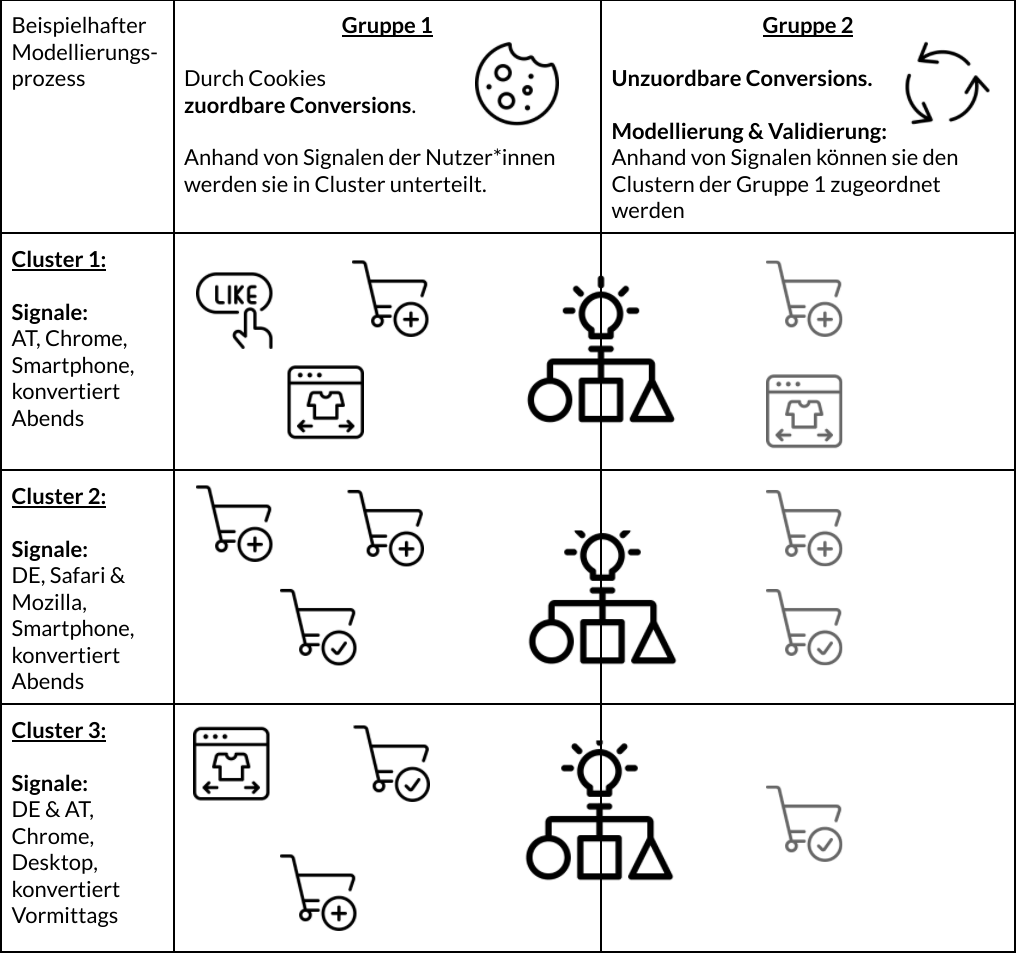
Group 1 is further divided into clusters based on their signals. These signals include, among other things, a user’s device, location, time, browser type and type of conversion. (The signals used are diverse and will certainly change in the future.)
Example modeling process:
Group 1
Group 2
Through cookiesattributable conversions.

Unattributable conversions.

They are divided into clusters based on signals from users.
Modeling & Validation:
Based on signals, they can be assigned to group 1 clusters
Cluster 1:
Signals:
AT, Chrome, smartphone, converted in the evening




Cluster 2:
Signals:
DE, Safari & Mozilla, smartphone, converts in the evening

Cluster 3:
Signals:
EN & AT, Chrome, Desktop, converted AM
Signals for modeling

Browser type

country

day & time

Device type
Type of conversion
3.
These characteristics can be used to statistically predict how likely conversions in this group 1 and its clusters are. This allows you to create a model that can predict how many of the unattributable conversions can be attributed to the campaign.
4.
The conversions and interactions on the site that cannot be assigned to the users due to missing cookies are now attempted to be matched with these new clusters instead. This matching is done using the signals.
5.
If the matching is successful, there is a further step to validate the assignment to the campaign. To do this, some of the users in the first group are regularly compared with the model.
6.
If the model is valid and the model’s prediction matches the sample from Group 1, these modeled conversions will be reflected in Display & Assigned to Video 360 (DV360) or Campaign Manager (CM) as a campaign conversion. If the model is not valid, the process is repeated.
The modeling process
Now modeling comes into play. This happens in 6 steps:
1.
The two groups of users are divided accordingly, so that users with 3P cookies are in one group and those without are in the other.
Group 1: Users with cookies (3P for impression or 1P for click on ad)
Group 2: Users without cookies
2.
Group 1 is further divided into clusters based on their signals. These signals include, among other things, a user’s device, location, time, browser type and type of conversion. (The signals used are diverse and will certainly change in the future.)
Signals for modeling
Browser type
country
day & time
Device type
Type of conversion
3.
These characteristics can be used to statistically predict how likely conversions in this group 1 and its clusters are. This allows you to create a model that can predict how many of the unattributable conversions can be attributed to the campaign.
4.
The conversions and interactions on the site that cannot be assigned to the users due to missing cookies are now attempted to be matched with these new clusters instead. This matching is done using the signals.
5.
If the matching is successful, there is a further step to validate the assignment to the campaign. To do this, some of the users in the first group are regularly compared with the model.
6.
If the model is valid and the model’s prediction matches the sample from Group 1, these modeled conversions will be reflected in Display & Assigned to Video 360 (DV360) or Campaign Manager (CM) as a campaign conversion. If the model is not valid, the process is repeated.
The implementation
Sounds good, but how can modeled conversions be included? To do this, you must tick the following settings:
Campaign Manager: Advertiser > Floodlight Configuration > Attribution Models
DV360: Advertiser > Resources > Floodlight Group > General > Attribution > Attribution Models
Tips:
In order to design the modeling in the best possible way, it is recommended that Global Site Tags or the GTM be used, the website’s declaration of consent adjusted accordingly, and the “Extended Attribution” selected in the Campaign Manager in the Floodlight configuration.
Conversion modeling is just one of many ways to prepare for the time after the 3rd-party cookie. LoadHere is our FAQ about the Cookieless Futuredown.