
Web Vitals In Ga4 8211 How A Faster Website Leads To Increased Sales

Management Summary
Don’t keep your visitors waiting. Optimize your website performance with Web Vitals and Google Analytics 4. Web Vitals can help you optimize your shop and achieve higher sales.
Web Vitals & Website performance
Everyone likes fast websites. That’s why it’s so important as a website operator to pay attention to the performance of your own website, especially if the website is a shop or offers services. Google also evaluates your website in many aspects. Not only is user-friendliness important, website performance is also measured. Google uses, among other things, Core Web Vitals to classify the performance of websites.
With little effort, the Web Vitals, which Google uses as a KPI (Key Performance Indicator) for website performance, can be measured with every website visit. When users visit your website, you can see how well your website performs on users’ devices. And the whole thing can then be easily evaluated in Google Analytics 4.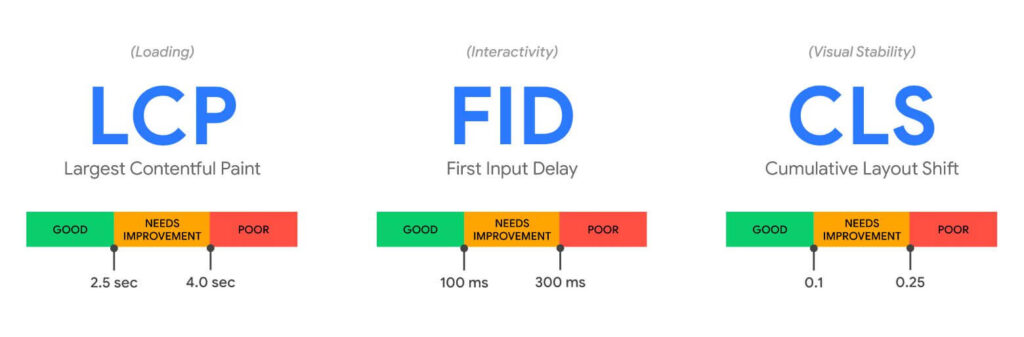 Source:https://web.dev/vitals/To optimize page loading speed, it is important to understand a little about the technology behind rendering a website. Google has defined three main KPIs that you can use as a guide. These are three metrics (numerical values) that determine how well the page is rendered in the browser:
- LCP: Largest Contentful Paint– indicates how long it takes until the largest image or text block within the currently displayed area (=viewport) has been loaded. In the optimal case, the value is less than 2.5 seconds.
- FID: First Input Delay– this is about the responsiveness of the browser when displaying a website. So how quickly you react to a click (or, on a tablet, to a tap). The value should be less than 100 milliseconds.
- CLS: Cumulative Layout Shift– If texts slip or images change position, this metric kicks in. This KPI provides information about whether the content on the website changes significantly when loading. If you’re reading something and the text suddenly slips because something is reloading, this metric will go into the red. In the best case (no shifting/shifting of the content) 0 is passed.
Installation options
Web Vitals is a JavaScript library that can be integrated into your website. You can either host it yourself or use a CDN (Content Delivery Network). Cloudflare provides a free resource, unpkg.com, from which Web Vitals may be deployed on any website.
So if an uncomplicated installation is preferred, the Web Vitals library can be made available quickly and easily on your own site via unpkg.com with just one line of code.
If a Google Tag Manager container exists:
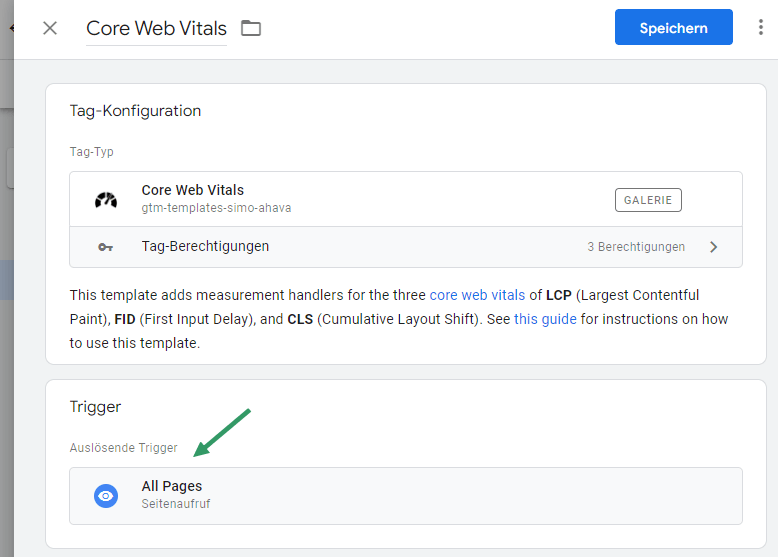
The easiest way is via the GTM template “Core Web Vitals”: The template can be searched for and found via the menu item “Templates” / “Templates” and by clicking on “Search in Gallery”. Once the template has been added to the workspace, it still needs to be created as a tag:
 There is actually no need to set anything separately for this day. All you have to do is set a rule (trigger) as to when the day should fire. It would be best to always capture the web vitals. That’s why we recommend using the All Pages Trigger:
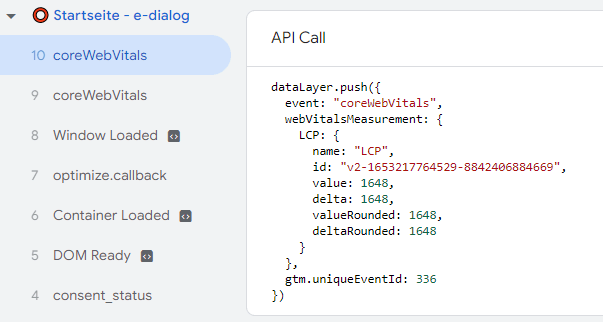
 If these changes were published now, nothing would be recorded. This custom template tag only writes Web Vitals data to the dataLayer (the data layer variable):
 In order to get this data into GA4, it needs to be captured. This can be achieved using a trigger and an additional GTM tag:
Triggers
Before the GA4 tag is created, the data layer variables would have to be created in the GTM. These will then transmit the data from the custom template to the GA4 tag at runtime.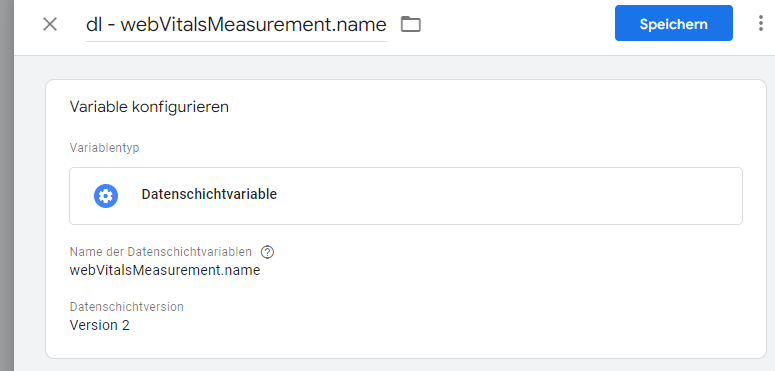 The following variables can be created:
| Name of the GTM variable | Data layer variable name |
|---|---|
| dl – webVitalsMeasurement.name | webVitalsMeasurement.name |
| dl – webVitalsMeasurement.id | webVitalsMeasurement.id |
| dl – webVitalsMeasurement.value | webVitalsMeasurement.value |
| dl – webVitalsMeasurement.delta | webVitalsMeasurement.delta |
| dl – webVitalsMeasurement.valueRounded | webVitalsMeasurement.valueRounded |
| dl – webVitalsMeasurement.deltaRounded | webVitalsMeasurement.deltaRounded |
These variables can then be used in the GA4 tag: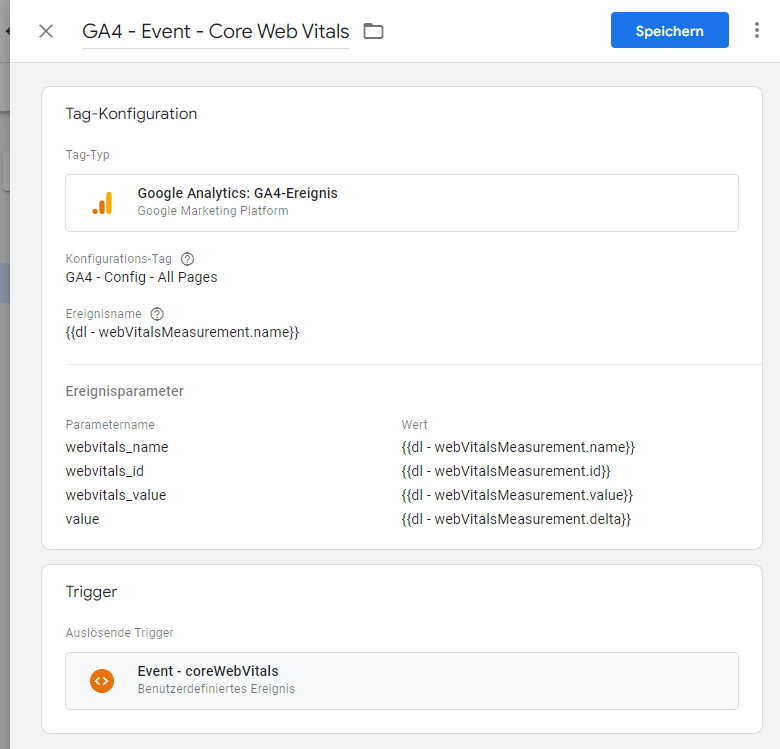
GA4 day
If this setup is published, the Web Vitals KPIs will be sent to GA4.
If you prefer to integrate Web Vitals natively (into the site’s source code):
The following code inserts Web Vitals natively (i.e. without a tag management system) into your website. The prerequisite for functionality is the integration of GA4 via gtag.
The code can be placed after the gtag code for Google Analytics 4.
Testing
If everything has been installed correctly (either via GTM or native installation), you will get GA4 HTTPS streams in the network console, which already show that Web Vitals data is being sent to Google Analytics 4:
Image: Network console
The Web Vitals can then be reported in GA4 using the following parameters:
- Event Name: LCP, FID or CLS
- webvitals_name
- webvitals_id
- webvitals_value
- value
Evaluation and optimization measures
The great added value of transferring the data into an analytics tool is that you can link this data with other information and thus form segments and create profiles of specific devices, countries of origin and browser/operating system.
Below – short and sweet – are some recommendations for action if you want to evaluate the Web Vitals.
- LCP too high: Largest Contentful Paint. If you have a lot of users with mobile or technically weaker devices or from countries with slower internet, it would be advisable to adjust the top area of the website if the LCP is too high. Larger images should be compressed or replaced.
- Is your FID: First Input Delay (browser response time when clicking)over 100msso you have to look for a possible cause for this value. High response time can potentially be caused by too many or too complex JavaScripts on the page. Too many click listeners (event listeners) can also slow down the page, as can the inclusion of too many loaded JavaScript codes. Here you would have to go through the individual JavaScript codes on the page and, if necessary, carry out a benchmark on some codes. A simple A/B test (with a specific code and then without) could also be informative.
- A value too high for CLS: Cumulative layout shift (content shift – i.e. when texts slip) could also indicate scripts on the website that are only reloaded late. This can be investigated by using the browser developer console. For example, in Chrome, in the developer console under “Network” you can set a delay (throttling) to test the Internet from a 3G cell phone, for example. You can then check whether content is modified again after the website has fully loaded.
Conclusion:
In today’s world and in the future, it is becoming more and more important to have a fast website. Web shops in particular should attach great importance to taking as little time as possible from their customers so that they can concentrate fully on the offer.
We would be happy to help you install and evaluate the Web Vitals on your website and would be happy to provide you with additional recommendations for action to optimize your website.




