
Techniques For An Efficient Tracking Setup 8211 Guide

Management Summary
In this guide I would like to give you some ideas for an efficient Google Tag Manager setup. The description of the techniques in this article is of a more general nature and does not go into too much detail. The main aim is to give the reader a feel for working efficiently in this domain. The text assumes a minimal understanding of the terminology of the data layer and a tag management system.
Guide: Efficient Tracking Setup Techniques
Data layer conceptualization
Tracking should emphasize leanness, clarity and efficiency. The data layer represents a Javascript object on the company’s website with which the GTM can communicate and extract information from. The whole thing is integrated into the website by the web developers based on events. Thus, in combination with a certain event that a user carries out on the website, information is provided in this object. There is often a tendency to want to capture everything and that. This often leads to data layers that are bloated and filled with excess information, which are error-prone and cumbersome to maintain. Therefore, the conceptual design must be thoroughly thought through.
Not only in terms of computing efficiency, but also in terms of work efficiency, a data layer concept that is as lean as possible and tailored to the company’s business needs is recommended. This should be developed with all stakeholders involved so that the reporting and marketing requirements can be implemented with the minimum possible volume of information. This creates clarity for analysis and reporting and reduces the burden that the website is exposed to due to tracking.
I would like to give you the following advice:
- Get the marketing and reportingRequirements of your stakeholdersand conceptualize them based on the lowest common denominator.
- Work this in if possiblepredefined eventsa. You can find a list of thishere.
- TestImplement the data layer: define scenarios for each event, which should trigger them and which parameter values should be available in which case. This is necessary in order to identify any gaps at an early stage. With gaps in the construct, you run the risk of seeing and interpreting distorted or even incorrect data.
- Combining events: In some cases it may be worthwhile to combine events. The most prominent example here would be an online store with a number of products. The view_item_list event is tracked, in which the view of products on list pages is to be tracked. In an average session, this event would fire dozens of times if captured individually per product view. Here it is worth combining a few products and shipping them in a batch.
Aefficient, tailor-made data layer conceptrequires a lot of experience, but also sensitivity. Our professionals will be happy to assist you with this! Contact us directly:kontakt@e-dialog.group
Minimalist tag management
It goes without saying that clean, clear and minimalistic tag management helps with clarity and puts less strain on the website. Excess elements mean excess, additional code. There are some tips and tricks to help keep the number of elements low while still ensuring full functionality.
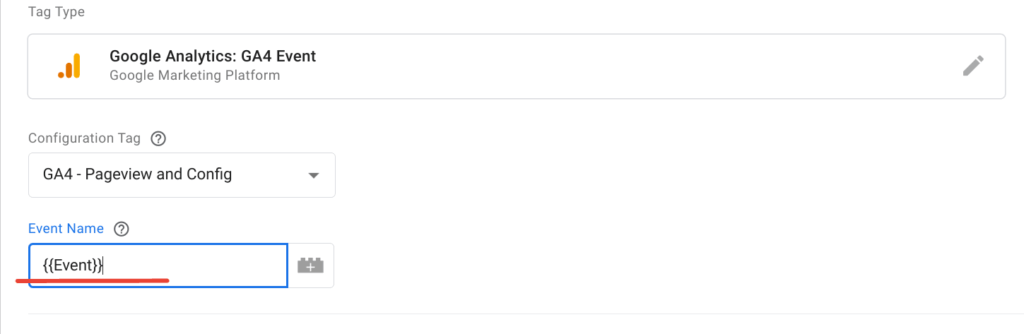
- Generic tags: Not every event has to be its own day. Work with the variables available to you. Provided the data layer is properly implemented and the event names correspond to the standard events, a day can contain several events. For this purpose, the variable {{Event}} can be used in the Event name field. This automatically takes over the event name of the data layer. It is important to use all appropriate triggers.
- Generic triggers: With a well-thought-out data layer, the whole thing can be continued and triggers can also be combined. Here you make use of a prefixed event name in the data layer. For example, instead of purchase, the event name eec_purchase or generic_purchase is used. If you do this through all events, an event trigger that matches the event name ^eec_(.*)$ or ^generic_(.*)$ via regex is sufficient. This includes all events with the same prefix that you can of course choose yourself. It is important that the prefix is removed from the event name of the tag so that it corresponds to the standard event name.

- Regular audits: Regularly check the Tag Manager for unused items and delete unused ones.
- Watch out for oneconsistent and structured namingof the elements – this means you are less likely to create something twice.
Last but not least, it remains to say that using the tag manager itself is highly recommended. A native integration of your tags is unlikely to lead to greater efficiency. Google Tag Manager is very well optimized in this regard. The workflow is also severely hampered by the native type of implementation, as you increase the technical hurdles and always have to work with a web developer.
Data enrichment through Server Side GTM
Large payloads and a large data layer bring ballast to the website. Events that involve products in particular can involve sending large amounts of data. Usually you send a lot of product data. Here the “heavy work” can also be shifted away from the client or browser to the server.
The server-side GTM offers the possibility of enriching data to an event before it is sent to the endpoint. This is made possible by so-called asynchronous variables and the Firestore API. Firestore is a NoSQL database that enables near real-time operations and is a very scalable way to store data. Querying a database always involves a certain amount of latency. If an event arrives in the server container and this event is to be enriched with data from the database, the server container must wait for the response before the event is processed and sent. There are so-called asynchronous variables for this – variables that are able to carry out asynchronous operations and enable scenarios of this kind.
An example will be described below:
Example: Enrich product data
The website operates with a large number of products. During an average session, users trigger a variety of events that contain product information. The consequence of this is that large amounts of product information and sometimes similar information are regularly written into the data layer and then sent in the event payload. This is a certain ballast for the website. This is reduced in the following way:
- The entire product catalog is transferred from the website backend to a Firestore NoSQL database in the cloud. Here it must be ensured that the information is kept up to date. A single product should be able to be queried from the database using a product SKU or product ID.
- The database is made accessible to the server container. The container has its own asynchronously working oneFirestore lookup variable, which can be used to:
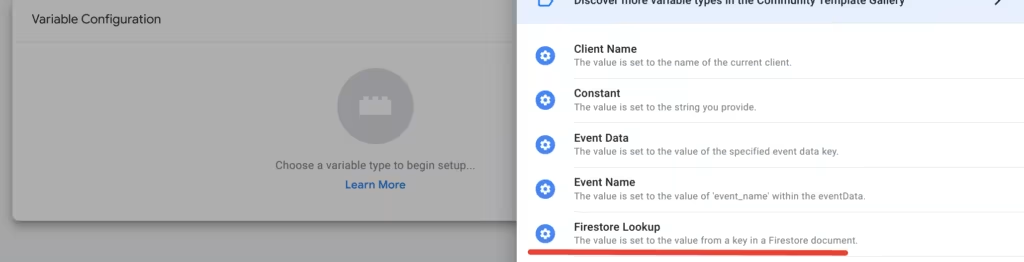
- The entire product information no longer has to be present in the data layer itself. A product ID is enough to query the NoSQL database and additional information that cannot be represented by the database. This could include, for example, the final price of the product, which can be made up of different circumstances (product-specific discounts, for example).
- This minimum amount of information in the data layer is enough. The remaining parameters are only enriched in the server container via the Firestore Lookup variable.
- The event with the enriched information is then sent to the respective endpoint.
This is just a case study. In practice, use cases are very individual and so is the ultimate logic of the setup. However, the potential for saving ballast on a website becomes clear here.
Conclusion
In summary, it can be said that a lot can be gained through proper and thoroughly thought-out conceptualization. As a result, there are plenty of additional technical optimization options, as demonstrated. Support based on comprehensive experience and expertise makes this process much easier. We at e-dialog would be happy to address your concerns. Contact us:kontakt@e-dialog.group




