
Three New Essential Twitter Ads Updates For Advertisers

Management Summary
This article explains who these innovations are available for and what the update means for advertisers.
Twitter hasn’t had an easy time recently (as of December 2022). Since its takeover by Elon Musk, the company has been repeatedly criticized. In order to make the platform more interesting for advertisers, some updates for Twitter Ads have now been launched.
Twitter Ads Updates for Advertisers
The current update to Twitter Ads affects three essential functions:
- Twitter Pixel – new and improved
- Twitter Conversion API – CAPI
- In-app purchases setup
The new (improved) Twitter Pixel
As usual with other ads managers, the new Twitter pixel now supports conversion tracking. This means you can always see how a campaign is performing or whether Twitter users are taking the desired action.
Additionally, advertisers can now measure how much they actually spend on desired actions like clicks. Additionally, improved pixels can track other movements. For example, it detects when someone puts an item in a shopping cart.
Twitter Ads now offers the option to optimize the campaign for different conversion types: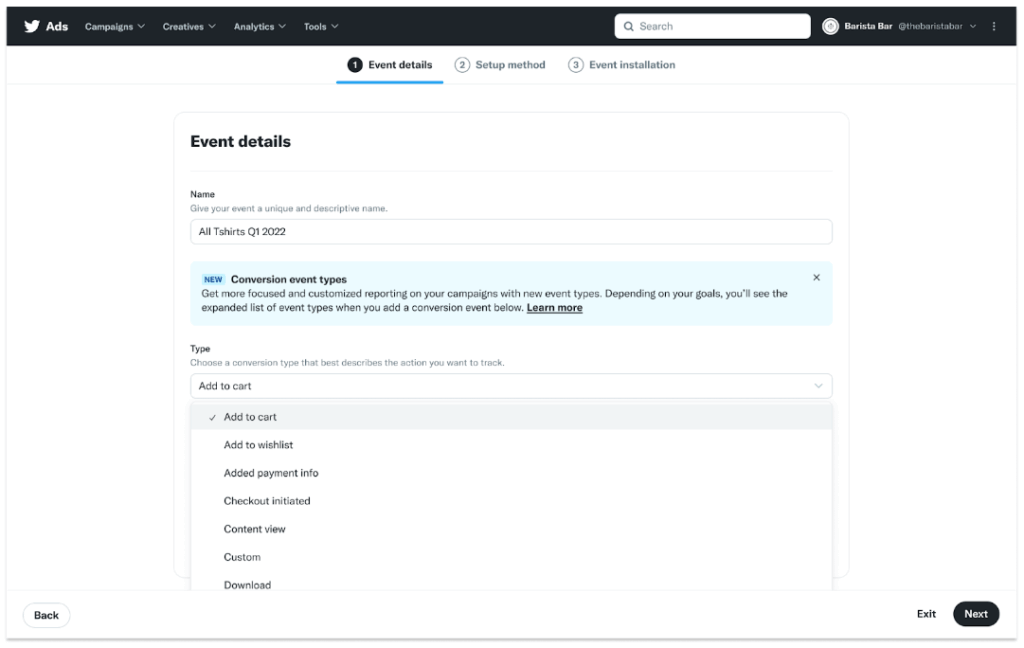 Source:TwitterFinally, Twitter has also made Pixels easier to set up and troubleshoot. With a simpler setup process, it should now be easier to get the Pixel up and running. Additionally, an update to the Pixel Helper extension for Chrome makes troubleshooting even more efficient.
To go into more detail here: The update also introduces “code-based event functionality”. Instead of URL rules, events are defined based on the code on the website.
The new Twitter Pixel consists of two parts:
- Base code: Must be implemented on all pages of the website.
- Event code: Requires the implemented base code.
→ Should be integrated into the most important buttons on the website, such as “Add to Cart” buttons.
Implement base code:
1. In the Event Manager, click View Base Code at the top of the page for the pixel you want to deploy. Source:Twitter2. On the Install Pixel Code page, make sure the Install with Pixel Code tab is selected.
3. From here, copy or download the pixel code into the “Pixel Code” field.
- To download, click on “Download Pixel Code” below the field.
4. Add this code before the </head> HTML tag on all pages of your website.
- Implementing it across your site is critical to properly tracking actions across your site.
- Note: If you have previously implemented a universal site tag and want to update your implementation, paste the previously implemented code into your site along with the new code that you copied or downloaded.
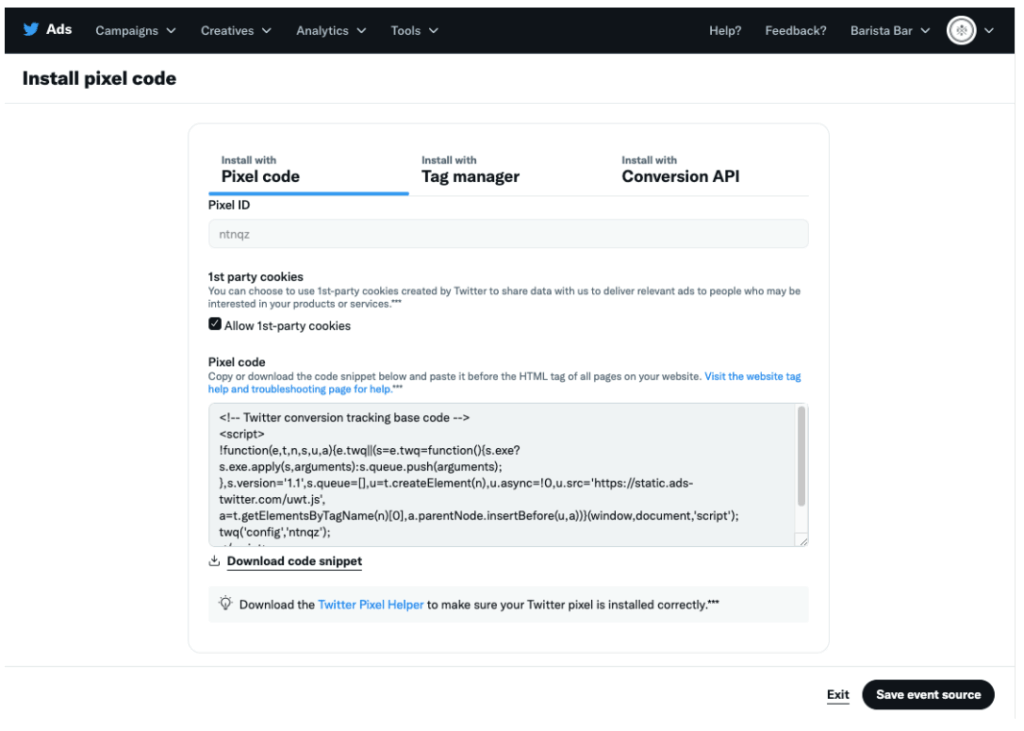 Source:TwitterOnce you implement the base code, events for “site visit” and “landing page view” are automatically created. This is used to measure the visit to a website or the ad landing page. You can find this in the “Event Manager”.
Event code implementation
1. In the “Event Manager” search for the event you want to implement.
2. Click on the three (3) dots next to the event name and select “Edit Event”. 3. Click “Next” twice, which will take you to the “Event Installation” screen.
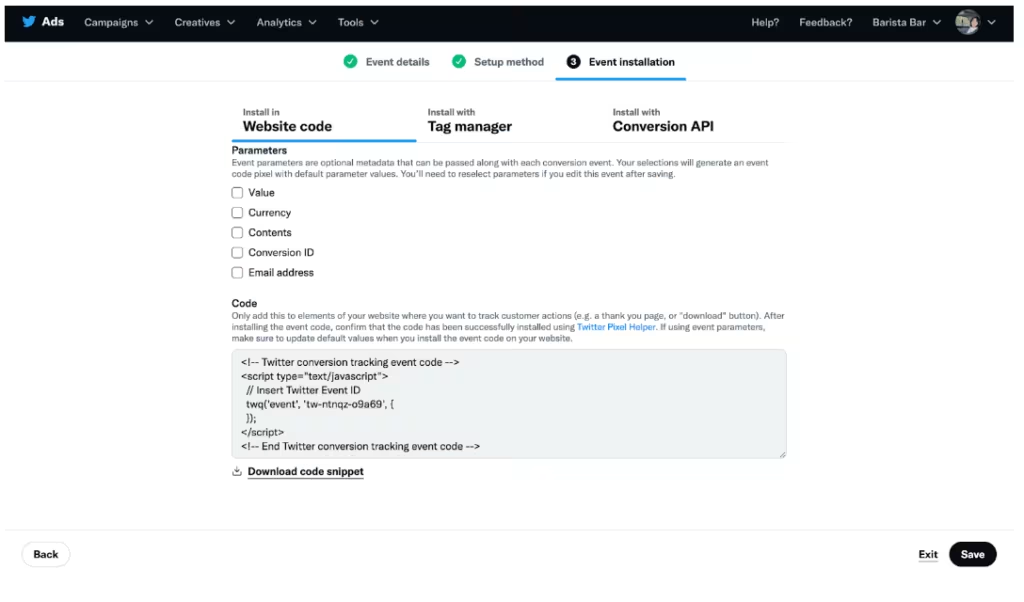 4. Click on “Download code snippet” below the “Code” field.
5. Add this code to specific elements of your website (e.g. a thank you page or a download button).
- If you use event parameters, update the default values when implementing code on your site.
- Note: If you have previously implemented a single-event tag and want to update your implementation, replace the previously implemented code with the new event code you copied or downloaded.
6. Repeat steps 1-5 for each event you want to track.
The new Twitter Conversion API:
Parallel to the improved Twitter Pixel, Twitter’s new Conversion API (CAPI for short) solution was also presented:
“CAPI is a measurement solution that allows advertisers to connect to our API endpoint and send conversion events from their servers to Twitter without using third-party cookies,” Twitter says officially.
In addition, CAPI enables conversion tracking for the first time without the use of Twitter pixels. For example, CAPI can independently collect Twitter click IDs or email addresses and send them to API endpoints.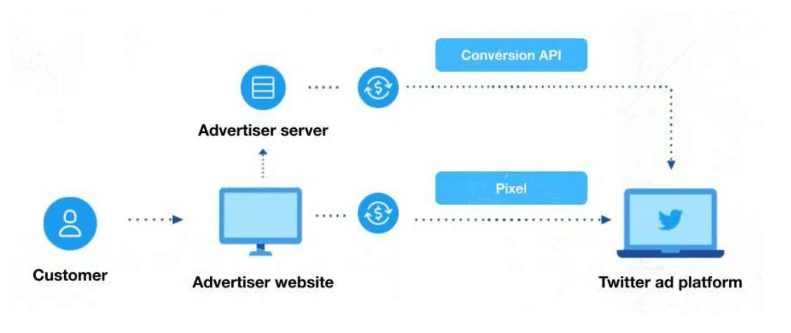
Key Benefits:
- Setting third-party cookiesAs third-party cookies become obsolete across the web and advertising industries, it is important to develop measurement solutions that rely less on cookies. CAPI does not use third-party cookies and can help improve optimization and ad targeting.
- No Twitter website tag (pixel) Requirement:Using a pixel is not required for the Conversion API but can help provide additional measurement insights.
- Advanced Measurement:The Conversion API can be used to track offline conversion events. All events that can be linked to an email, click ID or telephone number can be tracked, both online and offline.
The Offline Conversions API solution allows these conversions to be measured in addition to online conversions.
To implement the Twitter Conversion API, we recommend the official oneTwitter Guide.
Improved setup for in-app purchases
Twitter now offers automatic optimization for in-app purchases. This allows advertisers to choose whether a campaign should be optimized for app installs or in-app purchases.
“Most app advertisers are interested not just in installs, but in lower funnel actions, such as purchases,” the release says.
Ads are primarily shown to users who are likely to make a purchase. Twitter uses machine learning to figure out who they are. In the first test, 89% of advertisers were able to reduce their ad fees.
The Purchase Optimization app is now available for Android.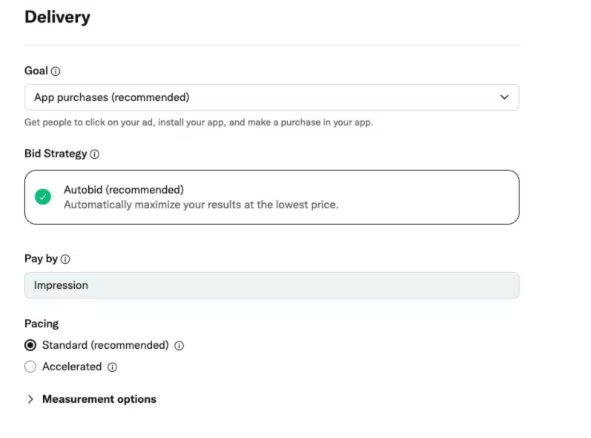
Conclusion:
With this major update, Twitter has eliminated some weak points in terms of tracking and performance optimization and, above all, is preparing for the post-cookie era with the introduction of the Conversion API in order to continue to be relevant for advertisers in the future.
Due to the current uncertain future (as of 2022/2023) of Twitter, every company must assess for itself whether it currently wants to be present with its own brand in the Twitter universe.




