
Cookieless Cross Domain Iframe Tracking With Ga4

Management Summary
Why Cross-Domain iFrame Tracking?
Integration via iframes is a common procedure. Advertising banners, share buttons and affiliate widgets are largely integrated via iframes. Forms, applications or single page applications (SPAs), which are usually managed on their own server under a different domain or come from non-company systems (e.g. booking tools, asset management platforms), can also be integrated in this way.
iFrame tracking makes it possible to track user interactions on the page embedded via the iFrame via your own website, thus obtaining a consistent and more complete picture of user behavior.
Cross-domain iFrame tracking, in turn, enables such tracking even when users within the iFrame interact with content hosted on another domain.
Suppose you run a website and have embedded a form or application on it through which visitors can interact, log in, choose from your services, configure them or even book/purchase them. Further assuming this form or application originated on a different domain and was embedded on your website via an iFrame:
If you now want to use Google Analytics to track how your website visitors interact with the embedded content, cross-domain communication must be enabled between your page and the page within the iFrame.
So it’s completely normal GA4 cross-domain measurement – or is it?
Cross-domain tracking can be done easily in GA4Tag Settings -> Domainsconfigurecan be set in the admin area.

Define domains in the GA4 Google Tag Settings
The domains specified on a list in the Google Tag settings are measured across domains. This also determines which outbound links on your own website do not generate an outbound link if Enhanced Measurement (clicks on external links) is activated.
So far so good, but unfortunately it’s not quite that simple when it comes to content from another domain embedded via an iFrame.
Special challenges with cross-site iFrame tracking
Without a special setup, the (parent) page and the (child) iFrame page do not communicate with each other, despite GA4 Cross Domain Measurement being set up normally.
If the top controlled domain name of the iFrame (child) page (e.g. my-or-other-application.com) is different than that of the parent (e.g. e-dialog.group), the content of the iFrame will be loaded into a third-party context.
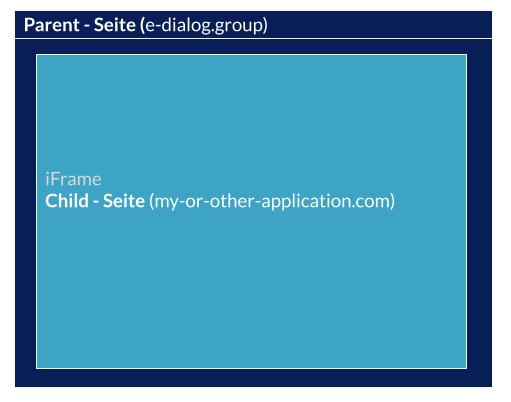
Example: Parent Page & iFrame Child Page
On the one hand, this means that every interaction on the page embedded using iFrames requires that the browser allows third-party cookies. Secondly, in this scenario, both the parent page and the page loaded via the iFrame retain their own client IDs, which results in you seeing too many users in your GA reports (each user becomes two users). In addition, the original traffic source is lost, a situation known as self-referral, making correct attribution of interactions impossible. Although there is an automated solution for this in GA4, in some cases – and especially in the context of single page applications – this does not work.
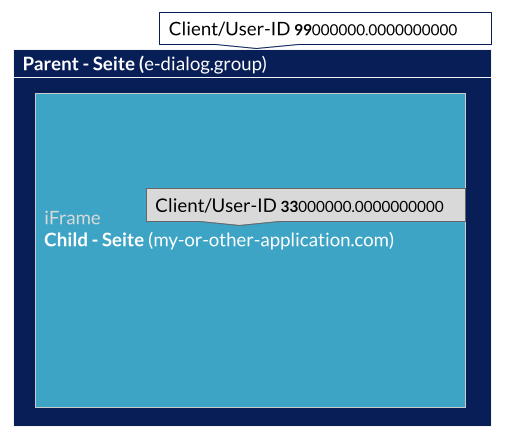
Example: Parent Page & iFrame Child Page User Client IDs
Lack of browser support for third party cookies and incorrect attribution.
Which brings us to the two problematic points:
- the increase in browser tracking protection mechanisms or the lack of browser support for third-party cookies and
- the duplicate user ID and thus increased user numbers in GA and the incorrect assignment of interactions or conversions.
Before and now. What screws can be turned with GA4 and Google Tag Manager?
While the technology and use of iFrames hasn’t changed much, there has, especially in terms of the approachPost-cookie era, a lot has changed in dealing with third-party cookies. The use ofCookies in the cross-domain measurement environment are therefore becoming less reliable and, above all, less promising.
Traditionally, tracking cross-domain iFrames was also solved via cookies. However, many browsers have been restricting the use of cookies in a third-party context for tracking for some time now. In addition, users have the option of making browser settings so that they block cookies, which means that this type of tracking is prevented.
By using a cookie-less method to track cross-domain iFrames, GA4 in conjunction with Google Tag Manager is able to unify the two otherwise differentiated user IDs and track interactions even when cookies are blocked. This is particularly important in the current climate where privacy concerns and ad blocker use are increasing.
Some solutions that have already been found for UA to transfer the client ID, such as the detour via local storage, cannot be implemented one-to-one due to the lack of a standard mechanism for deactivating cookie storage in GA4, so other ways have to be taken for this too.
Furthermore, implementing a tracking solution for cross-domain iFrames usually means working on the tracking and/or data layer implementation on both sides, on the parent side and on the child side embedded via the iFrame. New solutions, if applicable, can reduce the effort here.
Conclusion:
Nowadays, there is no way around integrating content, applications, forms from non-proprietary domains and systems on your own site. And even if tracking content via iFrames, let’s be honest, sometimes causes more gray hair, iFrames offer a quick way to integrate “third-party” content on your own website and are therefore a common use case. In order not to lose meaningful analyzes and correct attribution in this use case, a separate cross-domain iFrame tracking solution is also required for GA4, because the advantages of the integrated cross-site tracking cannot be used here. In addition, a well thought-out cookieless cross-site iFrame tracking implementation can also prevent additional effort and achieve a promising solution.




