Content Groups Universal Analytics Ua Vs Google Analytics 4 Ga4

Management Summary
This article compares content groups in Universal Analytics (UA) and Google Analytics 4 (GA4).
What are content groups?
Content groups (German: Content-gruppe / Content-Gruppierung) are a tool for organizing and analyzing tracking data (events, page views, etc.) of a website by dividing them into clearly defined areas. These groupings make it possible to better understand the performance of content within specific categories and derive targeted optimization measures.
Some simple examples of content groupings
For an eCommerce company:
- clothing
- electronics
- Household goods
For a media company:
- Article
- videos
- Podcasts
Content groupings can be implemented in both Universal Analytics and Google Analytics 4 (GA4). However, the way data is collected between the two platforms has changed.
Content Groups in Universal Analytics
Universal Analytics (UA) allows you to create up to five content groupings. Content groups can be defined within each of these groupings. This convoluted approach can be confusing and has been replaced with a simplified structure in Google Analytics 4 (GA4).Content groups can be created in UA in two different ways – via the Analytics interface or Google Tag Manager (GTM).
Creation via the Analytics Interface:
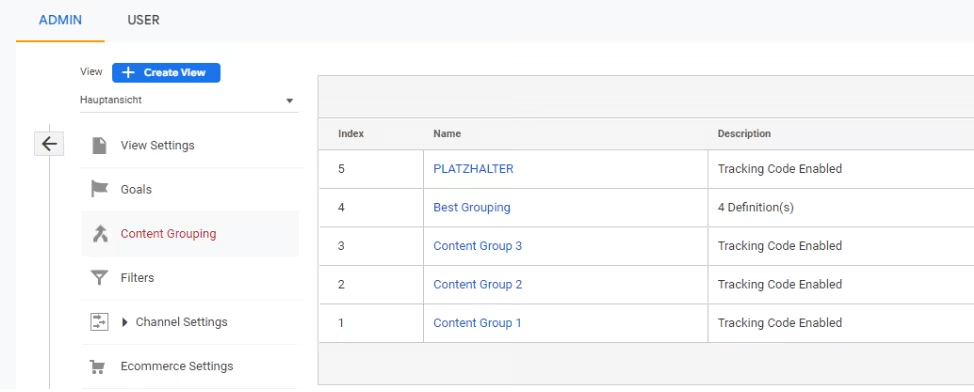 In the Google Analytics interface you can define rules to group the content on your website accordingly. Various rule types are available, such as grouping content based on URL structure or page title. These rules enable the content to be automatically assigned to the respective content groups.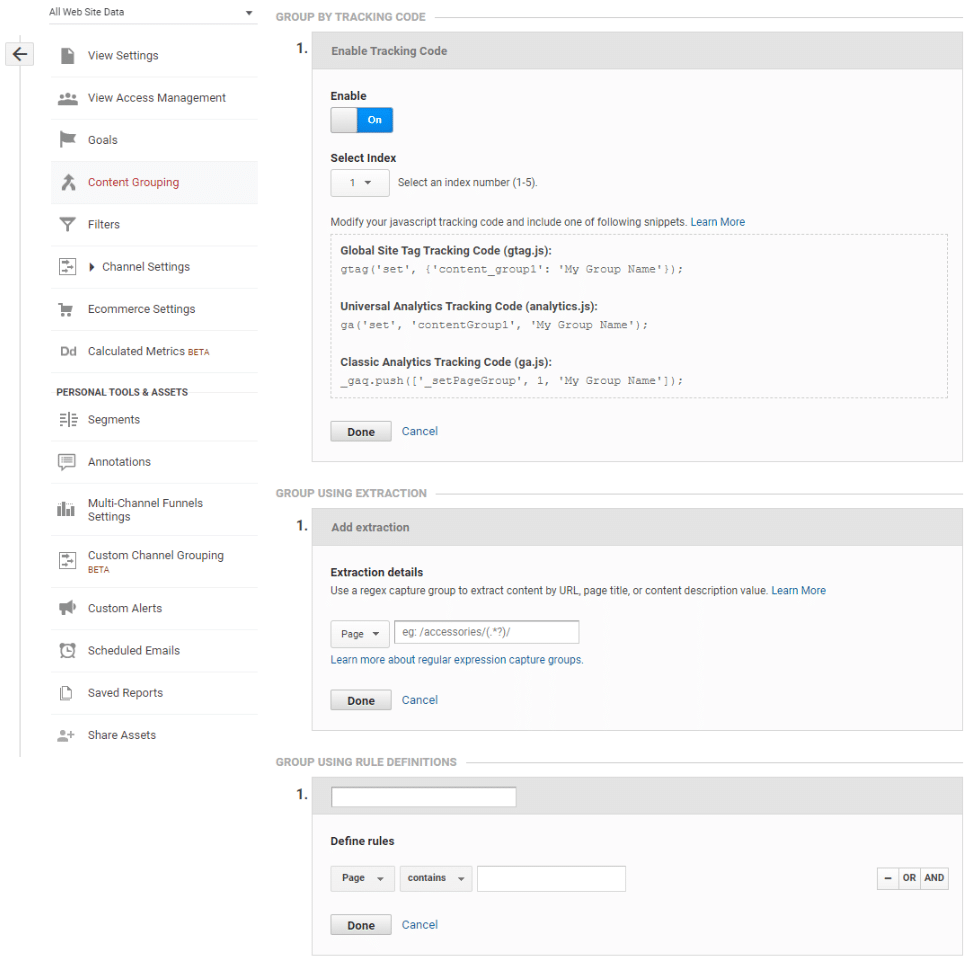
Creation via Google Tag Manager (GTM):
When using Google Tag Manager, you can use variables that populate the content groups in the GA settings variable. This approach offers more flexibility because you can use custom variables and triggers to group your site’s content more precisely.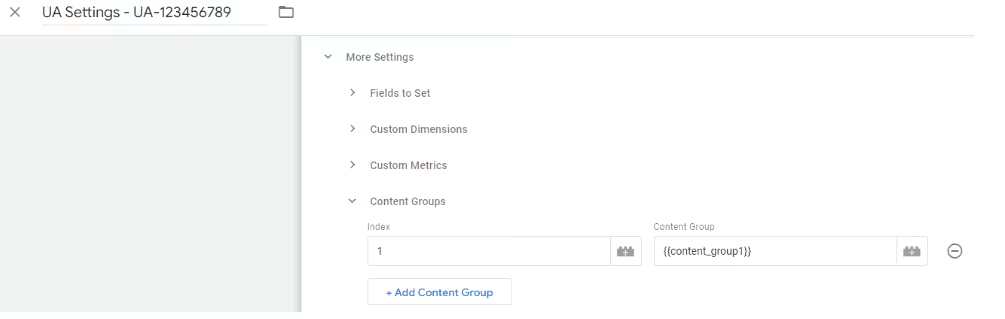
Content grouping in Google Analytics 4 (GA4)
Unlike Universal Analytics (UA), Google Analytics 4 (GA4) uses a simplified approach to creating content groupings. In GA4, “content_group” is defined as a reserved parameter anchored in events and event parameters. Unlike UA, which uses nested content groups and groupings, content grouping in GA4 is integrated directly into the event structure as an event parameter, making analysis and reporting easier.
Using the reserved “content_group” parameter in GA4
In GA4, the “content_group” parameter is used to group content directly within the event structure. This reserved parameter allows you to filter and better analyze content in your reports without requiring a separate structure like in UA.
To use the “content_group” parameter, you must implement it in your tracking code or GTM. Add the “content_group” parameter to the appropriate events or GA4 Configurations tag to group your content.
Implementation of “content_group” parameter in tracking code or GTM
In the case of the GTM, you create a custom variable that contains the value of your content group and add this value to the GA4 configuration as a “content_group” parameter.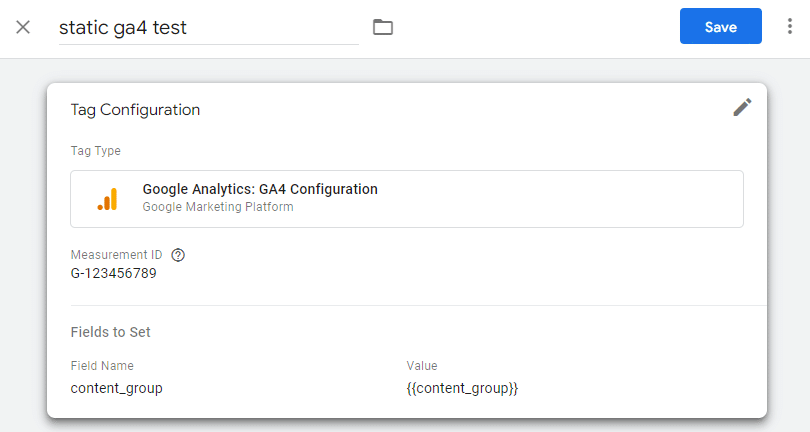 By using the “content_group” parameter in GA4, you can organize your content on aAnalyze at a granular level and better understand the performance of different content areas. This simplified approach makes it easier to take targeted optimization measures and improve user experience and conversion rates.
The use of the “content_group” parameterin conjunction with Google Tag Manager allows a high level of flexibility in grouping content by using custom variables. This method allows content groups to be seamlessly adapted to the specific structures of websites or apps.For example, GTM allows you to create variables based on URL structures, page titles, categories, or other elements and then assign them to the “content_group” parameter. This flexibility makes it easier to customize content grouping to meet the unique needs of your project and enables precise analysis of the performance of different content areas. This allows you to take targeted optimization measures and improve both user experience and conversion rates.