
Dom Scraping In Gtm Data Extraction Made Easy

Management Summary
Read data from the website without relying on a data layer or IT? DOM scraping offers this possibility. You can find out here how you can dynamically read out all content and use it for your analyses!
What does DOM mean?
The abbreviation DOM stands for Document Object Model and describes the structured structure of a website. The DOM can be imagined as a tree structure. The individual elements within this tree are called nodes. This can be, for example, headings, texts, images or even interactive elements such as links or buttons.
The goal of DOM scraping is to dynamically read the contents of these nodes.
What is DOM scraping used for?
DOM scraping offers a variety of advantages for web analysis:
- Easily capture all content available in the DOM
- Fast implementation saves time & Money
- No need to intervene in the website code
Basically, if a data layer exists, it should always be accessed. DOM scraping serves more as an alternative or supplement.
Practical application examples
Here are a few examples of the sensible use of DOM scraping:
Use Case 1: E-commerce data
In e-commerce tracking, product data plays an essential role in web analysis.
DOM scraping can be used to extract all product data if it is available in the website code: product name, price, categories and much more. The advantage is that the current content of the page is always read. For example, if there are several variants of a product, the content that is currently visible to the user is always recorded.
However, it should be noted that the product data available on the individual pages can fluctuate and is therefore not always reliably available. Here too, it is recommended to implement an e-commerce data layer.
Use Case 2: Navigation
Do you want to know which links in your navigation are clicked on most often? You can also find this out using DOM scraping by capturing the text of the menu item. This is particularly practical if the navigation content changes frequently, for example due to campaigns.
Use Case 3: Form
Contents of a submitted form can also be extracted. So if you want to see in your analysis tool which reason is most frequently selected for advertisements in the support form, or which topics are the most popular when subscribing to the newsletter, this is the way to go. Attention: Always observe data protection and do not collect any personal data!
Step by step: Extract data in GTM
First things first: The be-all and end-all lies in the planning. As always, it is important to remember to only record data that you actually want to evaluate later. More is not always more!
Next, identify the elements on the website that deliver the desired content.
You can use the developer tools to do this. Open this in your browser and move your mouse over the page to your element. Now you can examine the element in more detail:
(Almost) every node is equipped with a selector. In most cases it is the ID or a class. This will now be saved to the clipboard for later use in GTM. Here the ID of the element would be “references”.
Then we continue in the Google Tag Manager. There are two common ways:
Way 1: DOM variable
You use the DOM variable when you have found a unique ID or class for your element.
- Create a new variable and select the type “DOM Element”.
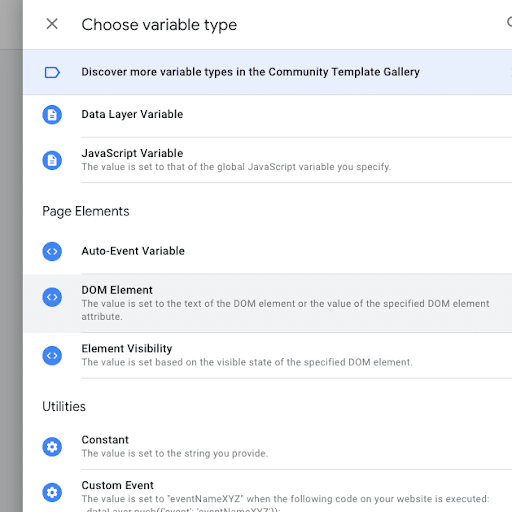
- In the variable configuration, you choose between ID or CSS selector and then add the value previously copied from the DOM into the input field.
- Optional: If you want to read the value of a data attribute instead of the text, fill in the “Attribute Name” field.
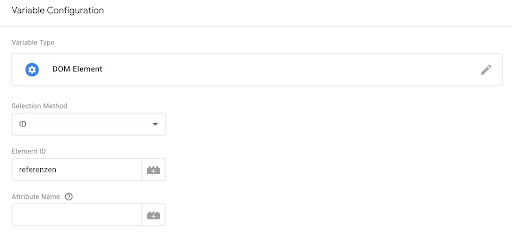
- Testing: Open preview mode and check the value of your variable.
- Finally, add the variable to the desired tag to submit it to the analysis tool.
Way 2: Custom JavaScript
You choose this route, for example, if there is no direct selector for the desired element.
This method requires basic knowledge of JavaScript.
Let’s say our References Headline has a child element with no unique class:
- Create a new variable and select the type “Custom JavaScript”

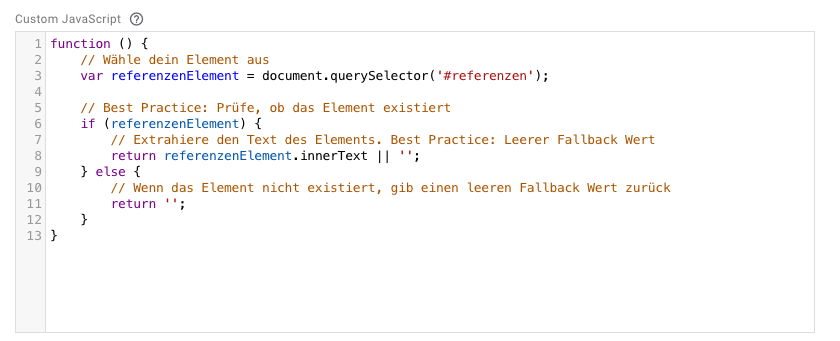
- Basic structure of the function: A JavaScript function must have a certain syntax and always contain a return value.
- Select element with querySelector: You can use the JavaScript selector functions to select your element.
- Extract text: With the .innerText function you can extract the text of an element. If you want to access the value of a data attribute instead, use the dataSet Object.
- The finished code could look like this:
- Debugging: Use the Console to debug your code. You can find tips on thishere.
- Testing: Open preview mode and check the value of your variable.
- Finally, add the variable to the desired tag to submit it to the analysis tool.
Congratulations, you’ve dynamically captured website content using DOM scraping!
Beware of pitfalls!
DOM scraping is a great way to read values dynamically. Nevertheless, caution is advised:
Changes in the DOM: The website structure can change quickly through code adjustments. The element’s selector may be renamed, or the desired content may be moved to another node.
In these cases, it is useful to store fallback values and check the values regularly in reports in order to be able to act quickly.Better Practice: Data LayerThe data layer was created specifically to contain values for tracking – the DOM is not. So if a data layer exists, this should always be used primarily!
Conclusion
DOM scraping enriches your web analysis with data and is a quick & uncomplicated way to capture relevant content. Make sure to think of it as a complement to the data layer. Use the data layer whenever possible, as it is not only more reliable but also remains independent of changes to the DOM structure.
With a bit of routine & By following best practices to avoid pitfalls, you too can enrich your analysis with data from the DOM. Have fun trying it out!




