Understanding Social Media Conversion APIs: How to Get More Out of TikTok & Co

Management Summary
Tracking in Transition: Conversion APIs are the new standard for clean, server-side campaign tracking—here’s how to set them up correctly for each platform.
Conversion APIs – The New Standard
In addition to tracking with conventional pixels, the Conversion API is gaining increasing importance. Increasingly strict tracking restrictions in browsers make it more difficult to capture events purely through client-side tracking. This is where Conversion APIs (CAPIs for short) come into play: they enable events to be captured server-side in addition to the browser.
If you would like to learn more about the basic functionality of CAPIs, you can find an article on this topic here.
Meta, TikTok, Snapchat & Pinterest: Who Offers What?
By now, most of the major players have made a CAPI available.
However: CAPI is not the same as CAPI. Even though the basic functionality is very similar across all platforms, each tool has unique features that should be considered. In the following chapter, you will learn some tips & tricks for setting up the various CAPIs.
To build a basic understanding of the functionalities of each service, every platform offers official documentation:
- Meta: https://developers.facebook.com/docs/marketing-api/conversions-api/
- Snapchat: https://developers.snap.com/api/marketing-api/Conversions-API
- TikTok: https://ads.tiktok.com/help/article/events-api
- Pinterest: https://help.pinterest.com/en/business/article/the-pinterest-api-for-conversions
Optimal Setup for Each Platform: The Rules
From Standard Setup to Custom Solution
Even though all four platforms offer a Conversion API, the setup effort can vary. By now, there are various partner integrations for each of the CAPIs, for example with shop systems, which enable a quick start. Meta particularly stands out with a broad range of different partners. Tip: plan sufficient resources for your setup—depending on the platform, the technical requirements vary in complexity.
If you work with Google Tag Manager, you can be especially pleased: each of the platforms offers an official tag template for their Conversion API.
Parameters – What You Should Definitely Send
As a general rule: What is sent client-side should also be sent server-side. So if you send product data in the pixel, for example, you should ensure that you also send it via the server. What matters here is not only the name of the parameter, but also what it contains.
Especially when you have multiple tools in use simultaneously, it can quickly happen that you confuse the parameters with each other.
As an example: When you send product data for the purchase event:
- Meta, Snapchat, and TikTok use the parameter “contents” in JSON format for this. Attention: What exactly needs to go into the “contents” object also differs per platform!
- Pinterest receives the individual product data in individual parameters such as product_id, product_price, product_variant, etc.
Standard vs. Custom
For each of the CAPIs (and pixels), there are predefined standard parameters that should be followed. If these are not sufficient for you, you can also send custom parameters. Just make sure that they are named identically on the client and server side.
Particularly important are also the so-called deduplication parameters, which play a major role in event quality. What exactly deduplication is and how you optimize it is explained next.
Two Is Better Than One
Each of the four platforms recommends a parallel setup. This means that events are captured both client-side and server-side. This method enables the highest possible accuracy. But here too, there are rules to observe. An incorrect setup can lead to events being counted twice—and that distorts our data! This is where deduplication comes into play: it identifies duplicate events and merges them together. For this to work, an identifier must always be sent that connects the events with each other.
Deduplication Using Event ID
All of these tools have one deduplication method in common: the use of the event ID in combination with the event name. With this approach, you send a unique ID with each event (both server-side and client-side) that distinguishes similar events from each other. When both the event name and the event ID match, the tool recognizes that the two events are identical and deduplicates them.
This ID can be the order number for the purchase event, for example, but any other unique value is also possible, as long as the event ID is the same in the client and server event. Attention: Each platform has different recommendations for the format of the event ID. While Meta, Snapchat, and Pinterest accept all characters in the string, the event ID for TikTok must not contain special characters.
Meta also offers another deduplication option: using the FBP or external ID. The FBP parameter contains the so-called browser ID, which distinguishes individual browsers from each other. It is set by Meta itself in a cookie. You can provide the external ID yourself. This can be a customer ID for logged-in users, for example, which remains constant with each website visit. Important: this ID must be hashed! With the help of these two parameters, you can also improve deduplication in Meta, although it is recommended to primarily rely on using the event ID.
Debugging
Test, test, test—the fundamental principle of every tracking setup. To ensure that the desired events arrive in the respective tool as expected, there are certain tools available.
First, if you work with Google Tag Manager, you can use the Debug Mode. The sent request provides information about the parameters sent and whether the request successfully arrived in the tool.
In addition to conventional debugging, each of the tools also offers its own services for optimal testing. Meta, Snapchat, TikTok, and Pinterest all use the same method: using the “Test Events” function, which you can find in the Events Manager (in Pinterest: Ads Manager), you can view and verify incoming requests.
If everything is set up correctly, you will see both server and browser events. It is important to note the same event ID. When the tool merges the events together, you will see that the events are deduplicated with each other. This indicates a correct setup!
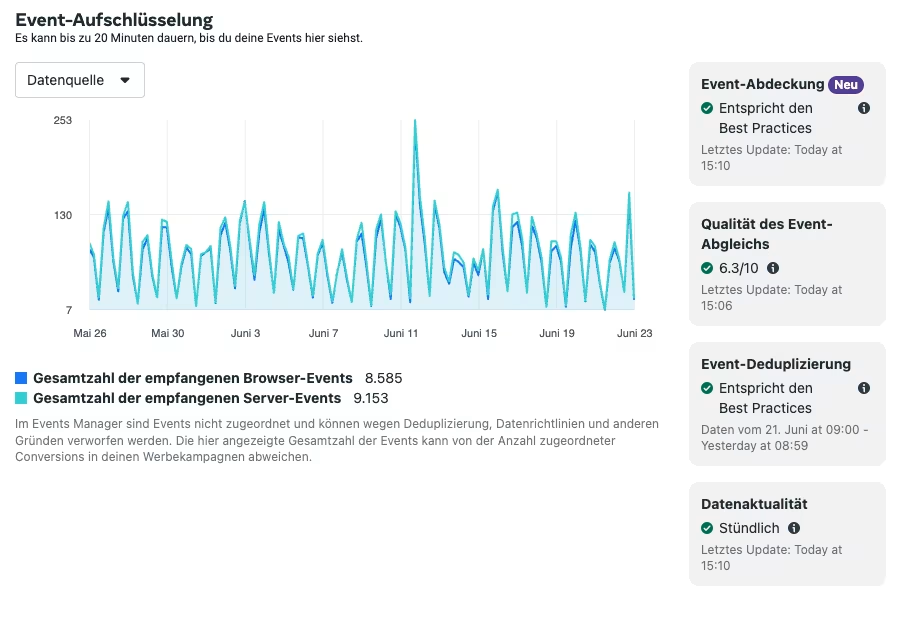
Using Meta as an example, you can view details about your event in the Events Manager that provide information about the quality:
Conclusion
Conversion APIs close tracking gaps that pixels alone can no longer fill. By following best practices, you too can lay the foundation for modern and clean tracking of your social media campaigns.