
Checklist For Successfully Controlling The Dv360 Campaign Set Up

Management Summary
In this blog you will find a checklist as a guide to successfully controlling your DV360 campaign set-up.
Campaign level
At the campaign level, cross-campaign settings are made, which are transferred to all insertion orders and line items within this campaign. The following settings must not be forgotten:
☐ Uniform and clear campaign name
☐ Status: Active
☐ The following settings do not affect the display of the campaign, but do contribute to a better overview and optimization of the campaign and should therefore be stored correctly:
- Overall campaign goal
- KPI
- planned advertising formats
- planned campaign budget
- planned start and end dates
☐ Frequency cap
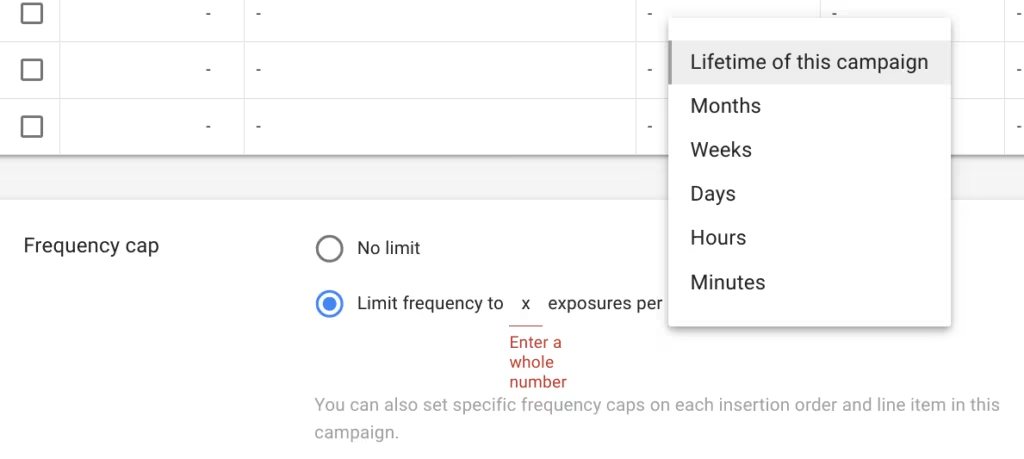
Frequency Cap Setting in DV360 – at campaign level
☐ CertainTargeting-Settings, which are the same for all insertion orders and line items, can already be stored at the campaign level. This particularly applies to:
- Geography,
- Languageand
- Brand safety(more on thathere).
Insertion Order Level
All settings on this level are applied to the line items below. However, it is possible to overwrite these default settings in the individual line items.
☐ More consistent and clearerInsertion Order Name
☐ Status:Active
(Tip: work in draft mode while editing the campaign and set it to active after finishing)
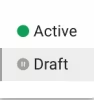
Status: Active setting in DV360 – at insertion order level
☐ currency(Attention: cannot be changed after the insertion order has been created)
☐ budgetandRunning times (!)
☐ Pacing(Tip: Flight + Even so that there are no underspending or overspending)
☐ goal– this setting helps optimize the insertion order and can be used as a benchmark
☐ Optimization(more about bidding strategies in DV360here)
☐ Frequency cap
☐ Apps & URLs(Inclusion and exclusion lists can also be created at the advertiser level and appear automatically when each new campaign is created)
☐ keywords(as a comprehensive brand safety measure, keywords for targeting see Line Item Level below)
☐ Viewability
☐ UnderAdditional settingsshould the partners costs such as theMedia feeor a possible oneCPM feebe controlled. (Attention: must be opened!)
Line Item Level
The final details are set at the lowest level. Previous settings at higher levels can be adopted or overwritten.
☐ More consistent and clearerLine Item Name
☐ Status:Active
☐ Inventory Source: Depending on the type of purchase, different things need to be taken into account. With the OMP, all desired exchanges must be ticked and no private deals must be selected. With the PMP, on the other hand, all exchanges must be removed and the appropriate deal must be stored.
☐ Targeting: The specific targeting settings are stored at the line item level. The following options are available:
- keywords
- Categories
- Environment
- position
- Audience Lists (you can find more information about the audienceshere)
- Day & Time
- Demographics
- Browser
- Device
- Connection speed
- Carriers & ISP
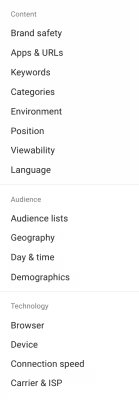
Targeting settings in DV360 – at line item level
☐ Flight dates(Tip: Adopt the terms of the insertion order)
☐ Frequency cap
☐ Creatives: the right advertising materials have been selected (pay attention to different funnel levels, targeting, formats, etc.)
☐ Conversion tracking: the correct floodlights have been stored
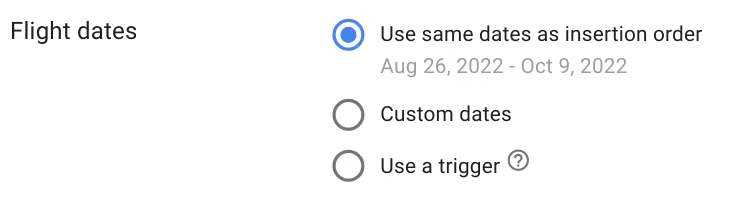
Flight date settings in DV360 – at line item level
Tip: With the help of Structure Data Files (SDFs), information about a campaign, insertion orders and line items can be displayed quickly and clearly. In this way, outliers can be quickly identified and processed. You can find more information on this topichere.
Conclusion:
A DV360 set-up extends over several levels and includes numerous setting options. These settings can be relevant for the entire campaign, for an entire insertion order or just for individual line items. So that you don’t lose track and forget important positions in the campaign, follow our checklist for successfully checking the DV360 campaign set-up.




