
The Most Important Tracking Monitoring Solutions At A Glance

Management Summary
Problems due to tracking failures
This is problematic, for example, in campaign management. If, for example, audience lists are no longer filled due to errors, personalized advertising materials are not displayed efficiently and the success of the campaign is not guaranteed.
Any tracking implementation therefore needs safety nets and controlling instruments to ensure the continuity of the data. Even a functioning tracking implementation can always be negatively influenced by ongoing website changes – and should therefore be monitored.
Tracking Monitor Solutions
#1 GTM Basic Custom Dimensions (CD)
- In the first step, the Custom Dimensions (CD) are created in Google Analytics (GA).
- The integrated variables – GTM Version and GTM Container ID – are then activated in the Google Tag Manager (GTM).
- Afterwards, the previously activated variables just need to be transferred as a custom dimension for all Google Analytics tags in the Google Tag Manager. This is best done using a Google Analytics Settings variable.
Advantages of the Custom Dimensions method:
- The GTM Container ID shows which Google Tag Manager collects data in a specific Google Analytics property. This has advantages and is particularly helpful for large and complex implementations.
- The actual live time of a newly released GTM version can be measured. This information is particularly advantageous for server caching and app tracking – here it takes longer until the changes made are live.
- The installation helps with debugging should an error occur in a Google Tag Manager change.
- The method is free and can be implemented quickly even for GTM and GA newbies.
GTM version and GTM container ID can also be tracked together in a custom dimension, thus saving a custom dimension.
#2 Create alerts in Google Analytics
Google Analytics offers the option to create individual alerts to monitor metrics. If defined metrics fall or rise (strongly) – an alarm is triggered for control purposes. We also recommend Google Analytics Custom Alerts as a basic program for monitoring the most important key figures.
Examples of Google Analytics alerts:
- Sessions fall sharply
- Transactions fall sharply
- Add to carts are falling sharply
Here’s how to set up Google Analytics Alerts:
- Custom Alertscan be created in the settings. The settings are at the data view level. Here you can up to50 individual messagesbe created per data view. By clicking on“New Alert”The following data entry mask opens:
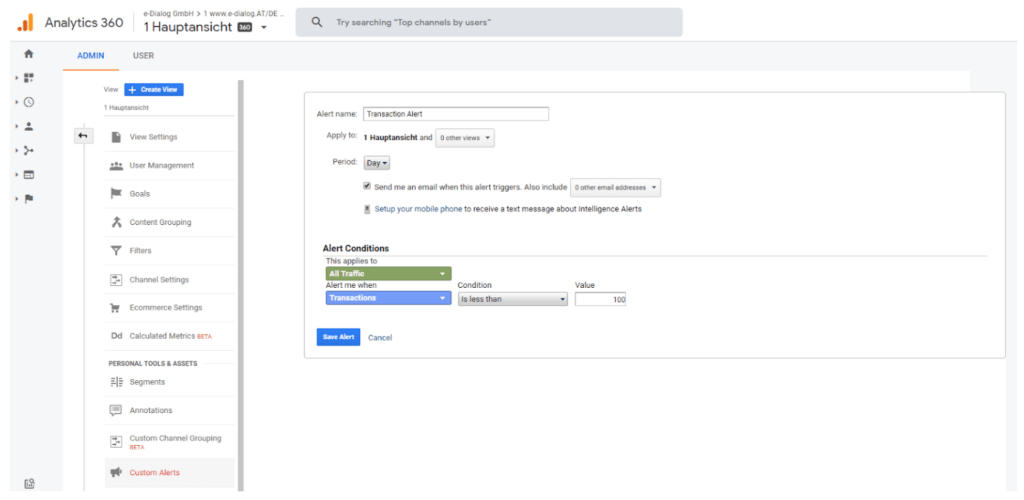
- AsAlert namewe recommend one if possiblemeaningful titleto choose.
For example: Blog: Pageviews decrease 70% (daily) - Thereafterthe area/data viewSelect to which the alert should be applied.
- “period” denotes thedesired periodin which the alerts are sent out –Day, month and yearare available to choose from. A particularly strong feature: the notification can also be sent to a mobile phone via SMS.
- TheAlert Conditionsdefine the trigger for the alert. Under “Applies to” the entire traffic or a segment is determined. For example Organic Traffic or Paid Search etc. in order to then define the actual rule e.g. Page Views decrease 70% compared to day before.
The alert conditions always depend on the business model, which data is important for the creation of audience lists and which goals have been set.
Benefits of Google Analytics Alerts:
- are set up quickly
- are available free of charge
#3 Day Audit Tools
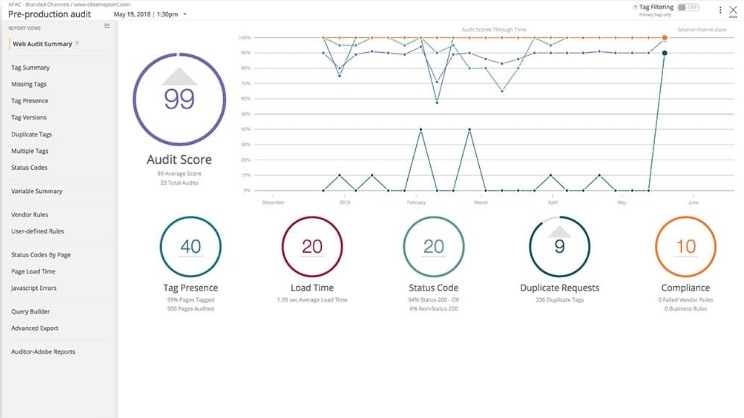
WithTag audit toolsTracking technologies can be monitored by various third-party providers. Again, the goal is to ensure that tags work and provide data.
The most famous representative:
- Observe Point
Observe Point provides an application that can be used to ensure the functionality of web analysis implementations. Observe Point offers many options for tool and report configuration: scan limits, browsers, user agents, operating systems, view ports and countless rules can be defined.
Advantages of Tag Audit Tools:
- Ready developed solutions
- Nice and clear (reporting) interface
- suitable for apps and web
- All tags from different providers can be monitored, not just the Google Analytics tags (solution 1 and 2)
Disadvantages of Tag Audit Tools:
- License costs
#4 Build your own Google Tag Manager Monitor
If Google Tag Manager is used for tag management, it is possible to set up a GTM monitor yourself.
Using so-called “lightweight monitoring,” Google Tag Manager users can create dashboards to monitor the behavior and performance of their tags. The API method “addEventCallback” is used for this. This method can be used to create event callbacks that are called at the end of an event. These callbacks receive information about the event, which can subsequently be used to create your own tag monitoring implementations.
Lightweight monitoring supports issues such as tag status, execution times and metadata. This data can then be displayed in a dashboard or used to trigger an alert system. Here you goGTM Lightweight Monitoring Documentation
Advantages of your own GTM monitor:
- No license fees (possibly paid Google Cloud services if used for this purpose)
- System individually adapted to your own requirements
Disadvantages of your own GTM monitor:
- The system must be set up and maintained by yourself
- IT skills required




