Optimize Assets For Html5 Advertising Media And Reduce File Size

Management Summary
Everyone knows that the loading time of a page has a major impact on the user experience and performance. The same applies to HTML5 advertising media, which is why the file weight of such advertising media is often limited by publishers. 150-200 KB is the standard guideline and is usually the zipped file size with all assets. However, be sure to ask for the publisher’s specific specifications before you start creating.
Components of an HTML5 advertising material
An HTML5 advertising medium usually consists of several components that are combined in a .html file. There are several ways to compress these components so that file size can be reduced and loading time can be optimized.
An HTML5 advertising material can contain the following components:
- HTML
- CSS
- Libraries (Javascript, Jquery, GSAP, …)
- Font files
- Pictures
- videos
Let’s take a closer look at the components individually:
HTML, CSS & Libraries
Basically, codes can be compressed very well. There are so-called minifiers online that are easy to use and also deliver good results.
It is not recommended to use heavy libraries. In many situations you can do without jQuery and rewrite the lines with JavaScript.GSAPis a good solution for complex animations. Otherwise, you can consider using CSS keyframe animations instead of Javascript.
If you have programs likeGoogle Web Designeryou can skip this step because the program has a built-in function when exporting that automatically minimizes codes.
Pictures
Replace with codes
Many images can be implemented very well with pure CSS and HTML (single-color backgrounds, circles, gradients, etc.). Before you start compressing an image, consider whether this wouldn’t be the case.
Prefer vector illustration
Illustrations (such as logos) can be easily exported as .svg (scalable vector graphics without loss of quality). This allows you to reduce size, especially when it comes to larger images.
Use online tools
Services likeTinyPNGoften deliver excellent results. Compress your images before merging them.
Photoshop export
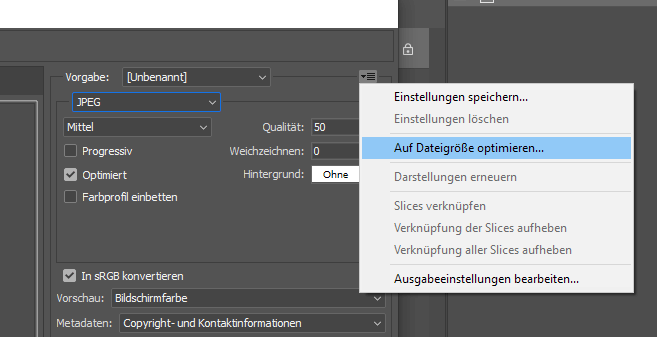
You probably know the “Save for web…” option. In the settings window you can set the necessary quality of the image. You can also specify the file size so that Photoshop calculates the quality for you that would not exceed your default.
videos
Find out in good time whether videos are even permitted by your publisher. InGoogle Adse.g. videos are not yet supported. In DV360, banners with video integration count asRich Media Creativesand have to go overstudiobe hosted.
In general, videos tend to have large file sizes. In this case, think carefully about whether it makes sense to use it.
Mp4 remains the most supported format in all major browsers.
GIFandSprite sheetsAlthough they are alternatives, they do not always provide a better result. Try out which method produces the best results for your video.
Fonts
Standard web fonts such as Arial do not need to be integrated separately. However, if you want to use custom fonts, you should look for alternatives firstGoogle Fonts, a library of free fonts.
Only use your own fonts if you can’t find what you’re looking for or if the strict style guide regulations only allow you to use your company’s own fonts.
In such a scenario, you have the following options:
-
- The font is only applied to one piece of text:
You can convert the relevant text passage into a vector graphic (svg) and thus avoid the integration of a font - The font is used often or it is a dynamic text that will later be linked to a feed:
In such a case, we advise you to include the font. Select only the .woff or .woff2 formats here (this option is not allowed in Google Ads). Online tools likeFont Squirrelcan help you identify unwanted characters (Subsetting) and keep the fonts slimmer.
- The font is only applied to one piece of text:
Conclusion – Use the necessary quality
As you have seen, there is a lot of room for optimization here. The most important thing is that you find the level of optimization. What can I do without? What definitely shouldn’t look pixelated? Is my advertising material so simple that I can use it as well?AMP Adcan create?
Whether a lot or a little, be sure to optimize your assets before or when merging files. You will see a noticeable difference in how your advertising loads.