
Sub Properties In Ga4 8211 Replacement For Missing Data Views

Management Summary
Account structure in Google Analytics 4
As the name “Sub-Property” suggests, this level is below the so-called “Source Property”. However, the data view level (right column in the screenshot) remains empty.
The levels in Google Analytics 4, as shown in the screenshot, are:
- Organization = e-Dialog GmbH (top right)
- Account = e-Dialog GmbH (left column)
- Property = GA4 Source Property e-dialog (middle column)
- Sub-Property = GA4 Sub-Property e-dialog (middle column)
 In order to combine several properties, the “Roll-Up Property” level can also be integrated. This is on the same level as the source property.
Filter data in GA4 sub-properties
The main function of a sub-property is to filter the recorded data in order to be able to evaluate it separately and to only give users access to this filtered data. But what filter options are there?
The first step here is to distinguish whether events that meet the set criteria should be included or excluded.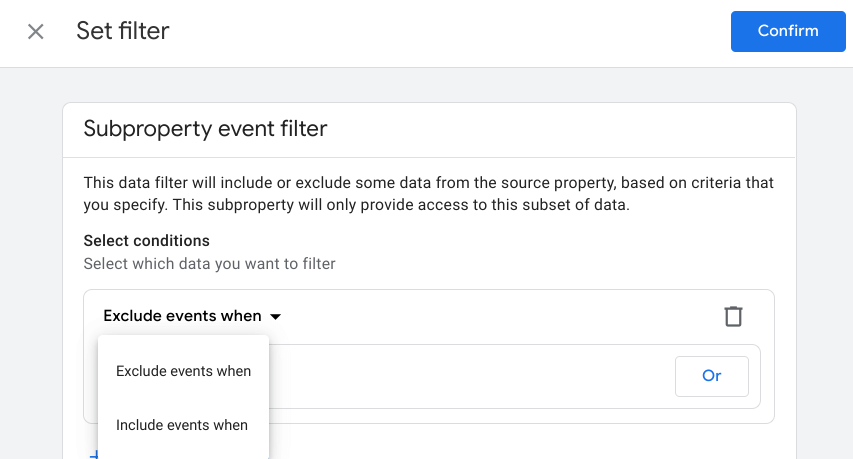 In the second step, the dimensions on which the filtering should take place are then selected. Using operators such as “matches exactly”, “begins with”, “contains” and similar, as well as with the help of Regex, you can define which data should flow into the sub-property. The following dimensions are available for filtering:
- Browser version
- City
- Continent
- Country
- Event name
- Screen Name
- Full page URL
- Language
- Page Path
- Page title
- Platform
- OS version
- region
- Signed in with User ID
- Subcontinent
- Language Code
- Measurement ID
- GMP app ID
- as well as all custom dimensions registered in the source property
For filtering, rules can be flexibly strung together using the operators “and” and “or”. For example, we can then filter data in the sub-property that only contains events within the blog and comes from Austria.
The user rights can now be adjusted and colleagues who should only see the blog data from Austria have direct access to the sub-property and no longer to the source property.
The filter settings of the sub-property can also be adjusted and changed at a later time.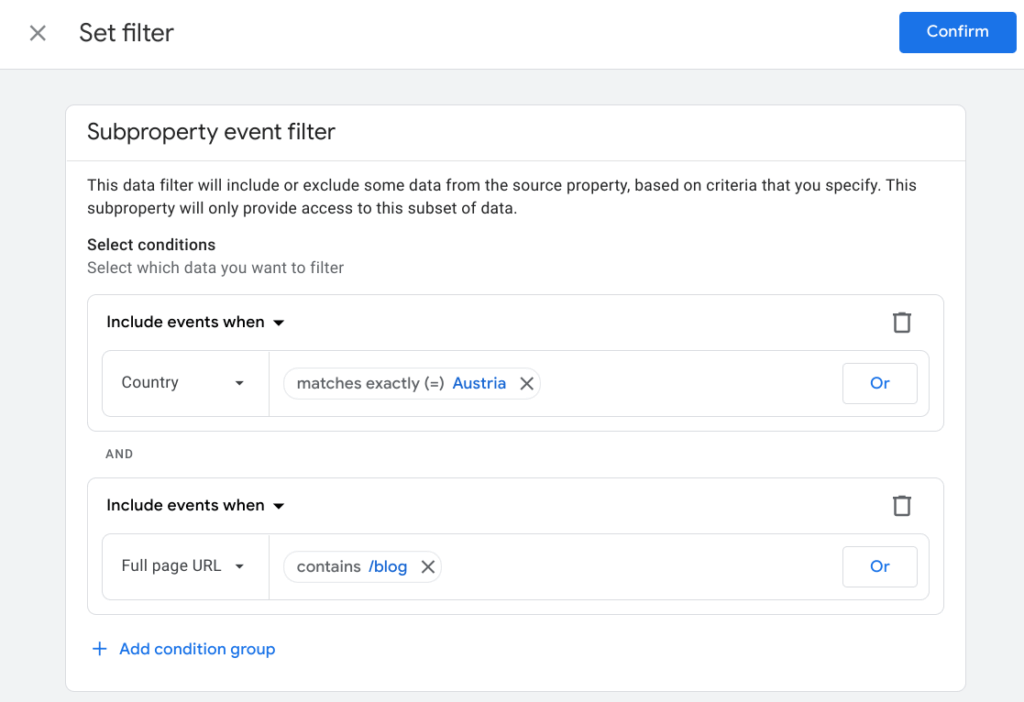
More functions in sub-properties
In addition to separate user management, other settings can also be made in GA4 sub-properties independently of the source property.
So can, among other things
- extra events marked as conversions,
- different currencies set,
- additional audiences created,
- Data deleted via data deletion request,
- the attribution model changed
- and also Google Ads accounts can be linked.
This all happens directly in the sub-property, without affecting the source property.
The sub-property therefore acts as an independent unit that receives its data from the source property. So all data that is displayed in the sub-property must also be in the source property. As soon as data in the source property is deleted, this also affects the data in the sub-property.
Limitations & Cost
In order to create a sub-property, admin rights at account level are required. Additionally, sub-properties are only available for source properties that have a Google Analytics 4 360 upgrade. There is also a limit of 100 properties per account to note, regardless of whether it is Universal Analytics, Google Analytics 4, roll-up or sub-property.
In addition to the basic costs for the 360 license, additional costs apply for sub-properties. This point is pointed out when creating a sub-property and it must be confirmed that you are informed about these additional costs. The cost per event in the sub-property is 50% of the cost per event in the source property – based on the respective 360 license agreement.
Conclusion
The additional costs and the 360 license as a requirement for sub-properties severely limit the flexibility of this new structural level. In my opinion, sub-properties are not 1:1 comparable to data views, but they are an important tool in the structure of Google Analytics 4 in terms of managing data and users.




