
Acquisition Reports In Google Analytics 4 8211 How They Are Interpreted

Management Summary
In Google Analytics 4 there are 3 acquisition types for reports to choose from. This article shows what the differences are, how you can interpret the reports and keep a good overview.
The three acquisition types in GA4
Google Analytics 4 divides acquisition dimensions into 3 different types:
- User-based = acquisition dimensions with the prefix “First user” (EN) or “First user interaction” (DE)
- Session-based = acquisition dimensions with the prefix “session” (EN) or “session” (DE)
- Event-based = acquisition dimensions without prefix
These 3 variants of the acquisition dimensions can be seen particularly well in the Explore Reports when you use the dimension search. Here in the example we searched for Channel Group and we see the 3 different dimensions: “Default channel group”, “First user default channel group” and “Session default channel group”.
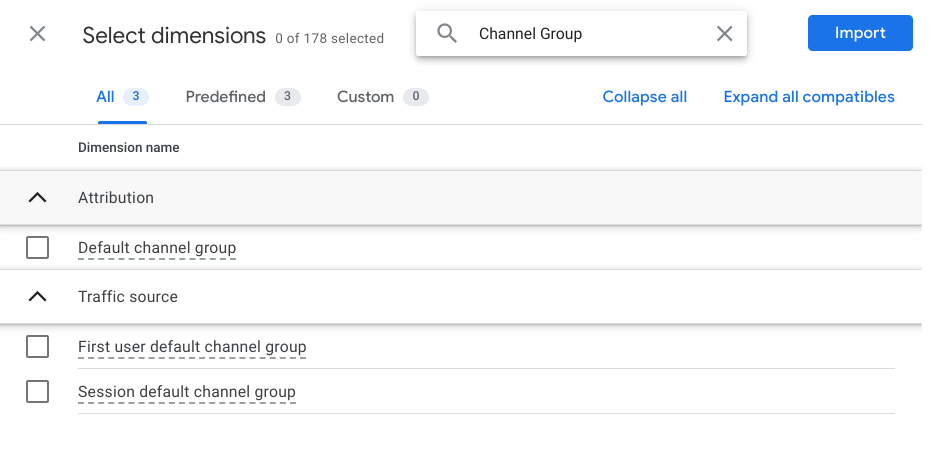
Now the question naturally arises as to which of these 3 dimensions should be chosen for the report. But that depends entirely on what the report is intended to evaluate. A look at the basis of the 3 dimensions offers help.
Without prefix: These acquisition dimensions can be found in the Explore Report under the “Attribution” section. When selecting this, in combination with the metrics “Conversions” and/or “Revenue”, that in theProperty settings selected attribution modelapplied. Here you can evaluate which channel (or campaign, source, medium, etc.) the conversion was generated according to the selected attribution model.
Prefix “Session”or “Session”: These acquisition dimensions show which channel (or campaign, source, medium, etc.) each individual session was generated through.
Prefix “First user”or “First user interaction”: This reports which channel (or campaign, source, medium, etc.) the user came to our website for the first time. If the user visits the website again at a later time via a different channel, the value in this dimension will still remain the same.
But what does the whole thing look like in reporting?
Acquisition in the standard reports
Under the sectionReports → AcquisitionThere is an overview report “Acquisition overview” as well as two detailed reports “User acquisition” and “Traffic acquisition”. The two detailed reports look very similar, but have significant differences in data interpretation.
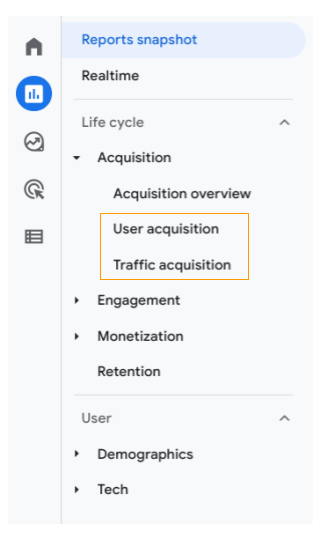
The “User acquisition” reportor in German “User acquisition report” shows which channel new users came to our website or app. Therefore, the first key figure is “New Users”. The first dimension can be changed by clicking on the arrow, so that, for example, not the channel grouping but campaigns through which new users were generated.
Secondary dimensions can also be added by clicking on the plus. Care should be taken to ensure that these have the same basis, i.e. user reference. For example, a combination of “First user source” and “First user medium”.
TheTraffic acquisition reportor in German “Newly generated traffic” focuses on the sessions. That is, which channel was used to generate the individual sessions. The events (interactions) and conversions are also linked to the respective channel through which the session was triggered.
In this report too, the first dimension can be changed and a secondary dimension can be added.
An example to clarify
I visited our website e-dialog.group through several channels:
- Visit: Paid Search
- Visit: Direct
- Visit: Organic Search
- Visit: Direct
How are my visits reported in the different reports in Google Analytics 4?
User Acquisition Report:
My first website visit is recorded here via the paid search channel.
All events, conversions, engaged sessions that take place in my first and the 3 subsequent sessions are also recorded here under the “Paid Search” channel.
The reason for this is that the acquisition dimension used to report here is user-related and therefore all interactions are linked to the channel of my first visit.
Traffic Acquisition Report:
This report uses session-related acquisition dimensions. The following values are recorded here for my visits: 1 session via paid search, 2 sessions via direct and 1 session via organic search.
The interactions and conversions I generated in these sessions are attributed to the respective channels that generated the session.
Conclusion
At first glance, these three different acquisition types can be confusing. Therefore, when interpreting the reports, careful attention should be paid to which dimension it is and what reference it has (user, session or event).
If problems arise in the interpretation, we are happy to provide our expertise.




