
Get More Downloads With App Install Campaigns In Dv360

Management Summary
Surveys from 2022 show that over 60% of users use apps regularly. The advantage of a mobile app lies in the improved mobile user-friendliness (faster loading speed, shorter paths, easier navigation), the interface adapted to mobile devices and easier personalization. We have summarized the advantages of performance-oriented app install campaigns in DV360, the necessary steps in the set-up, best practices and do’s and don’ts in this blog article.
What are the advantages of an app install campaign?
For advertisers with a strong focus on app installs or downloads, DV360 offers great benefits.
Measurability
DV360 offers the possibility of a very granular set-up. This means that the impact of a campaign can be easily quantified and the user journey can be understood. By linking to an SDK (software development kit) tracking, KPIs such as first open or in-app purchases can be assigned directly to the campaign.
Targeting options
One of the biggest advantages of App-Install Ads in DV360 is that you can use the same targeting options and frequency cap settings as common programmatic campaigns in Open Inventory.
The following targeting options are available:
- Brand safety
- Blocklists
- Environment (web, app)
- Viewability
- Audience lists
- Geography
- Device:
- Smartphone
- Tablet
- Operating system (Apple, Android, etc.)
Set-up of the app install campaign
Tracking with Floodlight
Procedure: Setting up install and/or in-app conversion tracking
- If Campaign Manager 360 is used: Set up conversion tracking using Floodlights in Campaign Manager 360.
- If Campaign Manager 360 is not used: Setting up a pixel in Display & Video 360. Enable activation for remarketing.
In general, an SDK tracking, for example from Firebase, is required for tracking installations and other activities within the app. This can then be used to create floodlights in Campaign Manager 360. Floodlight activity or Floodlight pixel tracks app installs. The activities also serve to create target groups. There is the option to set up tracking for app installs and in-app conversions via both Campaign Manager 360 and DV360.
Tracking via Campaign Manager:
- Tracking installations via theGoogle Play Store(Android):
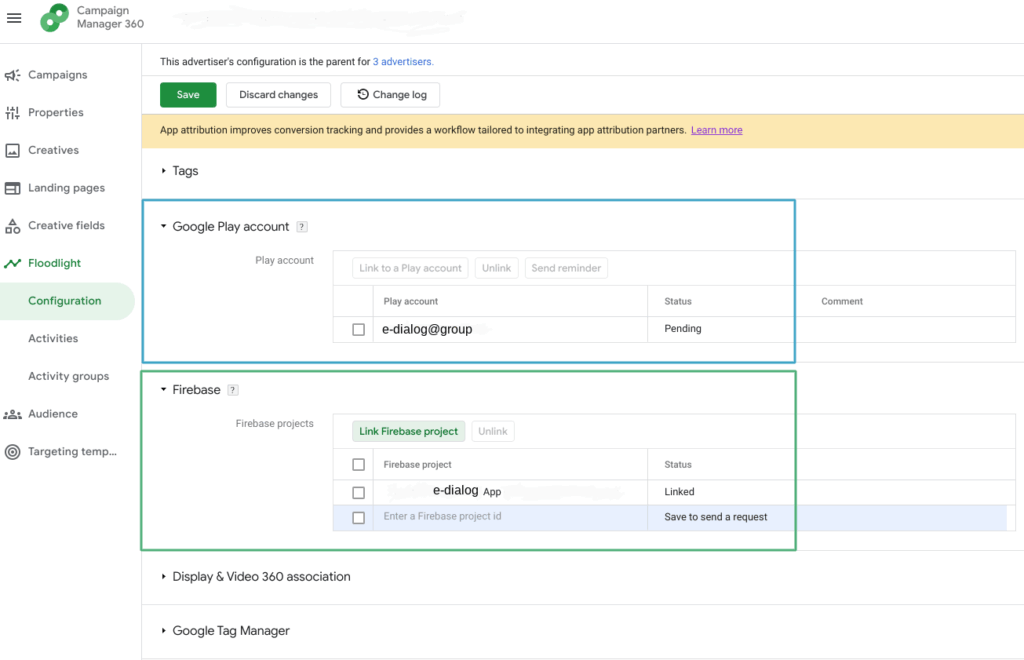
- At the advertiser level, under the Floodlight tab > Configuration can be found in the “Google Play Account” section. The email address of the Google Play Store administrator must be entered here. Once this is confirmed, the Google Play Store is linked to the Campaign Manager. To the Google help article
- Once the link is set up, tracking can be set up via Floodlight activities: Create a new Floodlight and enable tracking of installs from Google Play. Find and select the Android app you want.To the Google help article
- Tracking viaFirebase integration(Android & iOS):
- If your app was built through the Firebase app development and tracking platform, integration through Campaign Manager is suitable for measuring activity such as first opens and interactions within the app.
- At the advertiser level, under the Floodlight tab > Configuration can be found in the “Firebase” section. The app can be linked to the Firebase project ID.To the Google help article
- Floodlight GET/S2S request(Android & iOS): Setup requires code to be written to set up this custom solution in Campaign Manager.To the Google help article
- Third Party Trackers(Android & iOS): If a third-party solution is already in use, this may be a better solution for tracking.
Comparison of tracking methods in Campaign Manager
| Tracking installs via Google Play Store | Firebase integration with Campaign Manager | Floodlight GET/S2S | Third Party | |
|---|---|---|---|---|
| Supported apps | Android | Android & iOS | Android & iOS | Android & iOS |
| Benefits for marketers | Quick start | Good tracking Cover |
No changes to app required | No additional tools necessary |
| Benefits for developers | Minimal setup effort | No changes required after setup | No third party code in app | Easier if already in use |
| Tracking app downloads | When downloading | When first opened | When first opened | When first opened |
| In-app conversions | No | Yes | Yes | Yes |
| user-defined variables (e.g. shopping cart value) | No | Yes | Yes | Yes |
| Use for remarketing lists | Yes | Yes | Yes | Yes |
| App code changes required? | No | One-time, upon setup | One-time, upon setup | No |
*Source:Google help articles
Tracking via DV360:
- Mobile App Floodlight Activities:
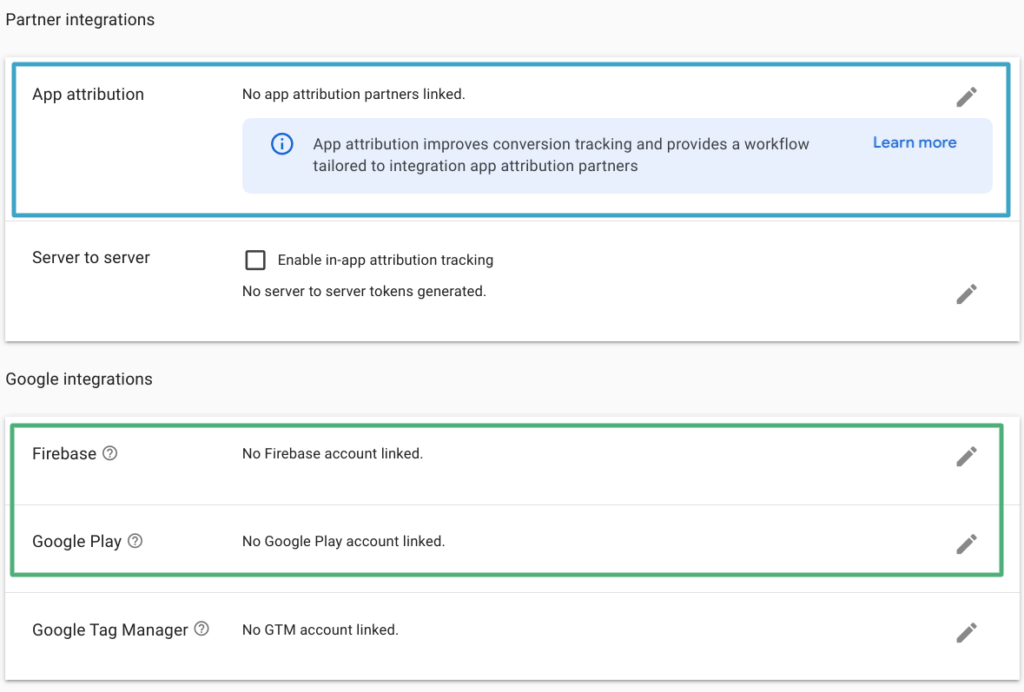
- Link your Google Play Store and/or Firebase accounts with the DV360 Advertiser. You can find the integration under Advertiser > Resources > Floodlightgroup > Basic details.
-
- Create a new Floodlight Activity. Select “Mobile App.” Then search for your Android or iOS app and decide which tracking (Google Play or Firebase) you want to set up this activity with.
Best practice app install campaign
Creating the setup in DV360 is designed to save time. As with other campaigns, a full-funnel principle can be used. It is important to consider which channels are relevant for interested parties and what should be optimized. Is a reach campaign planned or are concrete conversions (installs) desired? Both strategies can be useful, especially if you know the characteristics of the different booking types.
Set-up options in DV360
In DV360 there is the possibility to directly create a line item forMobile app installsto create. It is important to note that the insertion order is set so that bidding and budget are stored at line item level. This booking type only allows control in the app environment. It is therefore advisable to consider display, video and YouTube ads for promoting your own app.
Here are the special features in connection with an app install campaign:
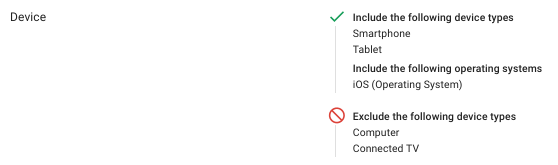
- Device: Exclusion of desktop and connected TV (app installations only possible in the Google Play Store and Apple Store, therefore no conversions possible).
- Separation at line item level by operating system (Android, iOS)
- Here is an example for iOS:
- Depositing the correct landing page (deep links to the Google Play Store or Apple Store) with the creatives. It is important to note with YouTube that the URL displayed must contain these links, so it cannot be designed individually.
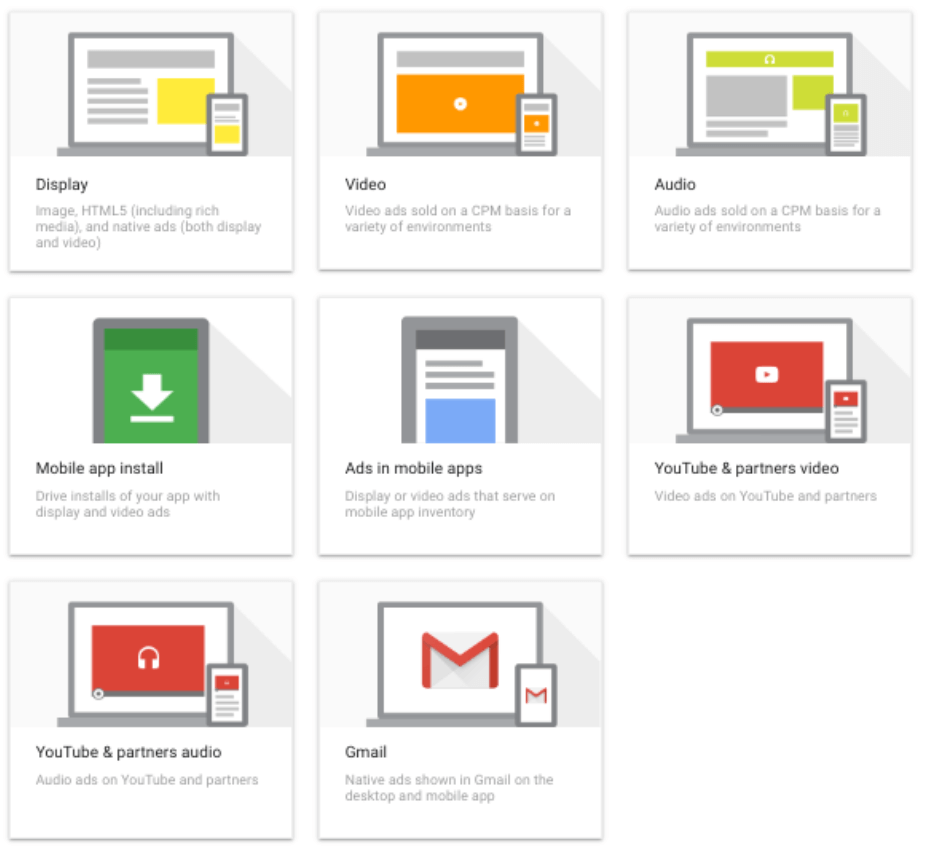
- Recommended booking types:
- display
- video
- Mobile App Install (App Environment with Format Gallery Creatives)
- Youtube & Partners video
Creatives
Creatives also play an important role in app install campaigns. In addition to the possibility of creating advertising materials directly in DV360, it makes sense to also use display banners or videos, depending on the set-up and funnel strategy.
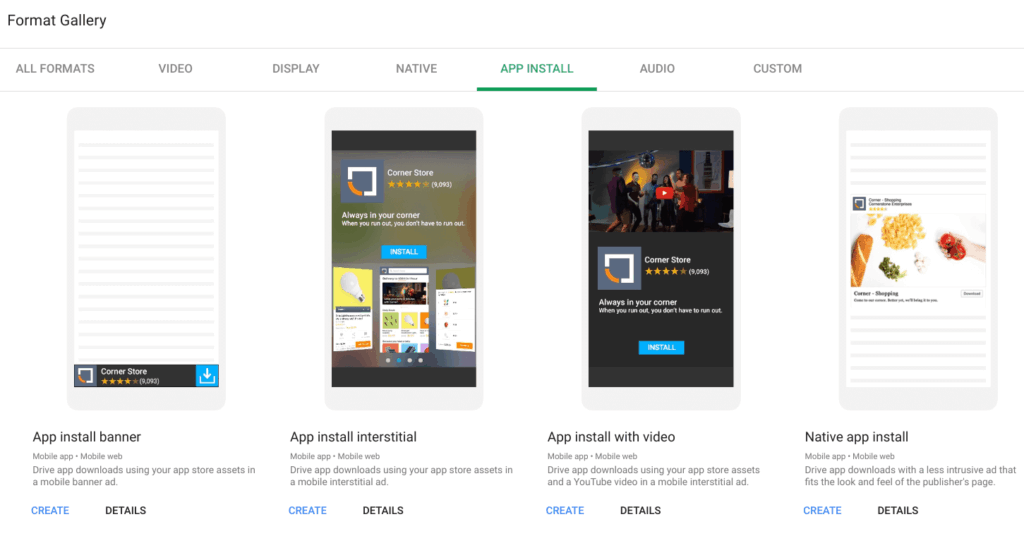
App install ads for the app environment can be created via Format Gallery. There is no need to create assets as they can use the assets from the apps and the advertiser. However, some formats (video, native ad) require the upload of image or video material. Four different creative formats are available: App Install Banner, App Install Interstitial, App Install Video and Native App Install.
Learnings
- Difficulty tracking iOS conversions. Unfortunately, there is no direct interface with the Apple Store, but installs can be measured using SDK tracking. However, due to strict data protection settings on Apple devices, this is incomplete. To get a holistic overview of ad performance, Google relies on techniques such as conversion modeling. Conversion modeling leads to better campaign performance when high-quality conversion data is ingested. The conversion models also use historical data to measure conversions that could not otherwise be observed. The Google Analytics for Firebase SDK performs on-device attribution using a user’s identity provided through the in-app login process. The user’s identity is hidden through Google’s on-device conversion approach, so no personally identifiable information ever leaves the user’s device.
(Source: App User Journey Playbook 2022) - Compared to classic conversion campaigns, the start-up time of the campaign can take longer. We therefore recommend a sufficiently long runtime, only then should optimization steps be taken. Ideally, it is an Always On campaign so that the algorithm can continually learn.
What is Firebase?
Firebaseis an app development platform that enables the construction and development of apps and games. Firebase can also be linked to Campaign Manager, DV360 and GA and enables conversion tracking of app install campaigns that are run via DV360.
https://www.youtube.com/watch?v=XHvWx1F3S4A&t=2s
Benefits of Firebase SDK Tracking
- Robust measurement and optimization
- Automated event setup and standardized data
- Trustworthy and reliable data
- Cross-web/app functions
- No attribution change required. Google Analytics is a complementary solution to the app attribution partner (Adjust, Appsflyer, etc.)




