
Four Tools Maximum Impact Your Guide To Google Ads Ad Adjustments

Management Summary
In this blog article, we introduce four ad adjustments in Google Ads that offer advertisers an effective tool to make responsive search ads more effective and relevant.
Google Ads ad customizations for responsive search ads
Customization options in Google Ads include keyword placeholders, countdowns, custom ad customizations, and location placeholders. Each of these features offers specific benefits that allow advertisers to make their ads more relevant, engaging and effective.
1. Keyword wildcards
Keyword placeholders are an effective feature of Responsive Search Ads (RSA) in Google Ads that allow ads to dynamically update with relevant keywords from the ad group. This significantly increases the relevance of the ads for potential customers. Here we explain how you can use keyword placeholders.
Application of keyword placeholders
Let’s say you’re promoting chocolate. By using the keyword placeholder code “Buy {KeyWord:Chocolate}” in the ad title, Google Ads automatically adapts the ad to relevant keywords. If a user searches for “dark chocolate bars,” your ad might look like this: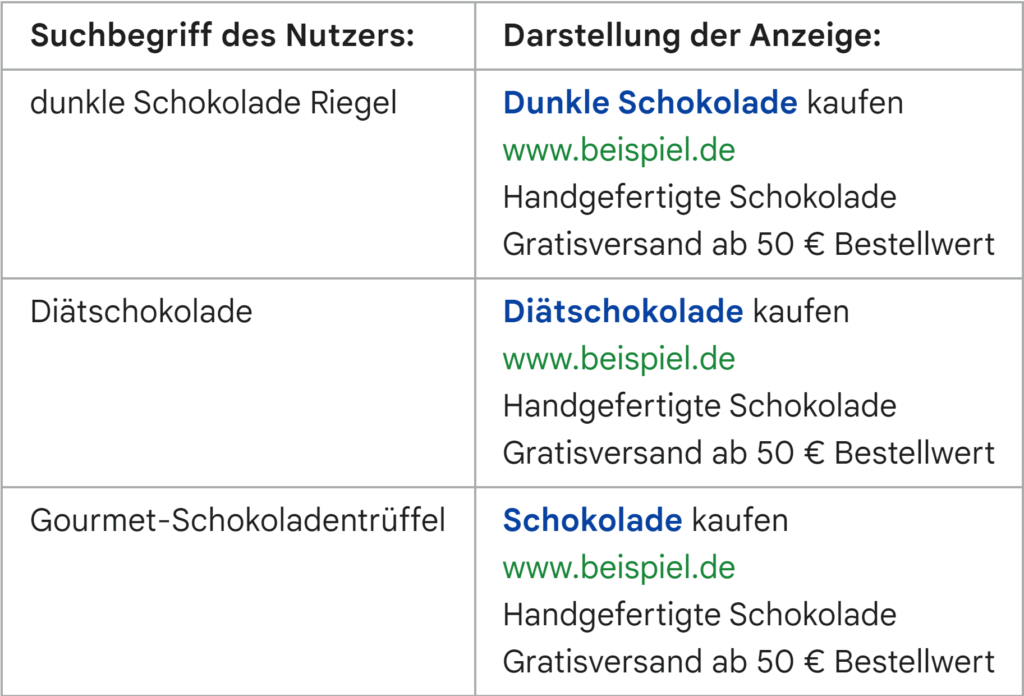 In the last example, the ad title shows “Chocolate” because the keyword “gourmet chocolate truffles” contains too many characters. In such a case, the default option is used: “{KeyWord:Chocolate}”
Keyword wildcards work the same for all keyword options.
Adhering to Google Ads advertising guidelines is essential, especially when adding new keywords.
2. Countdowns
Countdowns in Google Ads are an effective way to create urgency for limited-time offers and increase advertising effectiveness. They enable a targeted approach and thereby increase the chance of better results.
Two variants, COUNTDOWN and GLOBAL_COUNTDOWN, enable adjustment to local time zones or a globally consistent point in time. This feature is available in all responsive search ads, text ads, and dynamic search ads.
COUNTDOWN vs. GLOBAL_COUNTDOWN
COUNTDOWN: Displays a countdown based on the user’s local time zone, ideal for regional offers.
GLOBAL_COUNTDOWN: Shows the same countdown worldwide, useful for globally simultaneous events.Setting up a countdown takes just a few steps:Enter a curly bracket “{” in the ad text, select “Countdown” and set the end date and start time.
Choose the appropriate time zone and note that the countdown language is tied to that of the creative.
Click “Apply” and save your ad.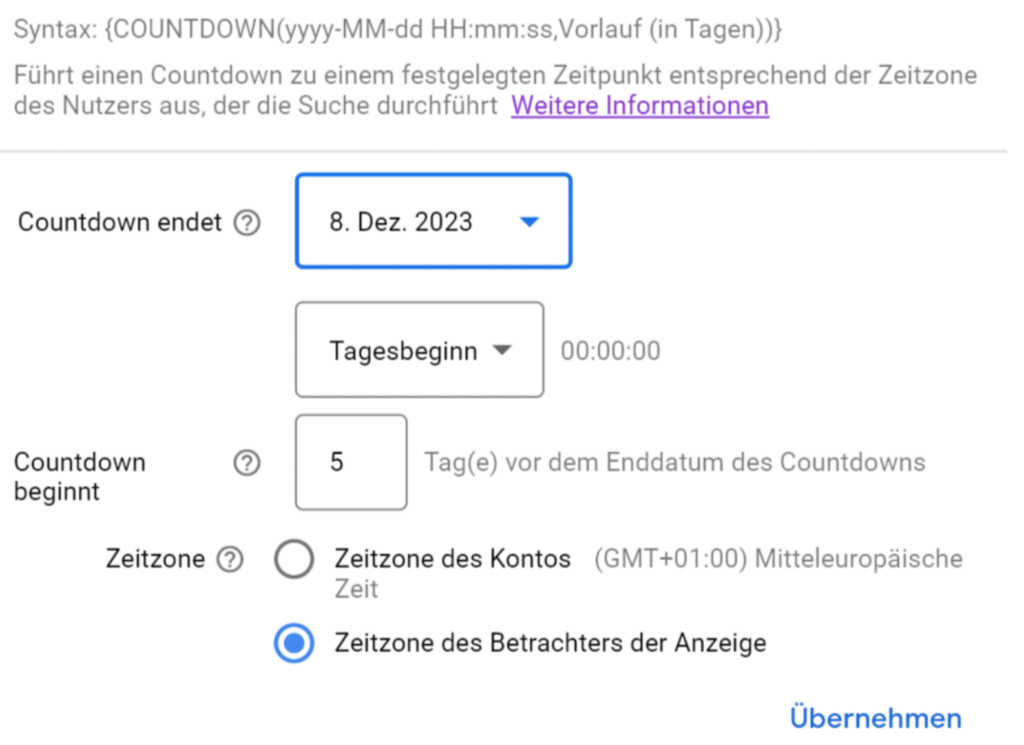 Make sure there is enough space in the ad copy for the countdown. As shown in the next screenshot, the “12 hour” countdown takes up 10 characters. This leaves you with just 20 characters for the rest of the text.
Please note that countdown adjustments will no longer be displayed after the end date and you should revise the headlines again.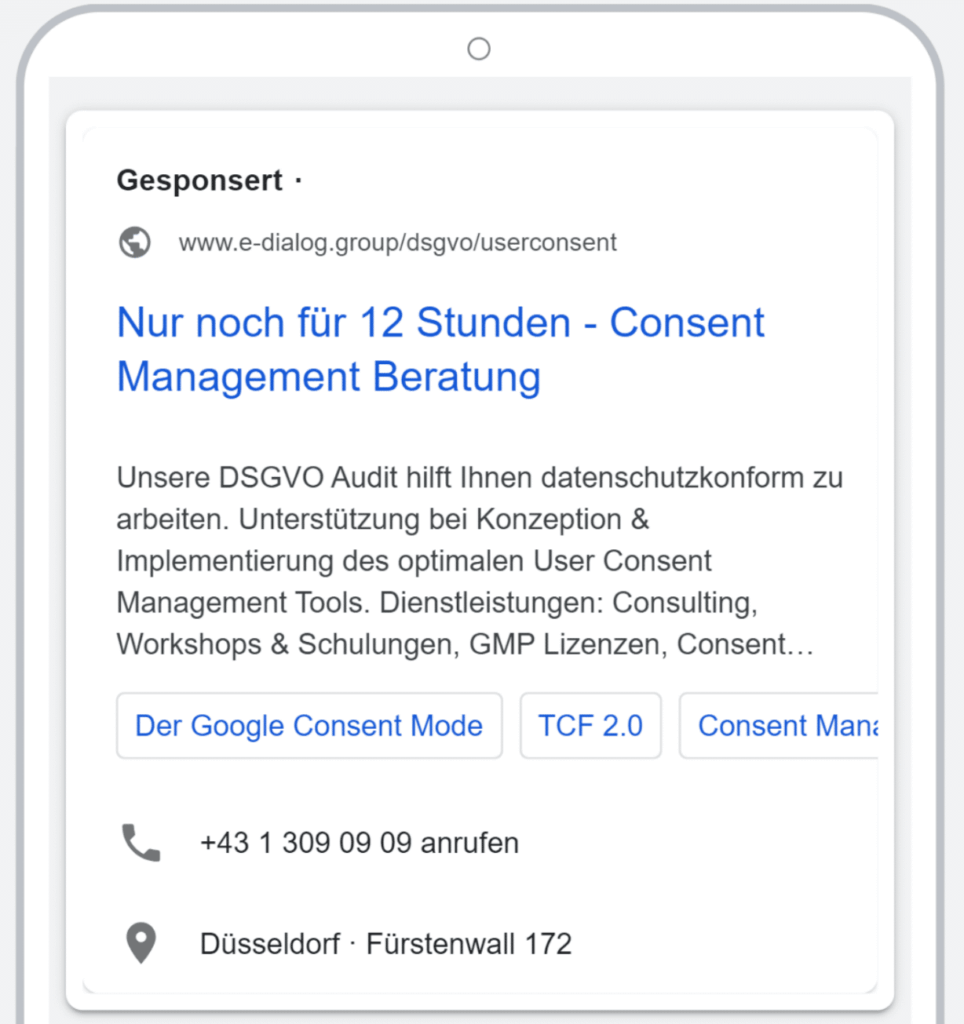
3. Custom Ad Customizations
Custom ad adjustments in Google Ads allow responsive search ads to be adapted to users’ search queries in real time. This feature provides a dynamic way to personalize ad content by setting individual attributes such as price or promotion. Using this feature, constant action changes can be handled just as easily and efficiently by only having to adjust a few variables instead of all individual displays.
Two practical application scenarios
PriceIf the price of the service you offer changes regularly, you can set this as an attribute. For example, if a user searches for a photographer, “Images from a professional starting at €99” will be displayed.PromotionsFor seasonal promotions, like summer sales or Black Friday, you can use customizations to dynamically update the offers in your ads. For example, the text “Summer dresses 30% off” can be inserted for a clothing store. This makes the ad more relevant and appealing to users searching for summer fashion.
Creation of the customization:
In your Google Ads account, under Business Data, you create new attributes that reflect your specific offers or products.
For “Attribute” you enter any name for the variable and for “Account Value” you enter your current discount campaign, for example.
Application of customization:
Specify the content for your customization, then insert it into your ad. A curly bracket with the selected attribute is placed at the desired location in the ad text.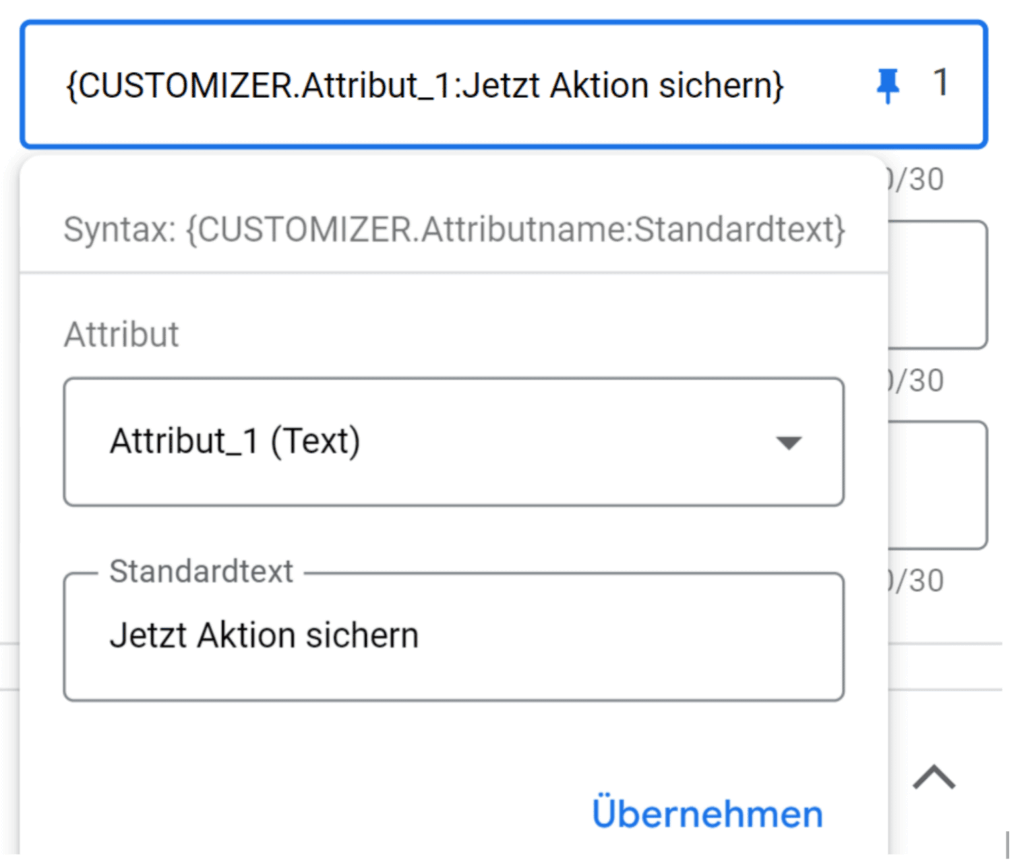 Under Attribute you select your variable and you can define a replacement text as the standard text if the actual attribute could not be displayed because it was not approved by Google, for example. In the best case scenario, this replacement text should be chosen very generically.
 After the initial effort, this function saves a lot of time. An attribute can be used in different ad titles and descriptions and with regular adjustments this saves you the trip to the Google Ads Editor.
4. Location placeholder
Location placeholders are an efficient tool in Google Ads to geographically customize responsive search ads. They increase the relevance of ads to local audiences by tailoring ad copy to specific cities, states, or countries.
How it works and benefits
personalizationLocation placeholders allow ads to be personalized for different geographical locations, increasing local relevance.EfficiencyEliminates the need to create separate ads for each location, saving time and resources.
Setting up a location placeholder:
In a new or existing responsive search ad, enter a curly brace ({) in the ad text and select “Location Placeholder” from the drop-down menu.
Select the desired geographic level (city, state, country) to display.
Optional: Set a default text that appears if no location can be replaced.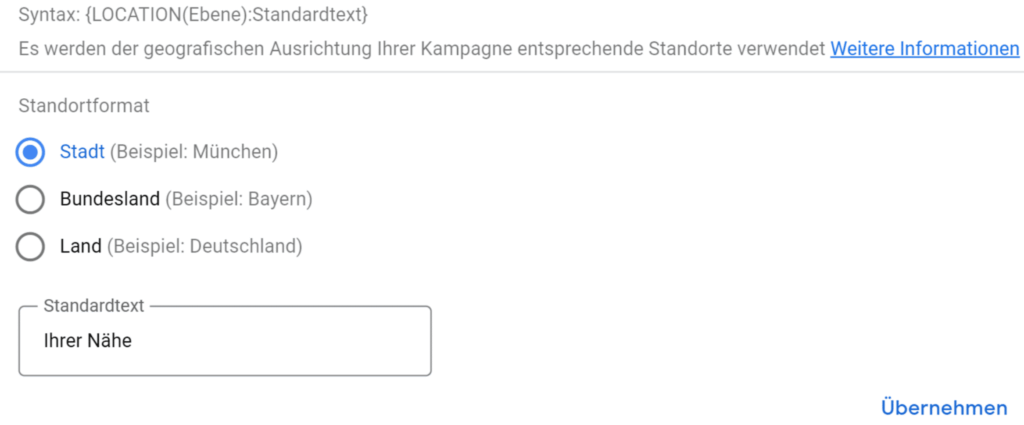 Example:
Advertisement title: “Advice in {LOCATION(City):Near you}”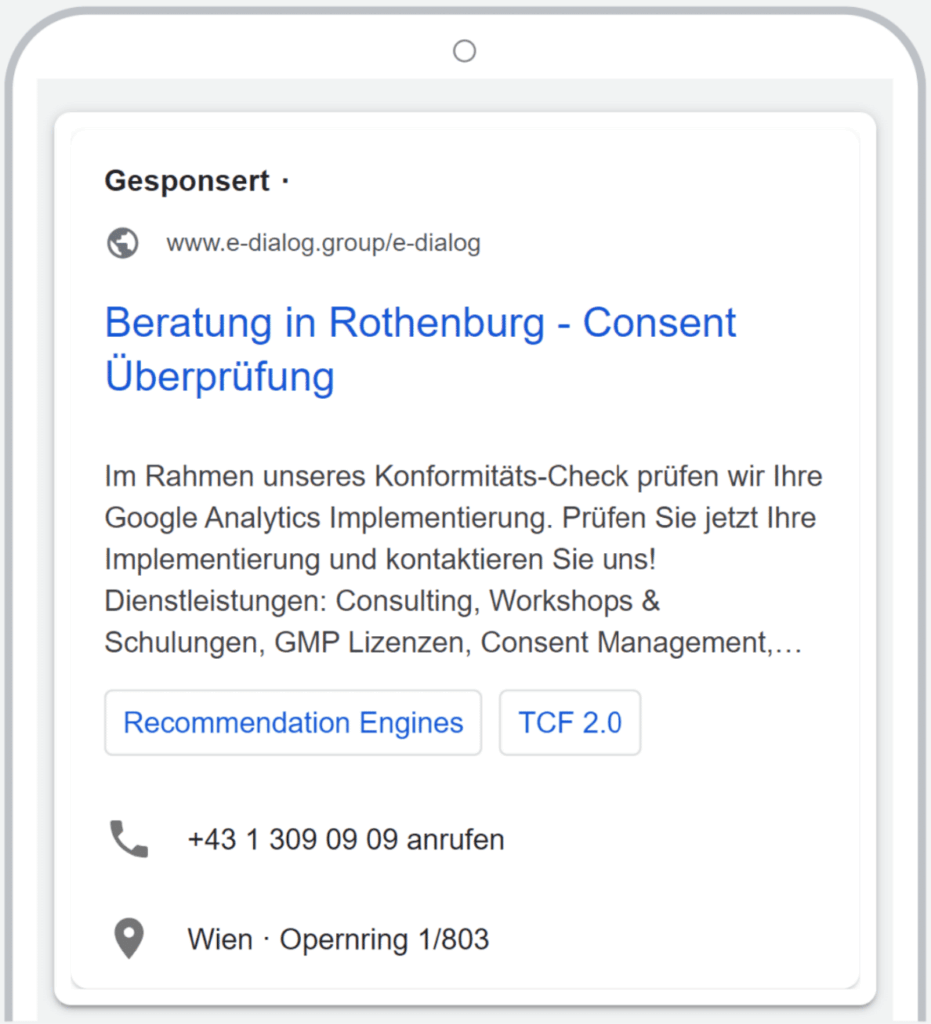 Now the title is “Advice in [City]” and creates relevance to the respective user location. If no location can be used, “Advice in [your area]” is displayed instead and is therefore very general and relevant for every search.
Best practices
Make sure there are at least three headlines without location placeholders. Also make sure that there is enough space in the ad text for the location placeholder.
Conclusion
The four featured ad customizations in Google Ads offer advertisers a comprehensive arsenal to make their responsive search ads more effective and relevant. Keyword placeholders increase text relevance while countdowns create a sense of urgency. Location placeholders allow ads to be targeted to local audiences, and customizations provide flexibility when displaying specific product information or using promotions. These tools open up creative and efficient ways to dynamically adapt ads to the needs and interests of the target group and thus significantly increase advertising effectiveness.




