
Never Again Loss Of Dashboards Hy How Data Studio Pro Backs Up Your Reports (ex Looker Studio Pro)

Management Summary
UPDATE: Google has renamed Looker Studio back to Data Studio as of April 2026. Similarly, Looker Studio Pro will now be called Data Studio Pro. Don’t be confused by the naming conventions in the text! The information in this article remains valid.
While the free version already provides a strong foundation for data analysis, Data Studio Pro (formerly Looker Studio Pro) takes it to a new level. Particularly for larger companies and complex data projects, it is worth taking a closer look at the core functions of the premium version.
Data Studio Pro / Looker Studio Pro
Many will be familiar with Google’s Looker Studio tool. The free data visualization tool enables users to store data from various sources in specially designed dashboards, analyze it and display it in interactive reports. The tool is particularly characterized by the simple visualization of various data sources and also offers the possibility of supporting conclusions and decisions with complex analyzes and reports.
Looker Studio Pro is the paid premium version of Looker Studio, which comes with some exciting additional features. Above all, the focus on organization, access management and collaboration offers companies additional advantages, which we will discuss in more detail here.
Additional features are also explained in more detail in this blog article.
Exclusive features for optimized collaboration and data security
Content belongs to your own organization:
Unlike the free version, where reports and data sources are assigned to individual users, in Looker Studio Pro they belong to the organization. This prevents the loss of valuable data analysis, even if employees leave the company.
This feature is a real game-changer for companies that value the security and availability of their data. Unlike the free version, where reports and data sources are assigned to individual users, in Looker Studio Pro they belong to the entire organization.
What does that mean specifically?
- No data loss due to changes in the team:If an employee leaves the company, the reports and data sources created are retained. They will not be deleted but will continue to be available to the organization.
- Centralized administration: All content can be managed centrally. This simplifies organization and makes it easier to search for specific reports or data sources.
- Increased security: Central administration allows access rights to be precisely defined. This ensures that only authorized people have access to certain data.
Application examples:
- Knowledge management: Reports and dashboards serve as a knowledge base for the company. Thanks to central administration, this knowledge is retained even when employees change.
- Handover of projects: When projects are closed, reports and data sources can be easily handed over to new project teams without data being lost.
The difference to the free version is visible here and is underlined by the visualization below:
Worst case scenario with Looker Studio:
An employee leaves the company and the Google account is immediately deleted. Any undivided content (dashboard reports and data sources) that was owned by the deleted employee and was therefore only stored in the employee’s “Owned by me” area has disappeared. This content cannot be restored and must be reinstalled.
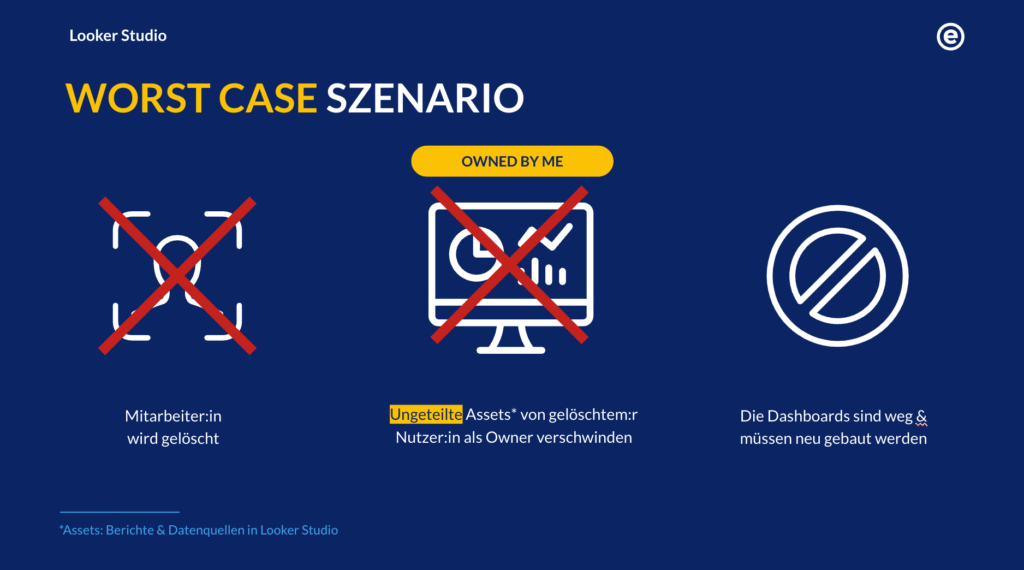
Worst case scenario with Looker Studio, source: e-dialog
Best case scenario with Looker Studio Pro:
In the best case scenario, the “Owned by me” area has already been deactivated in the admin settings, so that users only have the option of storing their content in the sandbox or in a workspace.
TheSandboxis a private environment for the employee within the organization. This environment is only accessible to the employee, but can be viewed and content moved and shared by the organization’s admin. The content is still available in the organization, but the data credentials still need to be renewed.
TheWorkspaceis a public environment within the organization in which content is shared with users who have access to the workspace. In the next point we will look at the concept of workspaces in Looker Studio Pro in more detail.
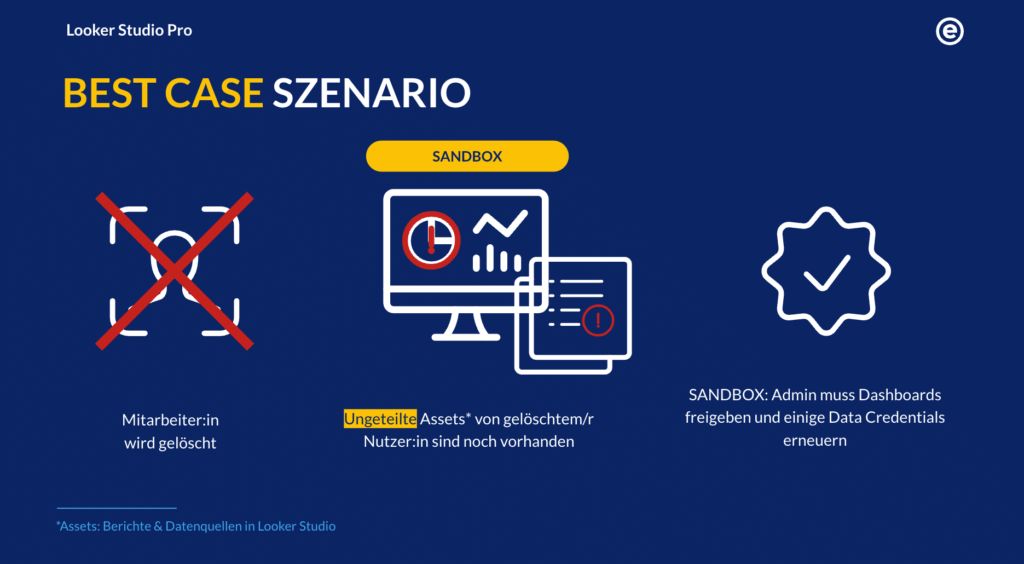
Best case scenario with Looker Studio Pro, source: e-dialog
Team workspaces:
Looker Studio Pro can be used to set up shared workspaces. This eliminates the tedious search in the “Owned by me” or “Recent” areas. Instead, all content is clearly organized in workspaces with their own folder structure. Access rights can be set depending on the role of the team members.
Team workspaces are the key to successful collaboration in larger teams. Using the folder and subfolder structure of up to 5 sublevels, Looker Studio Pro provides a central, organized location where all relevant reports and data sources for a project are grouped together. Content can be moved to different folders, but it is not possible to move entire folders.
In addition, access and content can be managed and released on a large scale here. The approval can be given at the Google user or Google group level, thereby optimizing the confusing access management within Looker Studio across content. Members of a team workspace automatically have access to the content within the workspace. Therefore, be careful: if content is moved from one workspace to another workspace, the access permissions may change!
However, for Free Looker Studio users, the organization within the workspace folders is not a disadvantage. Access is retained if the content has already been released for free users and all shared reports and data sources can be found in the personal “Shared with me” area.
Advantages of team workspaces:
- Better organization:The ability to create folder structures means that content can be organized clearly and does not get lost in the depths of the “Owned by me” or “Shared with me” areas.
- Clear access rights: It can be specified exactly which team members have access to which content.
- Quick search: Content can be found quickly and easily because it is stored centrally in one place.
Application examples:
- marketing: A marketing team can use different workspaces for campaigns, product analysis and competitor monitoring.
- Web Development: Access to environments such as production and pre-production can be easily managed. This helps ensure the right teams have granular access and sharing permissions
- Simplified onboarding: New employees can be quickly and easily integrated into existing projects by granting them access to the corresponding workspace.
But that’s not all! If these features do not yet convince you of the advantages of the premium version,Here you can find out more about how Looker Studio Pro can optimize report delivery, notify users of anomalies in diagrams or how Google Gemini can support the creation of dashboards.
Upgrade from Looker Studio to Looker Studio Pro: Here’s how!
As a Looker Studio Pro user, any new content created in a Pro project, such as a report or data source, automatically becomes Pro content. This content belongs to your organization and contains othersPro features that are examined in more detail in this blog article. In addition, Looker Studio Pro content is protected from accidental deletion by backing up your Pro projects, ensuring that the content you create continues to work even as the organization’s workforce structure changes.
Pro content can also be shared with users of the free version of Looker Studio. Sharing Pro content directly with Looker Studio users grants them access to the content; however, these users cannot add or use Pro features.
If Looker Studio was already used in the organization before the upgrade, the content that has already been created must be migrated to the Pro version, otherwise the Looker Studio Pro functions will not be available. To do this, the content can be moved manually from the “Owned by me” area to your own sandbox or a folder within the workspace by clicking “Move to” in the three-dot menu to the right of the content and selecting the location here.
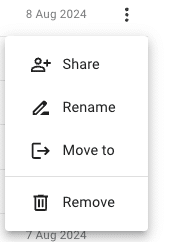
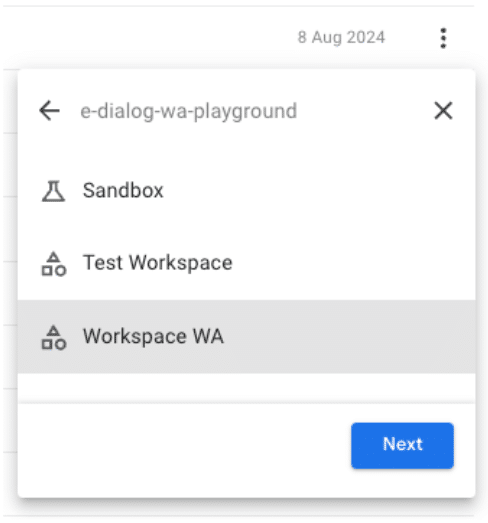
Looker Studio Pro features, source: e-dialog
Once the content has been moved to the Pro environment, users with a Pro license can use the premium features. Users of the free version can continue to use the reports as usual, but do not have access to the features presented in this article.
Cost model overview for Looker Studio Pro
Looker Studio offers two licensing models for upgrading to the Pro version:
Monthly Active Users (MAU):
- Enabled for all users at the organization level.
- Pro access for everyone, no access to the free version within the organization.
- Monthly price: $7 per MAU, with an annual commitment of at least 1000 users: $6 per MAU.
Subscription – Departmental Licensing:
- Enabled for selected users at project level.
- $9 per user per month (fixed).
- 30 day trial period (free).
- Activation possible within Looker Studio.
It is important to note that the MAU and the subscription model cannot be combined in the same organization.
For the subscription model, the following applies when upgrading to Looker Sudio Pro:
- The Looker Studio Pro subscription must be billed to the same billing account used for the GCP project.
- The subscription can be canceled at any time. After cancellation, there is a 30-day grace period to move content from the canceled Pro project to the free version.
- It is also possible to reactivate a canceled subscription within the 30-day grace period. A new subscription must then be taken out in order to be able to use the previous project again.
Little tip:If the organization doesn’t already have a Looker Studio Pro subscription, the Pro features can be tried out with a free 30-day trial.
Conclusion
Companies looking to improve their data analytics and strengthen their competitiveness through streamlined organization and collaboration in Looker Studio should consider Looker Studio Pro. A free trial phase allows you to try out the functions without obligation and makes the decision easier.




