Global Privacy Control (GPC): The Return of “Do Not Track” with Legal Support

Management Summary
What exactly is Global Privacy Control (GPC)?
The term “Global Privacy Control” refers to a technical specification that allows Internet users to set their privacy preferences universally. Instead of having to navigate through a consent banner on every single website, the browser handles this task.
Technically speaking, GPC works in two ways:
- HTTP Header: With every request, the browser includes the field ` Sec-GPC: 1 `.
- JavaScript API: Scripts on the webpage can query the status using ` navigator.globalPrivacyControl `.
Example: A user enables GPC in their Firefox browser. As soon as they visit the website, their browser automatically signals that they do not consent to tracking for advertising purposes. As a website operator, this signal should be interpreted technically, and the corresponding scripts and services should be blocked.
Why now? The difference from “Do Not Track” (DNT)
Many marketers still remember the “Do Not Track” signal. It failed miserably because there was no legal obligation to respect it, and website operators, understandably, didn’t want to lose any data. Most companies simply ignored “Do Not Track.”
With GPC, it’s different. The initiative has strong allies and, more importantly, a legal basis:
- U.S. (California, etc.): Under the CCPA/CPRA, companies are required to recognize universal opt-out signals such as GPC. Those who ignore the signal risk substantial fines.
- Europe (GDPR): Even though the GDPR does not explicitly mention GPC by name, data protection authorities are increasingly interpreting the signal as a valid objection to data processing (Art. 21 GDPR) or as a withdrawal of consent.
GPC and Its Interaction with Consent Management Platforms
A common misconception is that GPC completely replaces the cookie banner. During the current transition phase, the two systems complement each other:
-
01
GPC as a “pre-selection”
If the website (or the CMP) detects the GPC signal, the banner should either not ask for permission to set marketing cookies in the first place or set these categories to “Reject” by default.
-
02
Automation Through CMPs
Leading providers such as OneTrust, Usercentrics, and Cookiebot have already integrated GPC support. When the signal is detected, these tools automatically update the consent object without requiring the user to click.
Example: A user with an active GPC lands on a website. The CMP detects the Sec-GPC: 1 header, automatically sets the consent for “Marketing” and “Statistics” to “Denied,” and fires only the technically necessary tags.
Technical Implementation: How to Make Your Site GPC-Ready
To process GPC signals correctly, only a few steps are usually required in Tag Management or in the CMP configuration.
1. Detection via JavaScript
In Google Tag Manager (GTM), you can create a variable that checks the GPC status:
function() {

return navigator.globalPrivacyControl === true;

}
This variable can be used as an exception trigger to block the corresponding tags when GPC is active.
2. CMP Configuration
Check the settings of your consent management platform to see if the “Global Privacy Control” option is enabled. In most cases, a single click is all it takes to enable automatic prioritization of the signal over the banner.
3. Server-Side Detection
If server-side tracking is in use, the Sec-GPC header can be read directly on the server. This is the cleanest method, since it prevents any client-side logic from being bypassed.
How and where is the GPC set?
Not every browser takes the same progressive approach to privacy. While some “privacy-first” browsers tout GPC as a core feature, users of the major market leaders often still have to take manual steps to enable it.
The following browsers currently support GPC (as of March 2026):
- Firefox
- Brave (enabled by default)
- DuckDuckGo (enabled by default)
- LibreWolf & Mullvad Browser (enabled by default)
Step-by-Step: How to Set Up GPC
If you’d like to test how your website responds to the signal or want to strengthen your own privacy, here’s a quick guide for the most common setups:
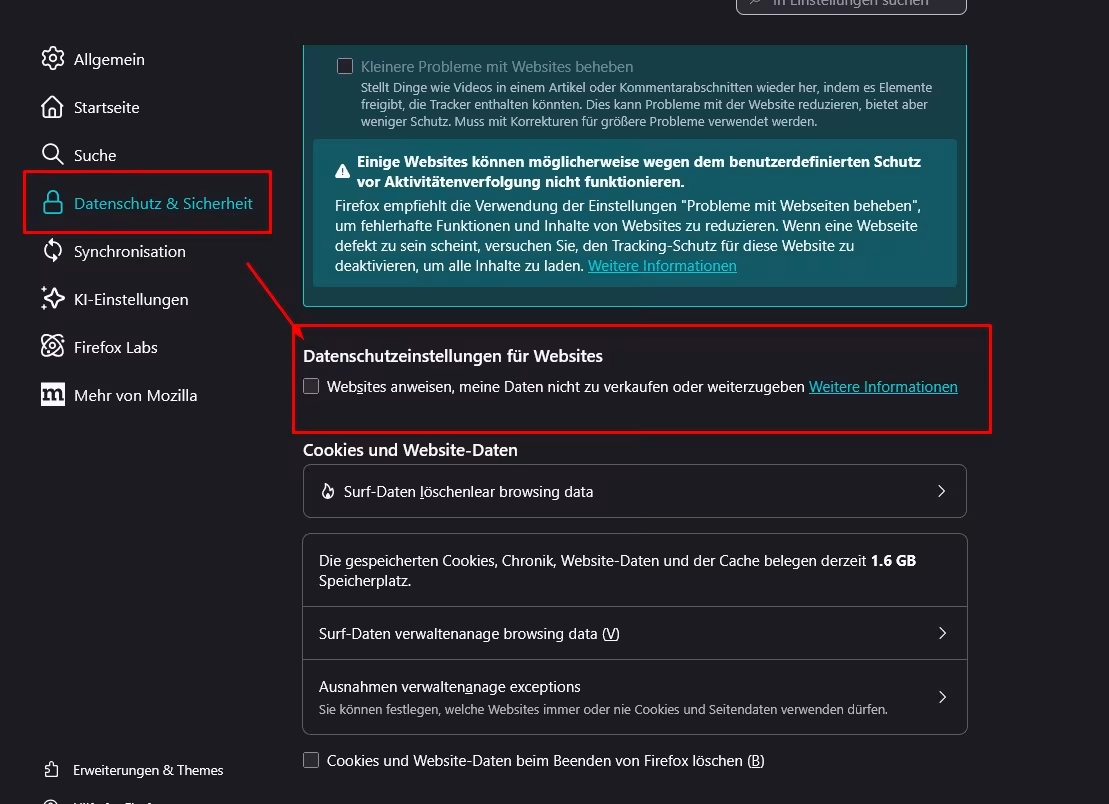
in Firefox (desktop)
- Open Settings.
- Go to the Privacy & Security tab.
- Scroll down to the ” Privacy Settings for Websites” section
- Check the box next to: “Instruct websites not to sell or share my data.”
Image: Firefox Activation
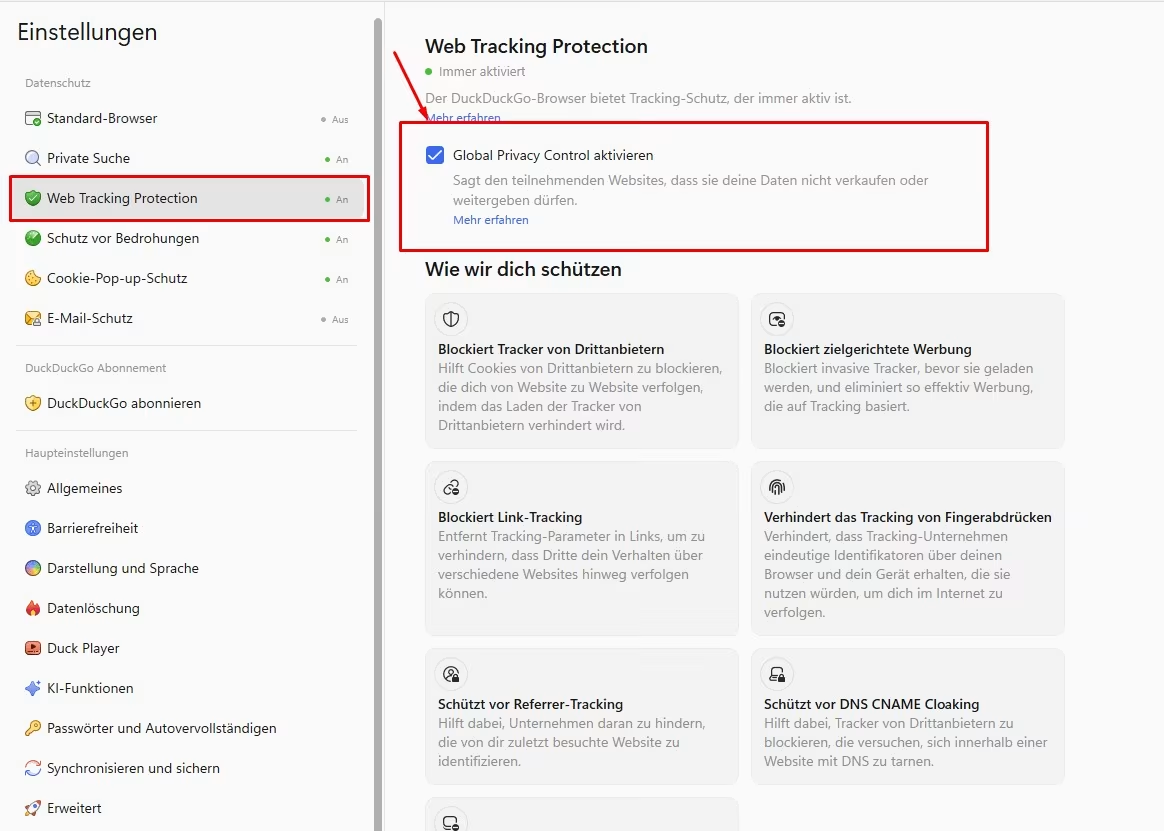
In DuckDuckGo (enabled by default)
In DuckDuckGo, this feature is enabled by default. Follow these steps to view or disable the feature:
- Open Settings
- Go to the “Web Tracking Protection” tab
- Find the setting “Enable Global Privacy Control”
Image: DuckDuckGo setting (enabled by default)
What do companies need to do now?
Data protection will increasingly shift from manual selection to automated preferences. Currently, there are no specific legal requirements mandating the handling of the GPC signal. However, if you still wish to take the GPC signal into account and thereby offer your website users full data protection compliance, we recommend the following steps:
-
01
Status Quo Check
Check whether your website currently detects GPC signals or whether it simply ignores them.
-
02
CMP Update
Contact your CMP provider and ensure that the GPC functionality is configured correctly to comply with U.S. law (if applicable) and GDPR best practices.
-
03
Tag Management Audit
Check your triggers in GTM. Make sure that marketing tags don’t fire when the GPC signal is set to true.
-
04
Update the Privacy Policy
Make sure to explicitly state that your website respects GPC signals. This builds trust among privacy-conscious users.
Conclusion
Global Privacy Control is not a short-term trend, but rather the logical response to users’ “consent fatigue.” While this requires an initial configuration effort for website operators, it offers a more stable and legally compliant foundation for tracking in the long term. Those who implement GPC today not only demonstrate technical expertise but also proactively position themselves as a trustworthy player in data-driven marketing.