
Youtube Masthead Use To Strengthen Awareness For Your Brand

Management Summary
YouTube Masthead is an ideal solution to build and strengthen brand awareness. This blog article presents the format, how it can be booked and how it is set up via DV360.
Creative
All the usual targeting options that are possible for YouTube via DV360 are also available for the YouTube Masthead display – for example Geo Targeting, Affinites or InMarket.
The minimum length of the video must be 15 seconds – on desktop and mobile devices the YouTube Masthead plays for up to 30 seconds before the video thumbnail (= preview of the next videos at the end of the actual video) is displayed. In the case of mobile, the next video will start playing in the mobile feed shortly afterwards. The video should therefore not be longer than 30 seconds – and according to best practice for video ads, the logo and advertising message should be prominently presented in writing in the first 5 seconds.
In addition to the video, an advertising title is used in an “Engagement Panel” to support the video. The headline can use up to 20 letters.
What should also be taken into account when it comes to the creative itself is that the size varies depending on the device. On desktop and connected TV, the video is cut off at the top and bottom. It is therefore important to design the advertising medium for the YouTube Masthead in such a way that logos, texts, etc. do not disappear.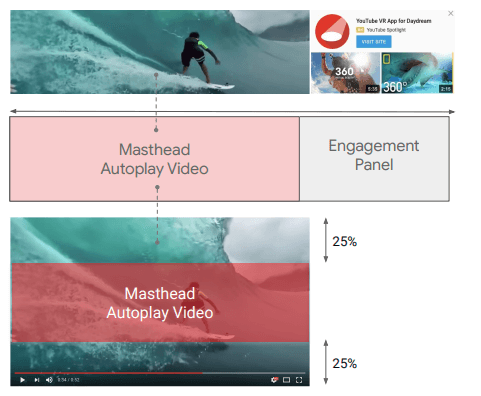 At YouTube Masthead, 2 creatives can be used in rotation per booked flight – unfortunately there is no option for an A/B test via DV360. If ads are to be tested, the insights must be analyzed manually after the campaign has ended.HereYou can quickly and easily get an idea of what a YouTube masthead will look like live. What is also very helpful here – everything that is entered in this preview can later be imported directly into DV360 when setting up the advertising material.
booking
YouTube Masthead is booked directly via Google with a programmatic guarantee deal. There is one for thatFormthat needs to be filled out. It is important to reserve the inventory at least 6 days (recommended 2 weeks) before the start of the campaign – by discussing with a Google representative whether there is enough inventory in the desired period with the selected targeting.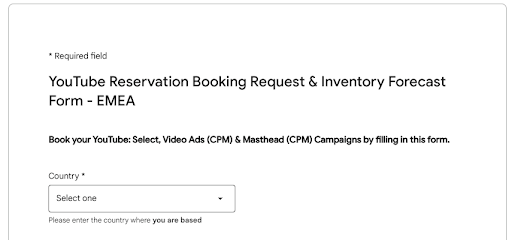 The minimum duration of the campaign is 1 day – although it should be noted that time targeting is not possible on YouTube Masthead. Therefore the campaign must run for at least 24 hours. A maximum of 7 days can be booked in a row. If a YouTube Masthead campaign is to run for longer, e.g. 10 days, twice the duration must be requested using the form.
The minimum spend for a flight is €7,000. There is no maximum spend – so it only depends on how much inventory can be made available.
After the deal has been made via the form and with a Google representative, it can be accepted in DV360.
Set up
The setup in DV360 initially runs like a regular YouTube campaign until you get to the point of creating the AdGroup. The advertising material itself must be uploaded to YouTube as a video as usual. Once this step is done, it needs to be assigned to the deal with the YouTube URL in DV360. This happens when the deal is processed.
The YouTube Masthead Deal is available for each partner under “Inventory” and then “My Inventory”. This deal can now be further processed using “Configure”.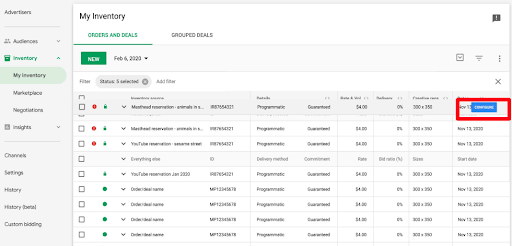 After selecting “New Ad” in the next step, the deal is first assigned to an advertiser and then to the specific campaign.
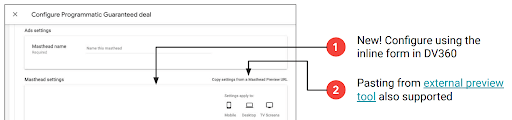 For the advertising material theYouTube Masthead Previewbe used to complete the display. Using the resulting URL, all settings can be adopted in DV360. Alternatively, you can complete the set-up in DV360 yourself.
For YouTube Masthead it is also possible to add tracking from Campaign Manager or a 3rd party tool, as well as a separate click tracker for the CTA from the Engagement Panel.
After the creative has been created, it appears under the line item as an ad group “Masthead”.
As usual, the video goes through an audit, which in the case of the YouTube Masthead can take up to 3 days.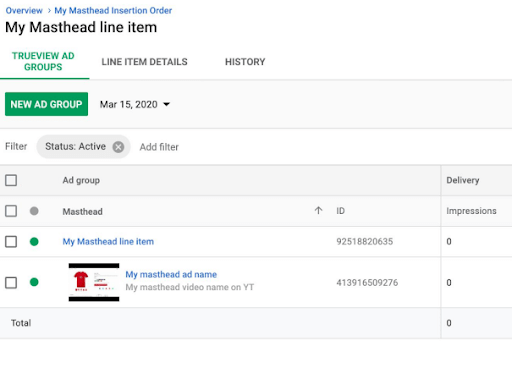
Conclusion:
And so you can book a YouTube Masthead campaign to strengthen your brand awareness! Here the most important points are summarized again:
- Contacting Google at least 2 weeks before the start of the campaign is recommended.
- Duration of min. 1 day, max. 7 days.
- When creating the advertising material, make sure that all options (CTA, engagement panel) are used and that no information is lost due to the crop on desktop and connected TV.
Upload and assign advertising material to DV360 at least 3 days before the start of the campaign.
Do you have anymore questions? We would be happy to support you in creating your awareness campaigns! Contact us viakontakt@e-dialog.group
Sources:
- https://support.google.com/displayspecs/contact/directsupport_emea
- https://support.google.com/displayvideo/answer/9783029#zippy=%2Ccreative-setup-for-youtube-masthead-campaigns
- https://www.youtube.com/videomasthead/




