
New GTM Update: Speed, Governance, and Visual Events

Management Summary
Google has announced major changes to Google Tag Manager. The technical infrastructure is merging with the classic Google Tag. In this article, you’ll learn exactly how you and your team can benefit from this transition, how the new features will make your day-to-day work easier, and why the switch poses absolutely no risk to your live data.
What’s changing with Google Tag Manager?
Over the past few years, the Google Tag (GTag) has undergone continuous development—while the development of Google Tag Manager (GTM) has, by comparison, fallen by the wayside. Now Google is taking a significant step to bring these two worlds together—Google Tags will be equipped with all the capabilities of a Google Tag Manager container. For you, this primarily means a potentially noticeable improvement in efficiency and performance.
It’s important to be honest:
This update does not automatically cause GA4 or Google Ads to suddenly collect more data. You are not forced to use only Google tools, nor will anything change regarding the privacy and consent settings you’ve painstakingly configured.
You decide when to start the update, since the switch is done via a voluntary opt-in directly within your container.
These three features make your day-to-day marketing work easier
1. Less code for faster loading times on your website
If you’re currently using multiple Google services—such as Google Analytics 4 and Google Ads —via Google Tag Manager, the browser must load a separate Google tag for each service. This costs your visitors valuable loading time and can negatively impact your search engine rankings.
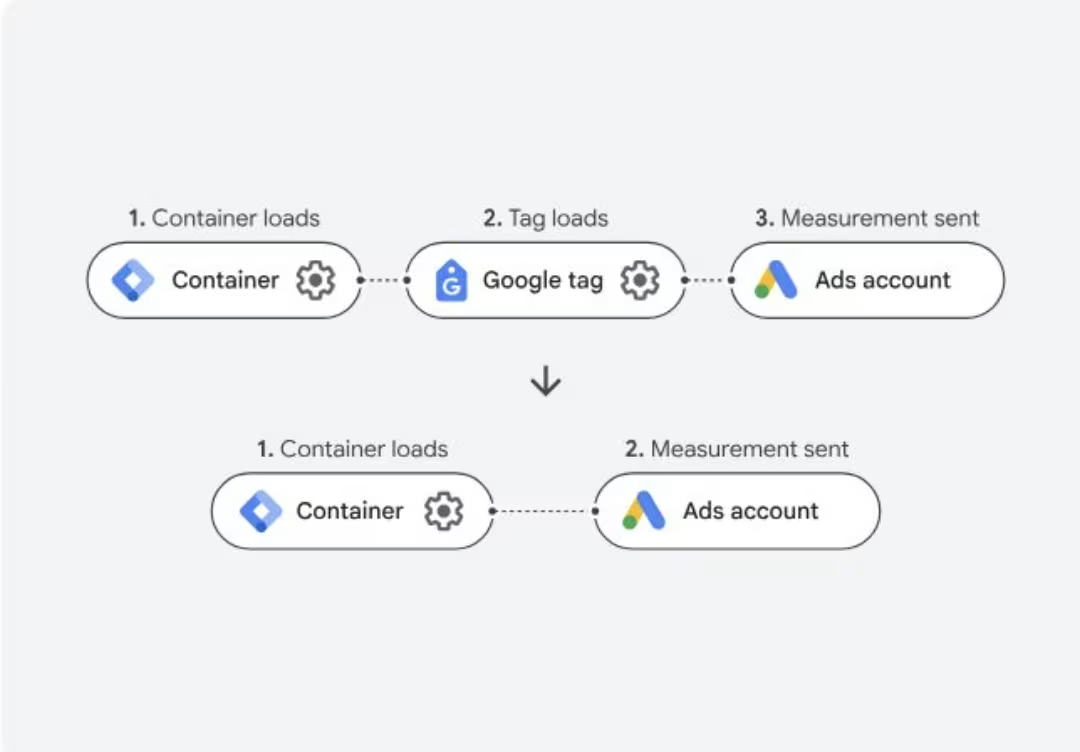
After the update, existing Google tags can be migrated to so-called “destinations” with just a few clicks. Google Tag Manager controls all tracking via a single Google tag, which triggers these destinations as needed. This means the browser only has to load one library, and your website loads faster—a direct benefit for user experience and conversion rates.
Image: Comparison of the old loading structure with the new, more streamlined destination architecture. / Source: Own illustration
2. Centralized Rules Instead of Inaccurate Data
A common challenge these days is ensuring that global settings—such as variables and/or privacy settings—are consistent and correct across all the separate tags. While the Tag Settings variables are already a step in the right direction, their location within the variables is rather inconvenient.
The new, centralized Google Tag settings right within the container are here to help you. Global settings—such as cross-domain tracking or specific privacy rules—only need to be configured once. The changes take effect immediately for all linked tools. In the event that an exception is needed for a specific tag, it can still be overridden on a case-by-case basis.
3. The Visual Event Builder: Set up tracking with just a click
Do you want to track a simple click event on your website, but find yourself having to wait days for IT resources or wade through complicated CSS code yet again?
To do this, Google integrates a visual editor directly into the GTM user interface. You open your live website, click directly on the desired element (such as a button), and GTM automatically creates the appropriate tag—including triggers and variables—in the background. This allows you to set up new campaign tracking in minutes instead of days.
The New Cockpit: User Interface Customizations
In addition to the technology, Google is also streamlining the user interface. Less frequently used menu items are being moved to an “Advanced” section. Users who work extensively with GTM on a daily basis may need one extra click at first, but in return they’ll have a much clearer dashboard. The classic overview page is also getting a makeover so that linked tools and global settings are immediately visible.
When will the update be released, and how can you test it safely?
Since reliable tracking data forms the foundation of your campaigns, Google isn’t taking any risks with the rollout. You don’t need to worry about errors on your live website:
- No automatic enforcement: Your current setup will continue to run exactly as it has been until you manually start the upgrade in the container.
- Safe testing environment: You can review all new features at your own pace in the preview and test them in a separate workspace before your customers notice anything.
- Quick Rollback: If something does go wrong, you can use the rollback option to quickly and easily revert to your previous version.
Google has not yet announced an exact release date, but the official help pages are already online.
Conclusion: A sensible step toward greater performance and independence
The upcoming GTM update isn’t just another empty marketing trend—it offers real value. Your website will benefit from faster loading times, and you’ll save valuable time when setting up standard tracking, since you’ll rely on IT less often. As soon as the notification appears in your container, you can try out the upgrade at your leisure in a test workspace.



