The Ultimate Guide: How to Find the Right A/B Testing Tool for Your Business

Management Summary
Gut feelings are great for love—but disastrous for business. If you want to increase your conversion rate in the long term, there’s no getting around A/B testing. But once you’re faced with the decision of choosing the right tool, it’s easy to get lost in the jungle of features, data protection regulations, and pricing models.
The market for A/B testing tools has literally exploded in recent years. From streamlined no-code solutions for landing pages to enterprise suites with feature flag management for entire product teams—the selection is vast. In this article, we’ll show you what questions to ask yourself before choosing a tool, which criteria really matter, and how to avoid common pitfalls.

Why Choosing an A/B Testing Tool Is More Than Just an IT Decision
A/B testing is not an end in itself. Ultimately, it should help improve the user experience and conversions—purchases, sign-ups, downloads—based on real data rather than assumptions. The right tool is merely the technical foundation. What matters most is that it:
- that matches your traffic volume
- integrates seamlessly into your tech stack
- can actually be handled by your team
- and grows as your testing program matures
A tool that, on paper, has the most features is useless if no one on the team uses it or if the budget doesn’t match the size of the company.
Step 1: Taking Stock—What Do You Really Need?
Before you even start comparing providers, it’s worth taking a look at yourself:
-
01
How much traffic do you really have?
To obtain reliable, statistically significant results, you need a minimum number of visitors per variant. When traffic is low, complex multivariate tests often don’t make sense—in these cases, simple A/B tests with a clear hypothesis are the better choice.
-
02
Who should do the testing—marketing, product, or both?
- Marketing-driven testing (landing pages, content, CTAs) → No-code tools with a visual editor
- Product-driven testing (features, onboarding flows, pricing logic) → feature flag systems integrated with developers
- Both → Platforms that connect both worlds
-
03
What does your tech stack look like?
A tool is only as good as its integration with analytics (e.g., GA4), CDP, CMS, and, if applicable, a data warehouse. Check early on whether your existing systems are supported—integration issues that arise later are one of the most common reasons why testing programs fall through.
-
04
How much technical expertise does the team have?
Some tools run entirely without code, while others require SDKs and developer resources. Let’s be honest here—a powerful but unused tool doesn’t add any value.
Step 2: Client-Side vs. Server-Side A/B Testing
Before you look into specific tools, you should make a fundamental technical decision: Should your tests run on the client side or the server side? This decision will largely determine which tools are even worth considering.
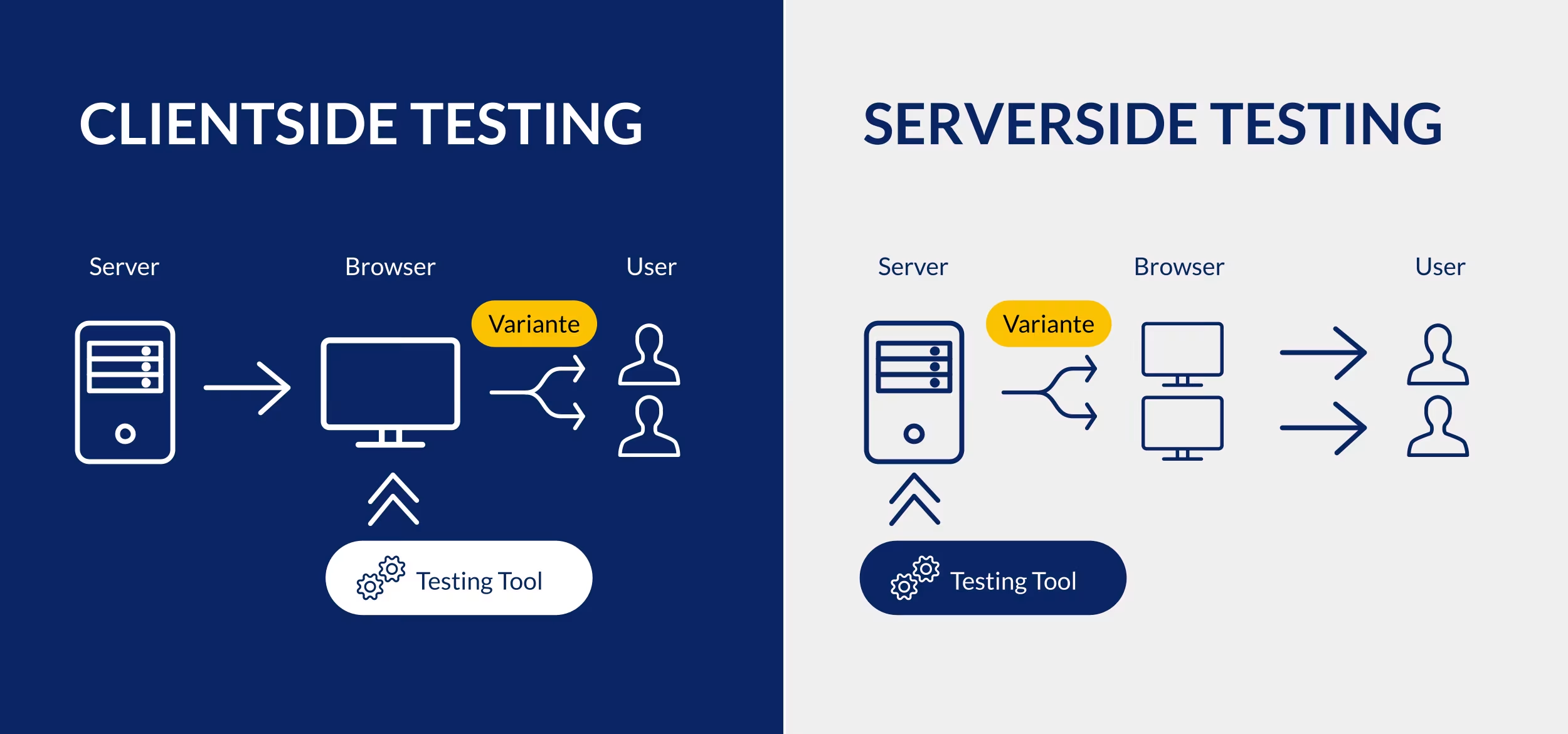
Image: Comparison of client-side testing and server-side testing, Source: e-dialog
Client-Side Testing (The “Classic”)
The changes are loaded directly in the user’s browser via JavaScript.
- Advantage: Quick to set up, often usable without in-depth programming knowledge
- Advantage: Visual editors make testing accessible to non-technical users
- Disadvantage: May cause a brief “flicker” (flickering effect) on the page if the original loads just before the variant—this can skew test results
- Disadvantage: Limited to visible front-end changes (layout, text, images, CTAs)—back-end logic, pricing algorithms, or personalized recommendations cannot be tested this way
Server-Side Testing (For “Advanced” Scenarios)
The server determines which version a user will see even before it is delivered. The finished version is sent directly to the browser.
- Advantage: No loss of performance, no flickering effect
- Advantage: Allows you to test backend logic, pricing, search algorithms, or API responses, …
- Downside: Without a development team, nothing gets done here
- Disadvantage: Longer lead times, since testing becomes part of the regular deployment process
Which option is right for me?
As a rule of thumb, most traditional marketing and conversion optimization tests—such as headlines, images, CTA colors, and page layouts—can be easily implemented on the client side. However, when it comes to product logic, pricing, personalized algorithms, or tests spanning multiple platforms (web, app, IoT), server-side testing is virtually unavoidable. Many more mature testing organizations therefore take a hybrid approach: client-side tools for marketing, server-side feature flag systems for the product team.
Step 3: An Overview of the Key Selection Criteria for A/B Testing Tools
Once the starting point is clear, it’s time to move on to the actual comparison. Use this checklist to take a closer look at the tools:
| Criterion | What You Need to Keep in Mind |
|---|---|
| Types of Tests | A/B testing, multivariate testing, split URL testing, and multi-page testing—does the tool support your use cases? |
| Editor & User-Friendliness | Is there an intuitive visual editor for quickly editing text and images? What options are available to developers? How can you review changes and share previews? |
| Privacy & GDPR | Where are the servers located? What data is processed? Are IP addresses anonymized? What legal documentation is available? |
| Performance | How does the tool’s script affect your website’s load time? |
| Targeting & Segmentation | Can you target tests to specific audiences (e.g., only mobile users, only traffic from a specific campaign, only returning users)? |
| Interfaces | Can the tool be seamlessly integrated with your digital analytics system, your CRM, or your e-commerce platform? |
| Scalability & Pricing | How is billing calculated—based on verified users, page views, or total traffic? Is there a flat rate, or is billing calculated on a case-by-case basis? What happens during traffic spikes? |
| Additional Features | Are there additional analytics such as heat maps, click maps, scroll maps, and session recordings? Are there options for personalization? What AI features are available? |
| Support & Documentation | What onboarding resources are available? What kind of support is provided? Is there comprehensive documentation, case studies, etc.? |
A practical tip:
Don’t be blinded by the longest list of features. For each item, ask yourself specifically: “Would we really use this in the next 12 months?”

A/B Testing Tools: A Brief Overview of the Top 3 Providers
To give you a concrete starting point for your shortlist, we’re introducing three tools that have proven particularly effective in different categories. Important: “Top” here doesn’t mean “best for everyone”—rather, it refers to tools that are well-established, mature, and have a broad user base in their respective categories.
The Top Dog for Corporations: Optimizely
The established enterprise solution on the market, offering a full range of features for client- and server-side testing as well as feature flag management. Optimizely is specifically designed for organizations that want to establish experimentation as a company-wide culture.
Ideal for: Large e-commerce platforms and enterprise companies with high traffic that have their own development teams and the necessary budget.

The All-Rounder: VWO
One of the longest-established all-in-one platforms for experimentation. VWO (Visual Website Optimizer) is now part of Wingify, along with AB Tasty, but can still be licensed as a standalone tool. VWO supports A/B, multivariate, and split-URL tests and includes heatmaps and session recordings right out of the box.
Ideal for: Marketing and UX teams with medium to high traffic who want to consolidate testing and behavioral analysis into a single tool.
The European Alternative: AB Tasty
Data protection is paramount, especially in the DACH region. As a European provider, AB Tasty (now operating under the umbrella brand Wingify following its merger with VWO) stands out for its full GDPR compliance, local data storage, and strong performance—all without compromising on features. The platform also offers robust personalization options.
Ideal for: Companies where compliance and data sovereignty are top priorities. Marketing teams in the enterprise and mid-market sectors that want to closely integrate testing with personalization.
Common Mistakes in Tool Selection
In our consulting practice, we repeatedly encounter the same pitfalls. To help you avoid them, we’ve summarized them for you here:
- Tools first, strategy later. An A/B testing tool is no substitute for testing hypotheses. Without a clear process, any tool will go unused.
- Too many tools for too little traffic. Enterprise features are useless if it takes months to achieve statistical significance anyway due to a lack of traffic.
- Integrations are underestimated. A tool that doesn’t integrate smoothly with GA4 or the CMS ends up creating more manual work than it saves.
- No consideration of cost logic. Some providers charge based on the number of users tested, others based on page views or seats—and as traffic grows, this can quickly lead to unexpected costs.
- Lack of accountability. Who formulates hypotheses, who analyzes the data, and who decides on rollouts? Without clear roles, even the best tool will go unused.
How to Succeed in the Tool Selection Process—5 Steps to Success
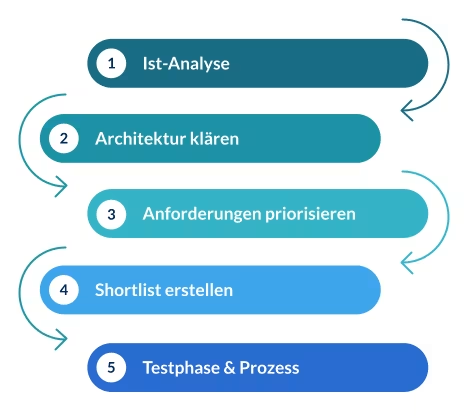
1. Current State Analysis: Honestly Assess Traffic, Tech Stack, Team Resources, and Testing Maturity
2. Determine the architecture: client-side, server-side, or hybrid—depending on who is doing the testing and what needs to be tested
3. Prioritize requirements: Distinguish between “must-haves” and “nice-to-haves” (see the criteria table above)
4. Create a shortlist: Compare a maximum of 3–4 tools from the relevant category; do not review the entire market overview
5. Testing Phase & Process: Use a demo or trial account with 2–3 real-world test cases, and clarify roles, approvals, and the reporting frequency in advance
Graphic: A Step-by-Step Guide to Choosing the Right A/B Testing Tool, Source: e-dialog
Conclusion: A Step-by-Step Guide to Reaching Your Goal
There isn’t just ONE best A/B testing tool—there’s only the best tool for YOUR current situation. If you’re just getting started, it’s better to begin with a “lighter” solution that’s easy to implement. The important thing is that you start testing at all and establish a genuine testing culture within your company! You can always switch to a different tool and take your testing to the next level later on.
Feeling overwhelmed by the jungle of tools? We’re here to help!
Choosing the right technology lays the foundation for your long-term conversion success. However, implementation, setting it up in compliance with data protection regulations, and seamless integration into your existing system landscape (such as Google Analytics 4) come with many pitfalls.