
Conversion Counting Methods In Ga4 8211 What Changes For Reporting

Management Summary
Google offers various methods for counting conversions in Analytics. There are two setting options for this. What is the difference between the two counting methods? What happens if you haven’t deposited anything? Which method is used for which conversion? How does the changed counting method affect my reporting? You can read the answers to these questions in this blog article
What is the difference between the two counting methods?
Once per event: (recommended by Google)
With this setting, GA4 counts an event as a conversion every time it occurs.
Example: In one session, a user completes the same conversion three times. With this setting, three conversions are then counted.
Once per session: (Counting method similar to Universal Analytics)
This option means that an event will be counted as a conversion once per session.
Example: In one session, a user completes the same conversion three times. With this setting, the conversion is only counted once.
What happens if no counting method is stored?
If you have not made a selection, Google Analytics will use the standard counting method. However, this depends on how you created the events.
- Is the standard counting methodonce per sessionstored, the conversions were created based on Universal Analytics:
– through an automatically created Google Analytics 4 property
– or using the Goals Migration Tool in the Setup Wizard after February 2023 - Once per eventis stored as the standard counting method for all other conversions.
Which counting method is used for which conversion?
In the admin area under Conversion there is a table with the stored conversions. Every conversion with a symbol behind it is the counting methodonceused per session. If there is no symbol behind it, the method isonce per eventapplied.
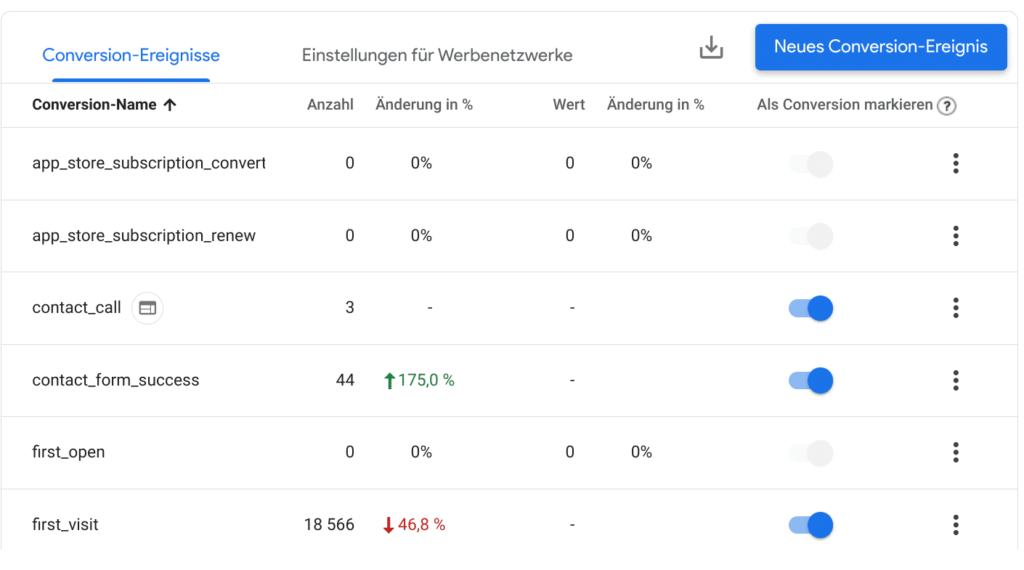
Screenshot of the admin settings for conversions in GA4, source: e-dialog
The counting method can be adjusted for the three points. However, you need the role of “processor” to do this.
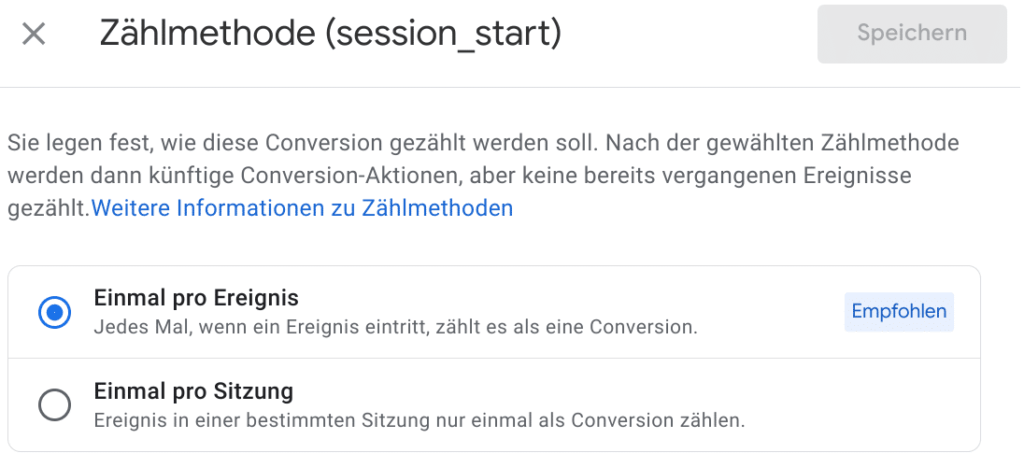
Screenshot of the counting method settings in GA4, source: e-dialog
Good to know:Changes are not applied to previous data.
How does the counting method affect my reporting?
With the methodonce per eventThe behavior of users can be reflected on your website or app. This makes it possible to distinguish between sessions with multiple conversions and sessions with just one conversion.
If the focus is on ensuring that the number of GA4 conversions is as close as possible to the number of Universal Analytics conversions, then:once per sessionthe better counting method.
Conclusion:
In summary, the update offers more flexibility and customization options for counting conversions. Based on the conversion goals, the best option can be selected for the specific requirement.
Our recommendation is to use the conversion setting once per event. This provides more precise insights into how many conversions a user has carried out in a session. In addition, old account structures such as UA should no longer be adhered to too much (although there may be cases in which it makes sense.)




