sGTM & Firestore: Leveraging Profit Margin for Value-Based Bidding

Management Summary
This article provides insights on the following topics:
- Expand web events in real time.
- Submit profit margins for value-based bids.
- Use Firestore together with the server-side Google Tag Manager.
Get More Out of Your Server-Side Tracking Infrastructure
Have you set up a server-side Google Tag Manager but have so far only used it to forward data from the client-side container? While that’s already useful, you can achieve even more with your server-side tracking infrastructure.
Instead of simply forwarding data directly from the website via client-side GTM to server-side GTM and on to various tools in the marketing stack, server-side GTM offers ways to retrieve data from other sources.
Use Case: Profit Margin – Why Focusing Solely on Revenue Is Often Insufficient in Marketing
One example is profit margin data. The standard approach for transmitting the value of a purchase on your website to various marketing tools is to send the revenue—that is, the amount the website visitor paid for the purchased product.
From a business perspective, however, it’s often more important to know how much profit your company made on that sale. The problem is that while the price is publicly available information, the profit margin needs to be kept secret from competitors. So you can’t simply disclose it in the dataLayer. For this purpose, server-side GTM combined with Firestore is an excellent solution.
What is Firestore? It is a database available through Google Cloud. Originally designed for app development, it specializes in storing data so that it can be read and updated very quickly. Although there are costs involved, you only pay for what you actually use. Depending on the use case, this is generally very affordable for tracking projects, since relatively little data is read or updated.
Boosting Profit Margin: Here’s How the Setup Works with Firestore and sGTM
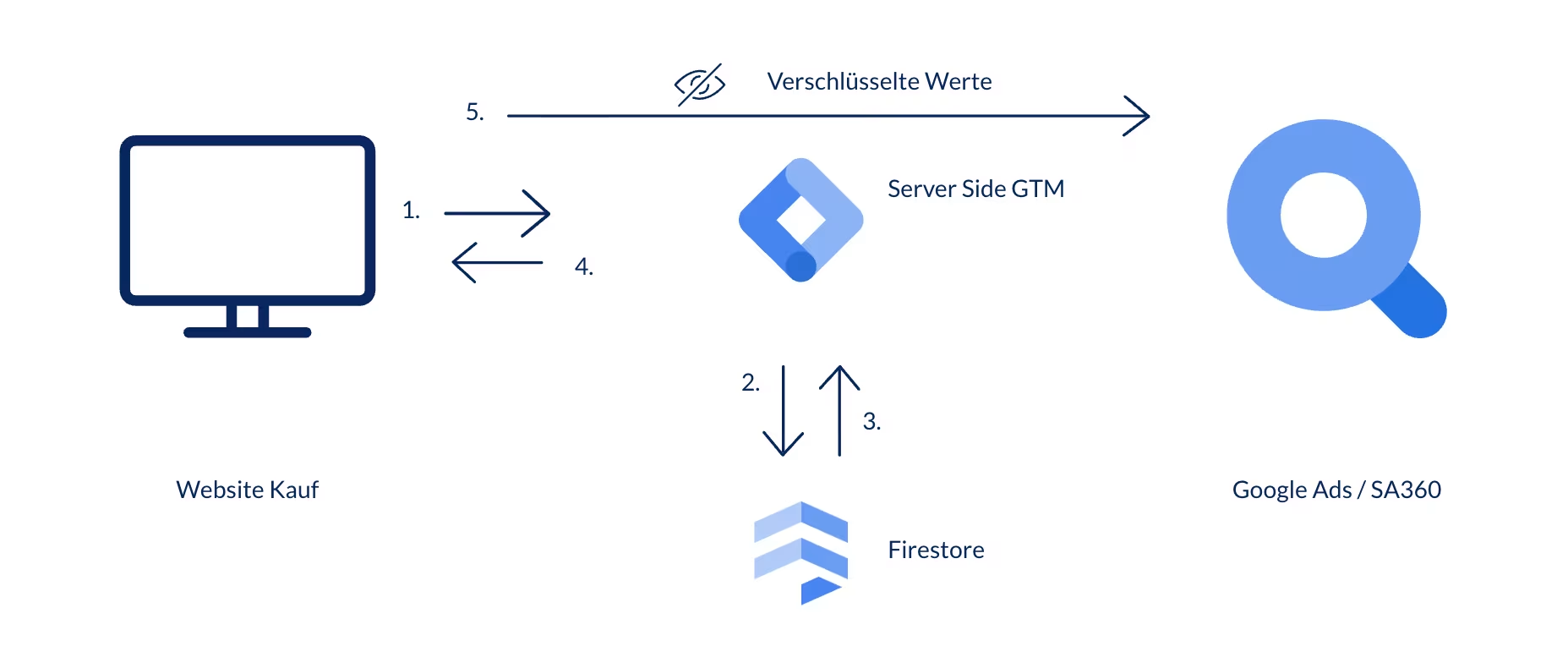
Image: Visualization of the data flow during data enrichment using Firestore and server-side GTM. Source: e-dialog
-
01
The profit margin for each product is stored in the Firestore database.
-
02
When a user visits the website and makes a purchase, the client-side container triggers a GA4 tag.
-
03
The request reaches the server-side container, and a Floodlight or Google Ads tag is triggered. When this happens, two things occur.
-
04
First, a variable stores the IDs of the purchased products, sends a request to Firestore, and retrieves the margin data for those products. This data is then added to the total profit from the purchase to calculate the new, margin-adjusted total profit.
-
05
The tag then sends a request with the new value to googletagmanager.com and receives the hash value in return. This hash value is then used in place of the value in plain text. This makes it possible to send the outgoing request via the browser (this is how server-side Floodlight and Google Ads tags work) without the value being visible in the browser. Note that this only works for values sent in the “Revenue” field.
This can then be used for various value-based bidding strategies. If you have additional data you’d like to use to adjust the profit value—such as a multiplier for the return rates of different product categories or specific products—that’s also possible.
What technical requirements do you need to implement this?
- You’ll need a Google Cloud project; this can be either one you’re already using for server-side GTM or a brand-new one.
- A server-side GTM container with access permissions for the Cloud project. This is also possible with server-side containers that are not hosted on GCP.
- The ability to keep the margin for each product up to date. There are various ways to update Firebase—ranging from more manual to more automated methods. Ideally, Firebase should be updated as often as the product catalog changes. There are no fixed guidelines here; the more outdated the data is, the less accurate the information provided will be.
The benefits of using server-side GTM + Firestore:
-
01
Real-time
It works in real time and is fast enough to update web events.
-
02
Data Security
Data can remain secure and hidden.
-
03
Modeling
Google’s modeling works as usual, since you’re working with web events.
Additional Options for Data Enrichment
If you want to use additional data that doesn’t need to be added to web events in real time, you can use Google Data Manager. You can learn more about this in our blog post titled “Importing First-Party Data with Google Ads Data Manager.”
You can find another interesting use case for Firestore and server-side GTM in my colleague Ekrem’s article on “cookie-less tracking.”
Conclusion: Think big when it comes to your web events
These are just a few examples of how you can enrich data in server-side GTM. Firestore is fast and reliable—so think big: Consider what would be truly useful for your business and what data you have in one place that could create significant value elsewhere. In addition to reading values from the Firestore database, you can also write data to it in real time. So instead of simply enriching your web events with information from your database, you can also feed your database with information from your web events—all without using a third-party advertising tool.