
Automatic Budget Allocation

Management Summary
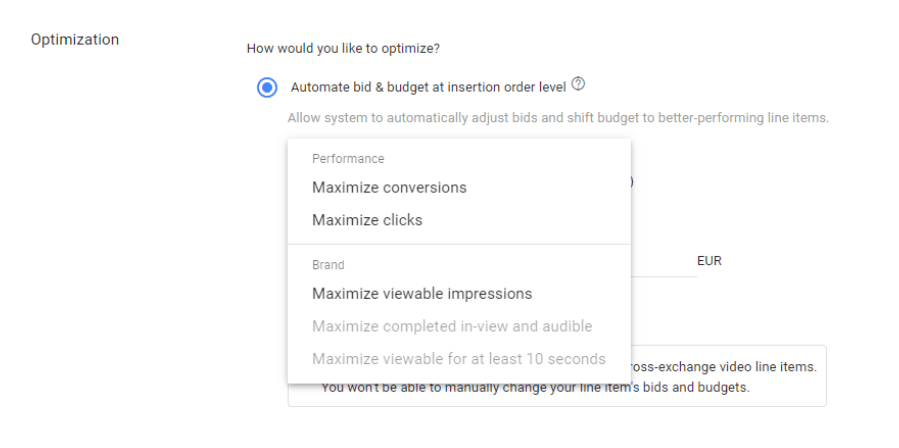
With the attitudeAutomatic Budget Allocation, (in German Automatic Budget Allocation) you have the optionSet bidding across the board, namely at insertion order level. Activating this option ensures that the budget is dynamically distributed among the individual subordinate LineItems.
Depending on which goal is stored in the system, the high-performing LineItems are funded, while less budget is allocated to the lower-performing LineItems.
In short, the system strives to achieve the best possible performance every day while taking full budget utilization into account.
The following goals can be set for Automatic Budget Allocation:
Switching the campaign to this bidding strategy makes sense especially if the…The campaign aims to achieve the lowest possible CPC or CPA valuesare. The system will automatically optimize for the best possible performance and allocate the budget accordingly.
This option proves to be very efficient, especially for highly performance-oriented campaigns that require regular monitoring.
When does automatic budget allocation make little or no sense?
In principle, the “automatic budget allocation” option is recommended for always on campaigns or campaigns with a campaign duration of longer than two weeks. Automatic budget allocation is not recommended in the following cases:
- Awareness campaigns that do not have CPC or CPA goals should use other bidding strategies. Note: Conversions should of course be recorded for CPA goals.
- If the subordinate LineItems follow different bid strategies, then switching to “automatic budget allocation” makes little sense. As soon as you activate this option, all subordinate LineItems will automatically be switched to this strategy. At LineItem level the setting is shown as follows:
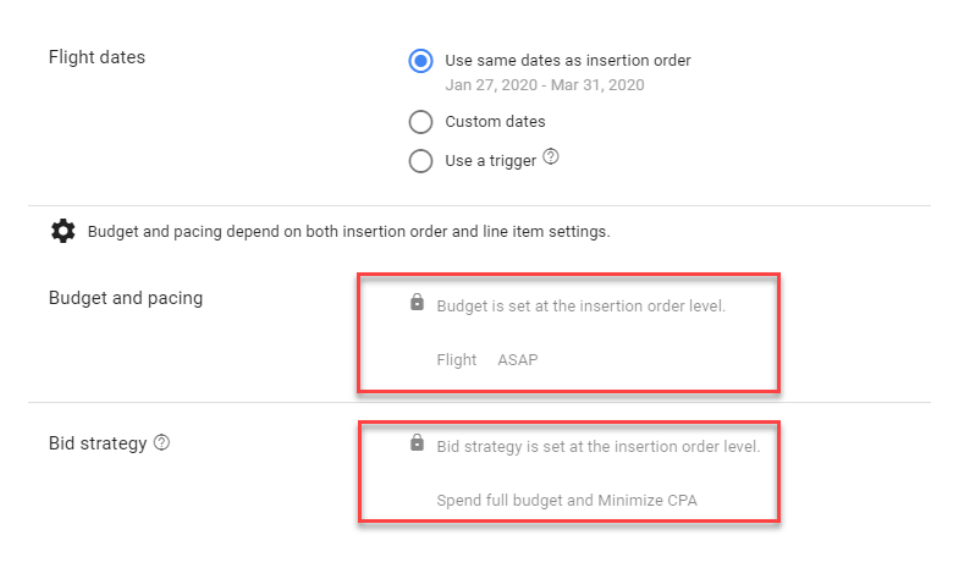
- This change also makes little sense for insertion orders that only have one subordinate LineItem. It is advisable to store the desired bidding strategy at the LineItem level.
- Automatic Budget Allocation is primarily intended for insertion orders that have a constant budget throughout the campaign flight. This option is not recommended for campaigns that have a daily or monthly budget change or tier.
Can this maximize the performance of my campaign?
Yes, definitely. Below we show how the performance of our test campaign could be improved through this change.
Three different bidding strategies were tested within this campaign.
Since this is a new advertiser and there were no “hard” conversions to optimize for at the time of testing, this campaign was started with a fix bid, followed by the “minimize CPC” bidding strategy.
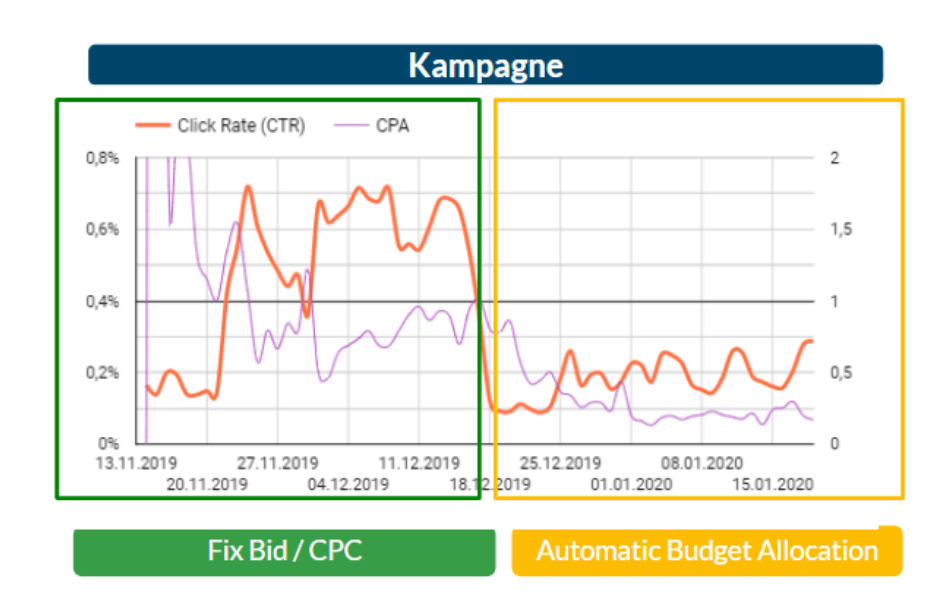
At first glance, the values look very good: a click rate of 0.8% in the awareness funnel level – (you can only dream of that!).
But appearances are deceiving. After a closer look at Google Analytics, you quickly realize that the on site KPIs do not reflect the good click rate by any means.
But what do you do if you don’t have any real conversions?
That’s right, you work with so-called soft conversions. In the case of this campaign, the Floodlight Activity “40 second session duration” was stored in the system as a conversion.
After almost a month, the Automatic Budget Allocation setting was activated with the goal of maximizing conversions. The aim is to ensure that users spend a good amount of time on the site, because optimizing the click rate is obviously not effective, no matter how cheap the CPC values are.
During the evaluation, the click rate values had to drop by 50%, but with a click rate of “only” 0.2% we are still in the green. As far as the remaining KPIs are concerned, they certainly look promising:
- Pages / Session: +69%
- Session duration: +115%
- Bounce rate: -20%
- CPM: -24%




