
Automation Through Sdf Upload

Management Summary
Whether large-scale changes, checking settings, or copying multiple insertion orders, line items, YouTube AdGroups and YouTube Ads – SDFs make it possible to work efficiently and effectively in DV360. This blog article provides a compact overview of how to work with SDFs.
The functions are described:
- Downloading SDFs
- Control of existing setups
- Setup adjustments
- Creation of new objects (e.g. Insertion Order, Line Item,…)
- Upload the finished SDF
Downloading SDFs
All objects of the campaign can be downloaded in one file using the 3-point menu at insertion order and line item level. Alternatively, individual objects can also be specifically loaded into an SDF by checking them and using the “Action” button. All objects that lie underneath – i.e. line items under an insertion order, for example – are also loaded into an SDF.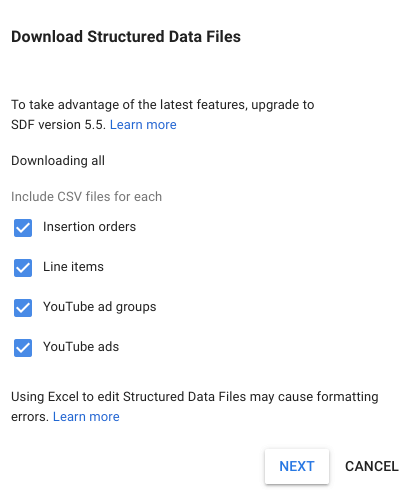
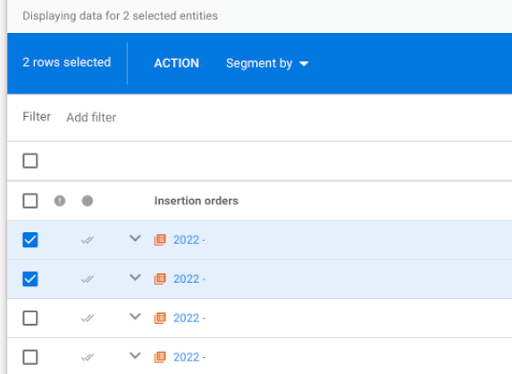 Example of uploading and downloading an SDF, source: e-dialog
Downloading and uploading SDFs can take anywhere from seconds to minutes depending on the amount of objects. It therefore makes sense to only select the objects required to avoid unnecessary waiting time.
Control of existing setups
All settings of the objects are reflected in the SDFs – but in raw data form. For example, geotargeting does not show “Austria” but “2040” – the country ID from DV360. Therefore, when using SDFs for control, it is necessary to know exactly which IDs are in use.
If different levels, for example both insertion order and line item data, are downloaded, they appear in their own tabs.
Setup adjustments
SDFs are also very suitable for making quick changes across multiple objects/levels at the same time. For example, start and end dates or frequency cap settings can be changed, advertising materials can also be exchanged or keyword lists can be stored.
However, if you change data in several tabs, it can result in the file being rejected by DV360 when uploading. Best practice is therefore to edit and upload each layer individually.
Creation of new objects
SDFs can also be used to create new objects. To do this, a line is created in an SDF. No ID is specified for the object itself – for example a new line item. An ID must be specified for the level above – in this example Insertion Order. This means that the new objects are correctly assigned and can be created. Without this assignment, creating new objects is not possible.
In this way, proven settings can be quickly duplicated.
| To create | required ID | |
|---|---|---|
| Insertion order | Campaign ID | |
| Line item | Insertion Order ID | |
| YouTube AdGroup | Line Item ID | |
| YouTube Ads | YouTube AdGroup ID |
Danger!Detailed Demo and Life Events are not represented in the SDF and therefore cannot be changed via SDF. If SDF is used to copy the YouTube AdGroup Settings, the above targeting will not be stored in the newly created AdGroup.
Upload the finished SDF
After all changes have been incorporated into an SDF, or all new objects to be created, it can be uploaded. To do this, click on the 3-point menu again, select “upload” and then select the SDF. It must be in a “.csv” format to be accepted.
If there are any errors, they will be listed. Common sources of errors are incorrect date formats or incorrect use of commas or semicolons.
As already mentioned, problems can arise when changes occur at multiple levels.
When creating new objects, they must be created per level, starting from the top level. This follows from the fact that the ID of the object above must always be specified. Therefore, it is not possible, for example, to create a line item and a YouTube AdGroup at the same time, because the YouTube AdGroup requires the line item (the line item ID).
Conclusion:
Structured data files enable a deeper insight into the set-up of campaigns, as well as the quick modification and creation of multiple objects below the campaign level in one go.
Do you have any questions about your campaign set-up? We’re happy to help you! Contact us viakontakt@e-dialog.group
You can find even more details about Structured Data Fileshereread up.




