
Tiktok Ads Manager Guide For Beginners Part 1

Management Summary
Why is TikTok relevant as an advertising platform for advertisers?
Just a few years ago, TikTok was considered the underdog in social media advertising. But with around 2.1 million monthly active users in Austria alone, the platform has now become an integral part of the advertising mix. Because on TikTok you can not only generate reach comparatively cheaply; Due to the young demographics of the users, advertisers can reach Gen Z in particular particularly well.
In our guide for beginners you will find out what you need to consider when implementing your first TikTok campaigns.
What is my advertising goal?
“What do I actually want to achieve by running TikTok ads?” – probably the most important question you should ask yourself in advance. The results that your campaign will achieve depend heavily on the objective selected in the Ads Manager. Similar to Facebook, TikTok also provides you with a selection of objectives that determine the optimization algorithm of the campaign. For auctions, you can choose from the following objectives along the funnel: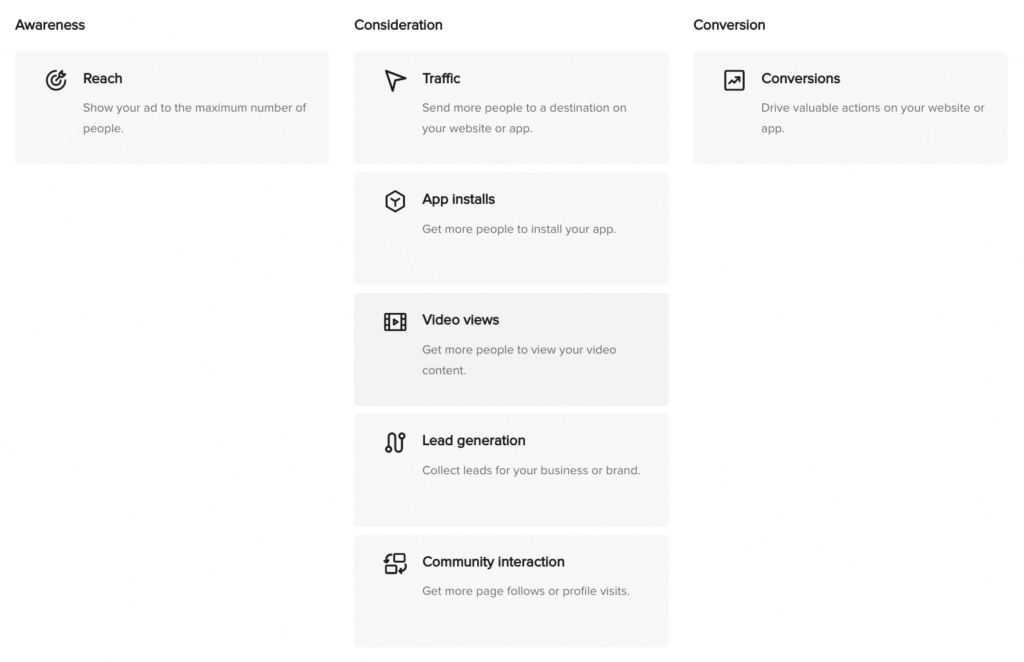 While the goalreachIn the upper funnel, the aim is to reach as many people as possible with the advertising message, the objectives in the middle and lower funnel stimulate active actions on the part of users – from clicks to profile visits to purchases.
How does the TikTok Pixel help me achieve my advertising goals?
The decision is based on the objectivetrafficIf you like it, a TikTok pixel is very useful – at the latest when setting goalsConversionHowever, there is no way around him anymore. The TikTok pixel allows you to track actions that occur after a click on your website – such as purchases. A pixel also offers you the opportunity to create custom audiences based on website data and later target them again during retargeting. Navigation to the Pixel Setup is done in the Ads Manager as follows:
- via the tab > Assets > Top navigation bar events,
- subsequently > Select Manage Web Events,
- top left > Set Up Web Events > TikTok Pixels > Next
 At this point you can name the pixel and choose between implementing it via a third party such as Shopify or installing it manually. If implementation via a third-party provider is not an option for you, you are faced with the choice of the manual option: quick and easy implementation in standard mode, or more effort for a more extensive setup in developer mode?Tip:For a more sophisticated advertising strategy, manual integration via developer mode is recommended, as it offers you the opportunity to set custom rules that determine when and in what form an event is triggered and to generate deeper insights by enriching the conversion data with additional parameters (information), such as the products purchased and the shopping cart value.
How do I reach my target group?
The right objective for your campaign has been found! Now it’s time to ask yourself another crucial question: “Who do I want to reach with my advertising message?” Depending on your objectives, it may be desirable to reach as broad a target group as possible – or to address a niche group of users as specifically as possible. The TikTok Ads Manager provides the following targeting options:
- Core audience:Create your audience based on demographic data, device characteristics, or interests and behavior.
- Custom Audience:Reach users who have already had contact with your company. This includes, but is not limited to, visitors to your website, people who have previously interacted with your ads, or who are in a customer file.
- Lookalike audience:Reach users who are similar to people in a custom audience. The strategic use of lookalike audiences can help improve performance in different phases of a campaign.
If you already advertise on Facebook/Instagram, these options will be familiar. However, especially with regard to behavioral targeting within core audiences, TikTok offers you more comprehensive resources to define your target group: This gives you the opportunity to target users based on their interactions with creators and videos of different categories, as well as based on interactions with videos that use certain hashtags.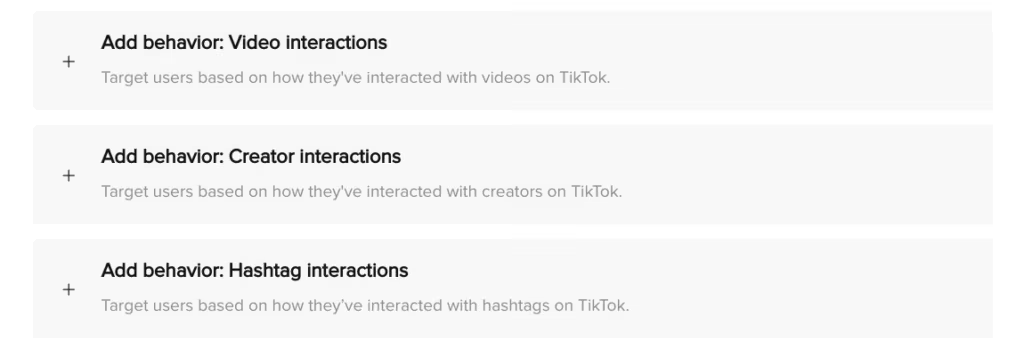 As tempting as this multitude of targeting options is, it presents advertisers with the challenge of identifying the right combination.We would be happy to support you in the strategic direction of your TikTok campaigns!
Where are my advertisements shown?
After you have defined your target group, the question automatically arises: “Where can I reach these users?”
Basically, depending on the objectives of the campaign, the TikTok Ads Manager offers three platforms on which ads can be displayed: TikTok, Pangle (video advertising platform) and News Feed App Series. Currently, advertisers from Austria, Germany and Switzerland who want to place ads in the DACH region only have TikTok available in the Ads Manager with in-feed placement on the For You Page. This means your ads will appear between organic videos.
In the second part of our TikTok Ads Manager Guide for beginners, we will focus on specific advertising material specifications and best practices on the subject of ad setup and design!
Why should you pay attention to your campaign’s comment setting?
Your targeting is set, but before you focus on the duration and budget of your campaign, you should make a small and hidden but not unimportant setting: Do you leave comments on your ads activated, or do you deactivate the function? This decision is quite important because both settings have advantages and disadvantages. A strong argument for thatActivation of commentsconsists of adapting the advertisement to the platform and the organic content. Users are used to exchanging ideas and discussing things in the comments of a video. If this function is not available, this can be noticeable and make your ad stand out even more from its surroundings.
In addition, the impression can quickly arise that the advertiser is not capable of criticism, which can have a negative impact on the advertising effectiveness of the ad. In addition, the comments on your ad provide you with valuable qualitative feedback in the form of insights into the thoughts and needs of your target group – this gives you the chance to respond to them and optimize your advertising strategy accordingly.
But when should you consider it?Disable comments? Basically, this question has a lot to do with your time resources – because anyone who allows comments on their ads should also deal with them, respond to them and ensure that comments that endanger your brand safety are removed. Otherwise, you risk creating an atmosphere around your ad that you wouldn’t want your brand to be associated with. In addition, from the user’s perspective, it can of course be frustrating to give feedback or even ask questions and not receive the desired response.In summary:The activated comment function offers you a valuable opportunity to foster relationships with your target group and generate insights at the same time. However, you should be able to ensure that the comments section is a safe space for your brand and its potential buyers.
How do I measure the results of my campaign?
The campaign including targeting and ads has been created and all important settings have been made – but the work is not quite done at this point! The optimization begins at the start of the campaign, followed by the evaluation of the results after the campaign has finally ended. At theoptimizationIt’s about observing whether individual target groups or advertisements stand out from others – be it in a positive or negative way. Are there any similarities between particularly well-performing ads? If you notice a pattern, you can form a hypothesis based on it and start testing.
ToEvaluation of performanceDifferent KPIs must be used depending on the chosen campaign goal; When considering a reach campaign, the reach achieved and the costs incurred for this reach – i.e. the CPM – are of course of particular interest, while these values say little about a conversion campaign.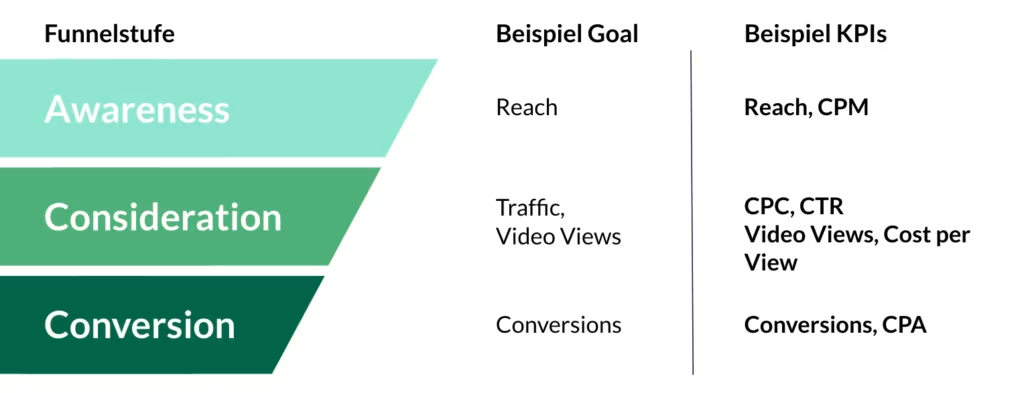 In order to be able to see the most relevant KPIs at a glance, the TikTok Ads Manager offers the option of using thecolumns-Dropdown to put together a custom view that you can then save for regular use and access again at any time.
 Tip:At the beginning, create and save one view for each objective or funnel stage so that you can later see the relevant KPIs at a glance with just a few clicks.




